
On August 12, 2026, Meta's engineering team published a detailed technical post about a new WhatsApp feature called Scam Alert. It is not breaking news from this week — it is something more interesting: one of the most important messaging-privacy announcements of the month, and a design worth understanding properly. The idea is simple to state and hard to build: catch scam messages the moment they arrive, using a machine-learning model that runs on your phone, without Meta ever seeing your messages — or even being able to tamper with the detection system in secret.
This explainer is built directly on the official Engineering at Meta post. It covers how the feature works, why it is fundamentally different from every spam filter you have known, exactly what you see as a user, what Meta never sees, how the company engineered away its own ability to cheat, when the feature might reach your region, and what you should do in the meantime.
Source: official Engineering at Meta blog
What is Scam Alert on WhatsApp?
Scam Alert is an optional, user-controlled feature currently in a limited beta that Meta itself describes as an early look, with no general-availability date or country list announced. Its core function: a small on-device machine-learning model examines incoming messages from numbers that are not in your contacts, and compares them against known scam conversation patterns derived from prior user reports.
When the model judges a message likely to be a scam, you see a warning that the sender never sees, with four choices in front of you: block the sender, report the message, mark the chat as trusted, or simply continue reading and replying. Marking a chat as trusted stops future warnings for that conversation, and it optionally lets you share the last five messages of that chat — with your explicit consent — to improve the model's accuracy.
One design detail matters more than the rest: the screening applies to messages from non-contacts, the model never edits or forwards your messages, and nothing is stored on Meta's servers. The message is screened on your device, and the decision stays yours.
Why this is fundamentally different from spam filtering
We are all used to spam filters in email and elsewhere, and they all work the same way: a server reads the message, classifies it, and decides whether to show it. That is acceptable for email because email was never end-to-end encrypted. WhatsApp, however, runs on end-to-end encryption, which makes the server mathematically incapable of reading content. Any "solution" that uploads messages for cloud inspection would break that promise and open a door that no policy could later close.
So Meta chose the engineering-hard path: move the entire model onto the user's device. The model is deliberately small enough to run on phone hardware with no server-side components, and it performs probabilistic classification using the conversational structure and linguistic signals of the message. The published principle is unambiguous: on-device only — the model and the message data it processes all remain on the device.
But that alone does not close the argument. The obvious follow-up question is: what stops Meta from shipping a model that quietly does something other than scam detection? Or from delivering a modified copy to one specific user? That is where the design gets genuinely interesting.
The chain of trust: engineering away Meta's own ability to cheat
This is the standout part of the announcement. The model does not ship embedded in the app — it is delivered over a content delivery network, which is exactly where silent manipulation would happen. Meta's answer is a documented chain of custody:
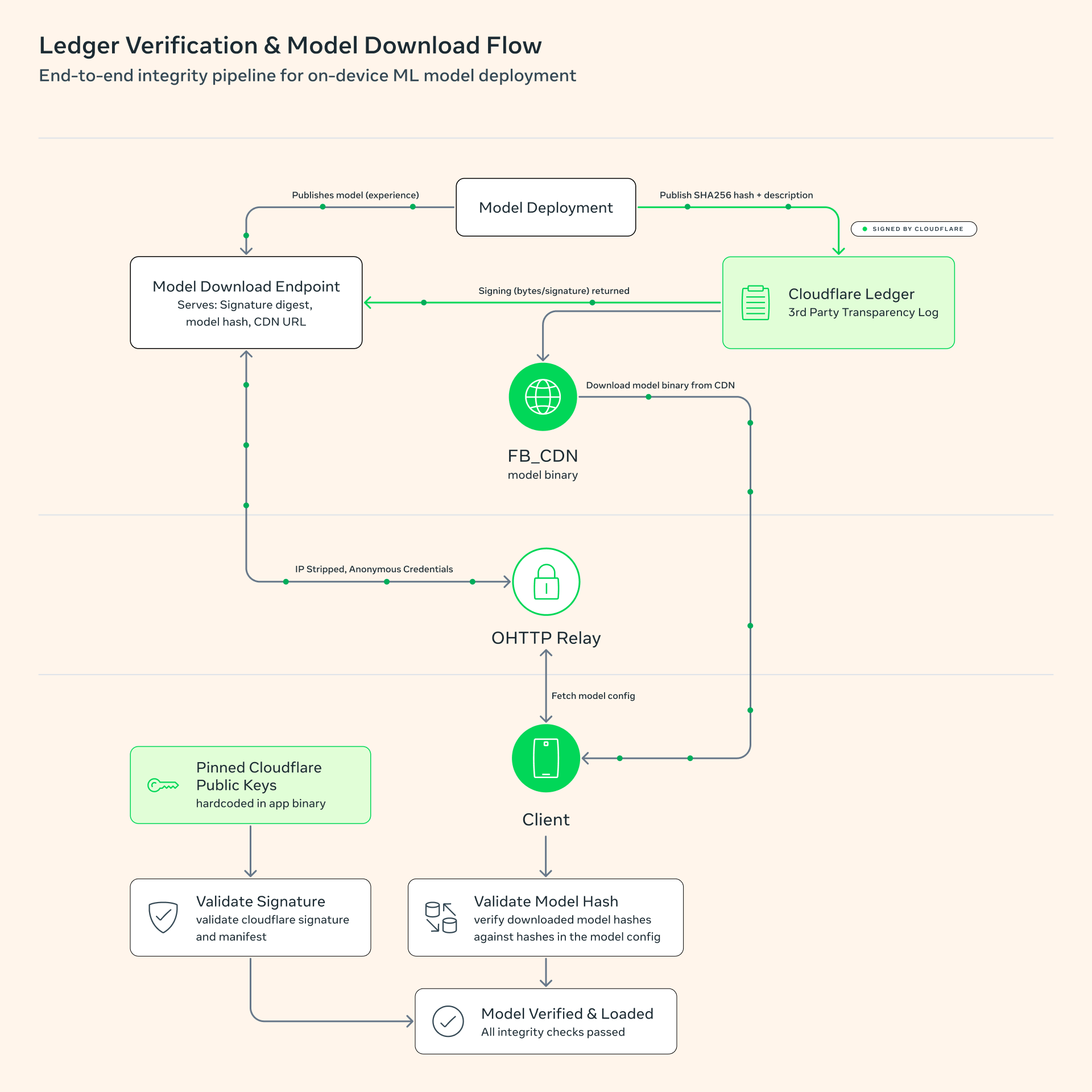
- A third-party transparency ledger. Every model version, including experimental variants, is published to an append-only ledger that cannot be rewritten after the fact, with SHA-256 hashes for every asset — so outside researchers can verify what shipped, and when.
- A signing key Meta does not hold. Download manifests are signed with Ed25519 keys through Cloudflare, and Meta itself does not possess the signing key. Any post-signature modification of the model is detectable by the client.
- A fail-refusing client. The WhatsApp app on your phone verifies the signature, the ledger entry, the manifest freshness, and every asset hash before loading a model. If any check fails, it refuses to load at all.
- Published weights. Meta published the model weights themselves, so independent researchers can confirm the model is purpose-built for scam detection and does nothing else.
- No targeted delivery. A different model copy cannot be steered to a specific person or group: experiment-group assignment happens on the user's own device with client-side randomness, tamper checks prevent experiment groups from shrinking once formed, and configuration fetches use anonymous credentials over an OHTTP relay that strips the IP address.
Source: official Engineering at Meta blog
Source: official Engineering at Meta blog
The practical consequence of this chain: even a malicious insider at Meta could not deliver a doctored model to a chosen user without leaving evidence, because the signing key is outside Meta's hands, the ledger is outside Meta's control, and verification runs on the user's device.
What about data leaving your phone?
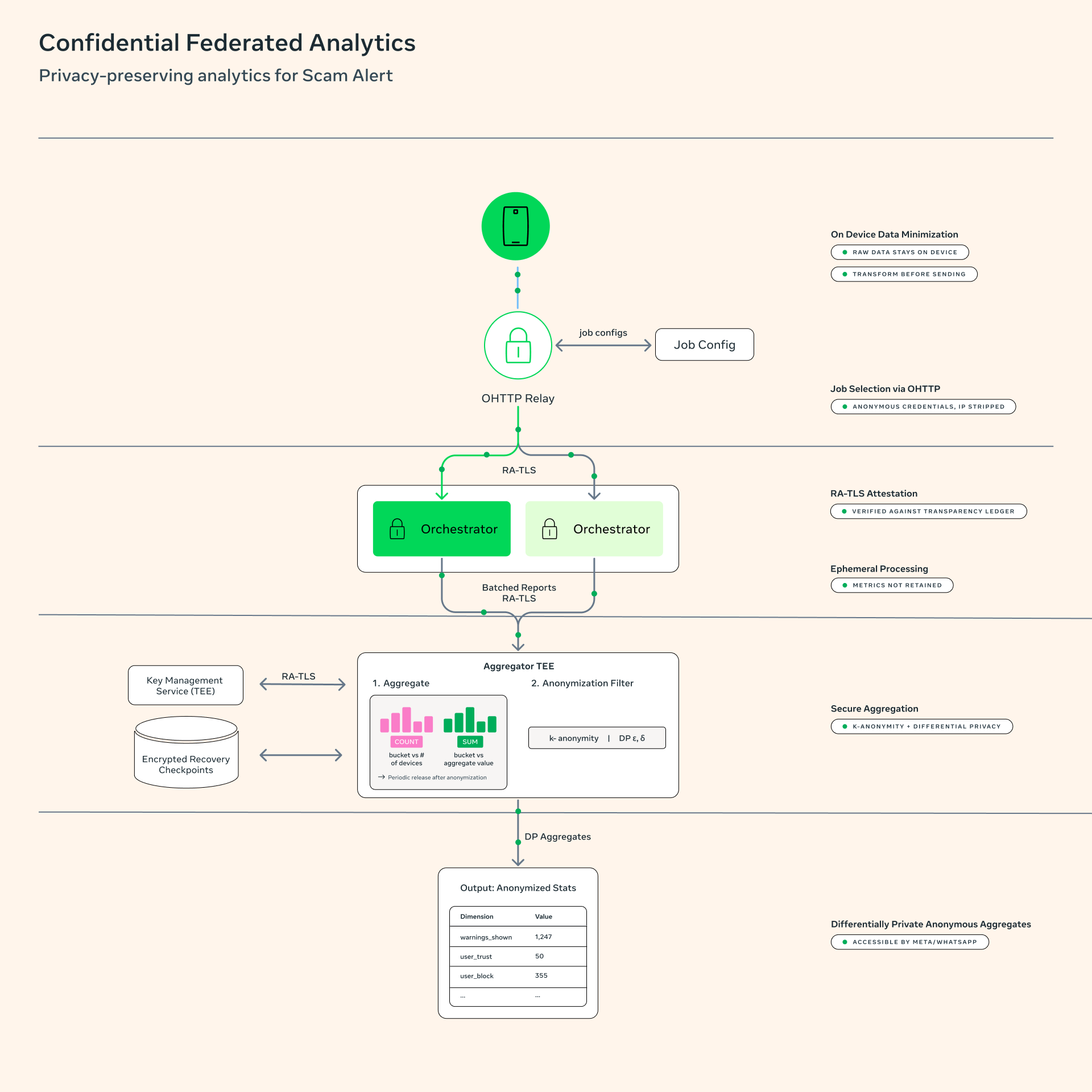
The system operates on a no-automatic-reporting principle. Nothing leaves your device that you did not explicitly choose to send. The only data gathered is aggregate and anonymous counters — how many warnings appeared, and how many users blocked, reported, or dismissed them — to measure whether the feature works. Even those counters are processed exclusively inside Trusted Execution Environments, confidential virtual machines that not even the server operator can open, and the outputs are published as differentially private aggregates with k-anonymity thresholds and explicit privacy-budget limits.
The subtle masterstroke is that the client verifies those TEEs too, through RA-TLS attestation checked against a third-party transparency ledger — and refuses to send anything if verification or any privacy guardrail fails. The logic is fail closed: it is better for the feature to break than for data to flow without guarantees.
What you actually see on your screen
When the feature is available to you and enabled, control is entirely in your hands: you can toggle it off at any time, and there is a transparent in-app log under Settings, then Account, then Request Info, then Scam Alert Activity, showing which messages were flagged, what the outcome was, and which model version did the screening. That internal transparency matters — it turns the feature from a black box into a personally auditable tool. Meta has also invited its bug-bounty community to stress-test the whole system through the official channel.
What this means for users in the Gulf and the wider region
WhatsApp is the undisputed primary messaging app across the Gulf — we have covered its successive features before, from usernames and their privacy implications onward — and scam messages are a daily plague: the fake bank agent, the "government department" caller, the investment promise, the fake update link — and, increasingly, AI-generated text polished enough to fool careful readers. Meta explicitly says the feature targets impersonation, social engineering, and AI-generated lures, which is precisely the class of scams flooding regional phones.
The honest caveat: the feature is in a limited beta, Meta has announced no timeline or market list, and we do not yet know where the region falls in the rollout order. What you can do today is practical: keep WhatsApp updated to the latest version, since features like this arrive through gradual updates, and do not wait for an alert to protect yourself — an unknown number asking for a transfer or a verification code is a scam until proven otherwise, no matter how polished and polite the writing is.
For readers interested in the deeper trajectory: this design extends Meta's earlier Private Processing work and the PAPAYA federated analytics stack presented at USENIX NSDI 2025. It represents a genuine school of thought — building intelligent features that respect end-to-end encryption instead of treating it as an obstacle.
Quick comparison: how platforms screen your messages
| Platform | Where messages are screened | Can the platform read content | Auditability of screening |
|---|---|---|---|
| WhatsApp with Scam Alert | On your own device | No — end-to-end encryption | Local model, public ledger, published weights |
| SMS | At the carrier | Yes — never encrypted in transit | Opaque to the user |
| Traditional email | On servers | Yes | Server-side, theoretically auditable |
| Apps without E2EE | On servers | Yes | Depends on company policy alone |
The difference is categorical, not incremental: in WhatsApp's new design, the no-reading guarantee is engineered, not promised.
Why now: the era of AI-generated fraud
The timing of this feature is not accidental. Messaging fraud entered a new phase with text-generation tools. The old scam message was betrayed by broken grammar from its first line; today, anyone can run a language model and produce a scam message in polished Arabic or English, in the convincing tone of a real bank employee, with a consistent story that survives several exchanges. The engineering cost of running a scam has collapsed toward zero, while the cost of spotting one still falls on the potential victim.
That is precisely why Meta chose pattern detection over keyword filtering: the model does not hunt for the word "prize" or "transfer" — it reads the conversational structure and linguistic behavior the way a trained analyst reads a suspicious message, which is the only kind of screening that can keep pace with fluent generated text. Meanwhile, part of the assistant industry is moving in the exact opposite direction: assistants that read your messages with your explicit consent in order to reply on your behalf, as in ChatGPT's new Apple Messages plug-in — and the gap between the two approaches is precisely this era's real question: who reads your messages, why, and under which guarantees. The engineering post explicitly names impersonation, social engineering, and AI-generated lures as the targets, and those are exactly the three categories rising fastest in global fraud reports.
For the Gulf specifically, this matters because regional scam campaigns lean heavily on impersonating well-known entities — banks, telecom operators, government bodies — and on manufactured urgency ("send the code now before the deadline"). Structure-and-pace screening is far better suited to catching that manufactured urgency than any banned-word list, because word bans are trivial to circumvent while the structure of a scam conversation is genuinely hard to disguise.
What builders should take from this design
Independent of WhatsApp, this announcement is a live reference in trust engineering, with lessons that generalize to any organization building intelligent features on top of sensitive data. Separate capability from intent: Meta did not ask users to trust its intentions — it engineered the system so that its own capability to misbehave is reduced even if the intent existed, with the signing key outside its hands and verification on the user's device. Prefer verifiable transparency over promises: publishing weights, hashes, and verification details converts claims into independently checkable facts. Analyze in aggregates, not individuals: differentially private counters are enough to measure performance without individual data, and fail-closed logic guarantees data never flows without complete guarantees. And treat gradual rollout as part of the security model: testing through bounded experiment groups while explicitly inviting the bug-bounty community to break the system turns a launch into an open audit.
These same principles apply to any service handling sensitive health, financial, or educational data in emerging markets, and the full reference is available in the engineering post linked in the sources.
Limitations stated honestly
The feature is experimental and limited in scope, and details may change before general availability. The model screens messages from non-contacts — a scam arriving from a number saved in your contacts falls outside screening. Classification is probabilistic, so errors will happen in both directions: warnings on legitimate messages, and scams that pass unflagged, which is exactly why the final decision always remains with the user. And everything above rests on a published design document; real-world performance at full scale is the test that has not happened yet.
FAQ
Does this mean Meta will read my messages?
No. The model runs on your device, the messages it screens stay there, end-to-end encryption is unaffected, and no content leaves your device without explicit consent — such as reporting a message or opting to share the last five messages when marking a chat as trusted.
When does the feature reach my country?
Meta has not announced a timeline or country list for the beta or the broader rollout. Keeping the app updated and watching official announcements is the practical approach.
Does screening work offline?
The model is downloaded to the device and runs locally, but the system periodically verifies model freshness and signatures online, so the full experience requires connectivity.
What if I get a warning on a legitimate message?
Classification is probabilistic and can make mistakes; that is why the options include marking the chat as trusted, which stops warnings for that conversation.
How can I verify what the model did with my messages?
Inside WhatsApp, under Settings, then Account, then Request Info, then Scam Alert Activity, you will find a log of flags, outcomes, and the model version used.
Sources
- Official Engineering at Meta post — August 12, 2026 — the primary source for every detail in this explainer; press coverage on August 13–14 confirmed the announcement in headlines without adding facts beyond it.