
What Is eSIM? A Simple Guide for Travelers in 2026
Last updated: May 2026
💬 Disclosure: Some links in this article are affiliate links. We may earn a small commission when you complete a purchase at no extra cost to you. This helps us keep our content free, and it does not affect the integrity of our recommendations.
You just landed in Dubai, Singapore, or London. Your phone shows "No Service." You walk past three SIM kiosks at the airport, all charging $40 for a tiny prepaid card. You wait in line, hand over your passport, watch a stranger fiddle with your phone, and pray the new SIM doesn't lock you out of your home WhatsApp. There has to be a better way — and there is. The answer is an eSIM, a small piece of software inside your phone that replaces that plastic chip entirely. In this guide, you will learn exactly what is eSIM, how it works, why 51% of new users discover it through travel, and whether it makes sense for your next trip in 2026.
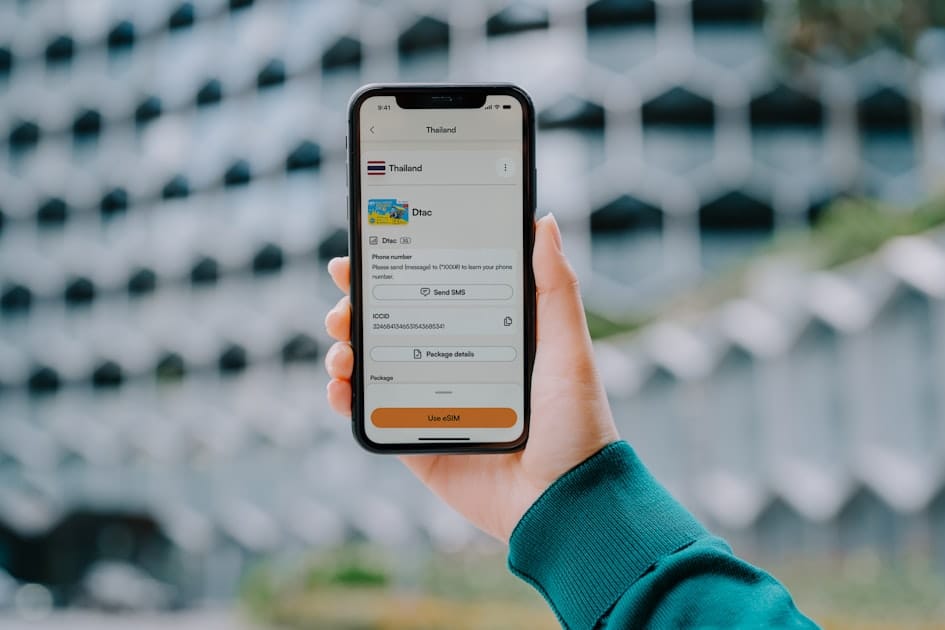
Quick answer: An eSIM (embedded SIM) is a digital SIM card built directly into your phone, smartwatch, or laptop. Instead of inserting a plastic chip, you scan a QR code or tap a button to download a mobile plan in under five minutes. It works with most phones made after 2018 and is now used in 15% of all international travel connections worldwide.
What Is eSIM Technology, in Plain English?
An eSIM, short for embedded SIM, is a tiny chip soldered onto your phone's motherboard at the factory. It performs the same job as your old plastic SIM card — proving to a mobile network that you are a paying customer — but it does it through software you download instead of plastic you insert. The technical standard behind it is GSMA SGP.22 (for consumer phones) and SGP.32 (for IoT devices), the same global body that defines how every mobile network on earth talks to every phone.
The numbers from GSMA Intelligence's Q1 2026 report tell the story of how fast this is moving. eSIM penetration in smartphones reached 5% globally at the end of 2025 and is forecast to double to 10% by the end of 2026. By 2030, GSMA projects 4.9 billion eSIM connections worldwide — about 55% of every mobile connection on the planet. There are already 1.5 billion eSIM-enabled devices in active use today.
Each eSIM has its own ID number called an EID — a 32-digit code unique to your device. Think of it like a serial number for the embedded chip. You will need this number occasionally when activating plans or troubleshooting. Modern iPhones can store up to eight different eSIM profiles at once, though only two can be active simultaneously. Samsung and Pixel phones support multiple stored profiles too.
The big shift in 2026 is hardware design. Apple's iPhone Air, launched in late 2025, is the first iPhone sold globally without any physical SIM tray at all — eSIM only, in every market. US versions of iPhone 14, 15, 16, and 17 have been eSIM-only since 2022. Even China, the last major holdout, opened its market to eSIM smartphones in early 2026, starting with the iPhone 17e and iPhone Air. The plastic SIM card is not dying tomorrow, but the writing is on the wall.
Why eSIM Matters for International Travelers in 2026
For the 280 million international travelers crossing borders each year, the math on eSIM is simple. The travel eSIM market is now worth $1.75 billion in 2026, growing at over 30% per year, and 51% of all eSIM users globally first tried the technology while traveling abroad. That is not a coincidence — it is the single use case where eSIM saves the most money and pain.
Take a Filipino OFW (Overseas Filipino Worker) flying from Manila to Riyadh on a two-year contract. The old playbook meant paying Globe or Smart eye-watering roaming rates ($2-4 per MB), or buying a Saudi SIM at the airport for $25-40 plus a deposit, then losing access to the Philippine number that family back home uses on Viber. With eSIM, the same worker keeps the original Philippine SIM active for family calls, downloads a Saudi data plan from Airalo for around $4.50 before the flight, and lands fully connected — both numbers ring on the same phone.
The same pattern repeats for Indian engineers heading to Dubai, Nigerian students moving to the UK, Indonesian workers in Hong Kong, and Vietnamese tourists in Japan. India alone sent 27 million outbound travelers in 2025, and eSIM adoption among Indian travelers has doubled year over year. For digital nomads bouncing between Mexico City, Lisbon, and Bali, an eSIM means never hunting for a kiosk again — they buy regional plans inside an app and switch countries with three taps.
There is also a quieter benefit that frequent flyers love. An eSIM cannot be physically stolen from your phone. Pickpockets in Barcelona or Bangkok cannot pop out the tray and resell your number. If your handset is lost, your carrier can disable the eSIM remotely, but no thief can use it in another device.
Step-by-Step: How an eSIM Actually Works on Your Phone
The first time you set up an eSIM feels almost too easy. Here is the universal flow on both iPhone and Android, broken into the steps that matter.
Step 1 — Confirm your phone is compatible. Open your dialer and type *#06#. Your phone displays its IMEI (always present) and, if it has eSIM hardware, an EID number (32 digits). If the EID appears, you are ready. If not, your phone does not support eSIM. We have a full guide on how to check if your phone supports eSIM with screenshots for every major brand.
Step 2 — Buy a plan from an eSIM provider. Open an app like Airalo or Saily, pick the country or region you are traveling to, and choose a data package. Plans typically start at $4.50 for 1 GB / 7 days and scale up to $89 for unlimited monthly plans covering 100+ countries. Pay by card or PayPal, and within seconds you receive a QR code by email and inside the app.
Step 3 — Install the eSIM (iPhone path). Connect to Wi-Fi. Go to Settings → Cellular → Add eSIM → Use QR Code, then scan the QR from a second screen or your email. Name the line something obvious like "Travel Spain." Keep your home SIM as the default voice line so iMessage and your home number still work, and set the new eSIM as your cellular data line. Toggle Data Roaming ON for the travel eSIM only — this is the single most-missed step that breaks first-time users.
Step 4 — Install the eSIM (Android / Samsung path). On Samsung One UI 6 or later: Settings → Connections → SIM Manager → Add eSIM → Scan QR code. Pick the new eSIM as your mobile data source. Open Mobile Networks → Roaming → ON. On Google Pixel, the path is Settings → Network & Internet → SIMs → Download a SIM instead? then scan the QR. The flow on Xiaomi, OPPO, and Honor is virtually identical.
Step 5 — Land and connect. Most eSIMs activate automatically the moment your phone connects to a partner network in the destination country. You will see the carrier name (for example, "Etisalat" in the UAE or "Smart" in the Philippines) appear in your status bar within 30-90 seconds of disabling airplane mode after landing.
For a complete walkthrough with screenshots and troubleshooting tips, see our dedicated guide on how to activate eSIM before you fly.
Comprehensive Comparison: eSIM vs Physical SIM vs Roaming
| Factor | Home Carrier Roaming | Airport Tourist SIM | eSIM (Airalo / Saily) |
|---|---|---|---|
| Cost — 1 GB in UAE | $30-60 | $20-35 | $4.50-9 |
| Cost — 5 GB in Europe | $200+ | $35-50 | $20 |
| Setup time | Already active | 30-60 min queue at airport | 2-5 min from your couch |
| Need passport? | No | Yes (most countries) | No |
| Keep home number active | Yes | Only with dual-SIM phone | Yes (always) |
| Works before you land | Yes | No (need to land first) | Yes (pre-install) |
| Switch countries mid-trip | Painful — high fees | Buy a new SIM each border | Tap → switch in app |
| Risk of loss/theft | Low | Plastic card can be lost | Embedded — can't be stolen |
| Refundable / cancellable | Bound to monthly plan | Rarely | Often (unused plans) |
| Works on most modern phones | Yes | Yes | iPhone XS+ / Galaxy S20+ / Pixel 3+ |
For a deeper side-by-side, read our full eSIM vs physical SIM breakdown.
Real Traveler Experiences
Maria, a 34-year-old Filipino nurse working in Dubai, switched to eSIM in 2024 after losing her physical UAE SIM in a taxi. "I lost the SIM, I lost the OTP for my bank, I lost the day," she told the Truescho editorial team. "Now I have my Smart Philippines line on the physical SIM and a UAE Etisalat eSIM. Even when I traveled to Bahrain for the weekend, I just bought a $5 GCC plan in the Airalo app on the bus to the airport." Her monthly mobile spending dropped from around $55 to $18.
Rohit, an Indian software engineer doing client visits across Singapore, Vietnam, and Japan every quarter, calls eSIM "the single best $30 I spend a month." Before, he carried a separate physical SIM for each country and a small zippered pouch to keep them organized. "I switched to a regional Asia eSIM. One plan, ten countries, no kiosks, no broken Vietnamese to a guy at the SIM counter." His average activation time at landing dropped from 45 minutes to under two.
Chiamaka, a Nigerian master's student in Manchester, uses eSIM the other way around — to keep an MTN Nigeria number alive on her UK iPhone so her family back in Lagos never pays international rates to call her. "My UK Three SIM is the main, MTN is the eSIM, and WhatsApp on both numbers works at the same time. My mum still calls the same Nigerian number she has had since I was eight."
Common Mistakes and Expert Tips
After helping thousands of travelers set up eSIMs, the same handful of mistakes keep showing up. Avoid these and you will have a smooth first experience.
1. Forgetting to enable Data Roaming on the new eSIM. This is the #1 cause of "my eSIM is not working" complaints. Travel eSIMs operate as roaming partners on local networks, so the toggle must be ON for that line specifically. It will not affect your home line.
2. Scanning the QR code before you arrive — but never installing. A QR code from most providers is single use. Once you scan and install, that QR is dead. If you remove the eSIM by accident, you need to ask the provider to re-issue. Save your activation email until your trip ends.
3. Setting the wrong default voice line. If your travel eSIM becomes the default voice line, calls to your home number stop ringing. Always check Settings → Cellular → Default Voice Line after install and pick your home SIM.
4. Buying a plan for the wrong region. A "Europe" plan from Airalo usually does not cover the UK or Switzerland — they are separate. Read the country list before paying.
5. Ignoring your phone's carrier lock. Phones bought on installment from US carriers (Verizon, T-Mobile, AT&T), Indian operators (Jio, Airtel) on contract, or Filipino postpaid plans (Globe, Smart) may be locked to that carrier and will refuse third-party eSIMs. Check with your carrier before traveling.
6. Throwing away the plastic SIM tool. You still need it for your home SIM if you ever swap phones.
7. Not testing before you fly. Install the eSIM at home a day before departure and confirm it shows up in your settings (it will say "No Service" until you reach the destination country — that's normal).
💡 Pro tip: If this is your first eSIM, Airalo is the easiest place to start — one app, plans for over 200 countries, and you can install it in under five minutes from your couch. For travelers who want a built-in VPN for added privacy on hotel Wi-Fi, Saily (made by NordVPN) bundles both in one plan.
What Most eSIM Guides Miss
Carrier lock for OFWs is the silent killer. Around 60% of OFW Filipinos and 35% of Indian outbound travelers buy phones on installment from carriers that quietly lock them. The phone supports eSIM hardware, but the operating system blocks third-party eSIMs. Always request an unlock code from your home carrier 30 days before travel.
China and Turkey have unique rules. Until early 2026, eSIM was effectively banned in mainland China for consumer phones — only IoT devices were permitted. The new policy allows eSIM on iPhone 17e and iPhone Air, with China Mobile, Unicom, and Telecom now offering plans. Turkey allows eSIM but requires foreign visitors to register their phone IMEI within 120 days or face it being blocked — a separate issue from eSIM itself but often confused with it.
Wi-Fi calling and the eSIM tradeoff. When you set a travel eSIM as your data line, Wi-Fi calling on your home line may stop working unless explicitly enabled per line. On iOS, go to Settings → Cellular → [Home line] → Wi-Fi Calling and confirm it is ON.
Your EID number, explained. The EID is permanent, tied to your phone's hardware, not to any carrier. You can find it under Settings → General → About → EID on iPhone, or Settings → About Phone → SIM Status → EID on Android. Some providers ask for it during signup, especially in regulated markets like South Korea, Turkey, and (now) China.
eSIM does not drain your battery faster. This myth circulates constantly. The embedded chip uses identical power to the plastic SIM it replaces — both are passive most of the time and only spike during signal handshakes.
Frequently Asked Questions
What is an eSIM and how does it work for international travel?
An eSIM is a digital SIM card built into your phone. For international travel, you buy a data plan from a provider like Airalo before your trip, scan a QR code to install it, and land in your destination already connected. There is no physical card to lose, no airport kiosk queue, and prices are typically 80% lower than home carrier roaming.
Is eSIM cheaper than international roaming for OFW workers?
Yes, dramatically. A typical Philippines-to-Saudi Arabia roaming bill from Globe or Smart can hit $80-150 for a week of moderate use. The same week with an Airalo Saudi eSIM costs around $9 for 3 GB. Over a two-year OFW contract with a single trip home, eSIM savings often exceed $1,000.
Can I use an eSIM in my home country and abroad simultaneously?
Yes — that is the single biggest advantage. Modern iPhones (XS and newer) and Samsung Galaxy phones (S20 and newer) support running your home physical SIM and a travel eSIM at the same time. Both numbers receive calls and WhatsApp messages in parallel. You pick which line uses data.
Does eSIM work in the UAE and Saudi Arabia for foreign workers?
Yes, fully. All major operators in both countries — Etisalat (e&), du, and Virgin Mobile in the UAE; STC, Mobily, and Zain in Saudi Arabia — have offered eSIM since 2022. Foreign workers can subscribe to local plans with a residence permit, or use travel eSIMs from Airalo and Saily without any local registration.
Will an eSIM drain my battery faster than a physical SIM?
No. This is a persistent myth with no technical basis. An eSIM is the same type of chip as a physical SIM — both are passive components that consume identical power. What can drain battery is using two active lines simultaneously (more network handshakes), but the same applies to dual physical SIM phones.
Is eSIM legal in mainland China and Turkey?
As of early 2026, China permits eSIM on the iPhone 17e and iPhone Air through China Mobile, Unicom, and Telecom — a major policy change. Other phones still require physical SIMs in China. Turkey allows eSIM freely, but all foreign-bought phones (eSIM or otherwise) must have their IMEI registered within 120 days to remain functional.
Can I keep my home WhatsApp number while using a travel eSIM?
Yes, completely. WhatsApp is tied to your phone number, not your physical SIM. As long as your home SIM (physical or eSIM) remains installed and active in your phone, WhatsApp keeps working with that number even while a separate travel eSIM handles your data.
Conclusion
The eSIM is no longer a niche gadget for tech enthusiasts — with 1.5 billion enabled devices, 10% global penetration coming by year-end, and 4.9 billion connections forecast by 2030, it is becoming the default. For travelers, the math is settled: lower cost, faster setup, no kiosks, no lost SIMs, and your home number stays alive. Whether you are a Filipino OFW heading to Riyadh, an Indian engineer flying to Singapore, a Nigerian student moving to Manchester, or a digital nomad doing the Mexico-Lisbon-Bali loop, the right eSIM will save you both money and an hour of airport stress on every trip.
If you want to dig deeper before you buy, browse our complete best international eSIM providers shortlist, compare against eSIM vs international SIM card options, and pair your data with the best VPN for travel for hotel Wi-Fi safety.
Sources
- GSMA Intelligence — Consumer eSIM Device and MNO Service Trackers, Q1 2026
- GSMA — eSIM Mass Market Deployment Report, 2026
- Apple Support — Set up an eSIM on iPhone
- Samsung Newsroom — Galaxy eSIM compatibility list, May 2026
- Airalo Help Center — Devices that support eSIM, May 2026 update
Stay Connected on Every Trip with Truescho
Whether you are an OFW, international student, or digital nomad — Truescho's travel guides help you pick the best eSIM, travel insurance, VPN, and rewards cards for every destination.
Browse Travel Guides →