
3 ===
Passport and Visa Photo Size Requirements 2026: Official Specs by Country
About 51,600 diversity visas were available in the United States for fiscal year 2025–26 — a life-changing number drawn from Nigeria to Nepal to Venezuela. Yet every year, otherwise valid entries are knocked out before a human ever reads them, for failures as small as a background that is too dark or a head that fills too little of the frame. The same technicalities quietly sink student visas, residence permits, and scholarship files on every continent.
Last updated: October 2026
Most applications need a photo of 35×45 mm (Schengen, Canada, the Netherlands) or 2×2 inches (USA, 51×51 mm), on a plain light background, taken within the last 6 months, with your head measuring 32–36 mm from chin to crown. Canada's printed passport photo is the big exception at 50×70 mm.
Below, every major spec comes straight from government pages, organized as answers to the questions people actually search. You will find the full per-country table, the hijab and glasses rules for each system, the digital pixel limits for online applications, and the seven reasons photos get rejected — each reason one you can check yourself in ten seconds.
What is the Schengen visa photo size in mm and inches?
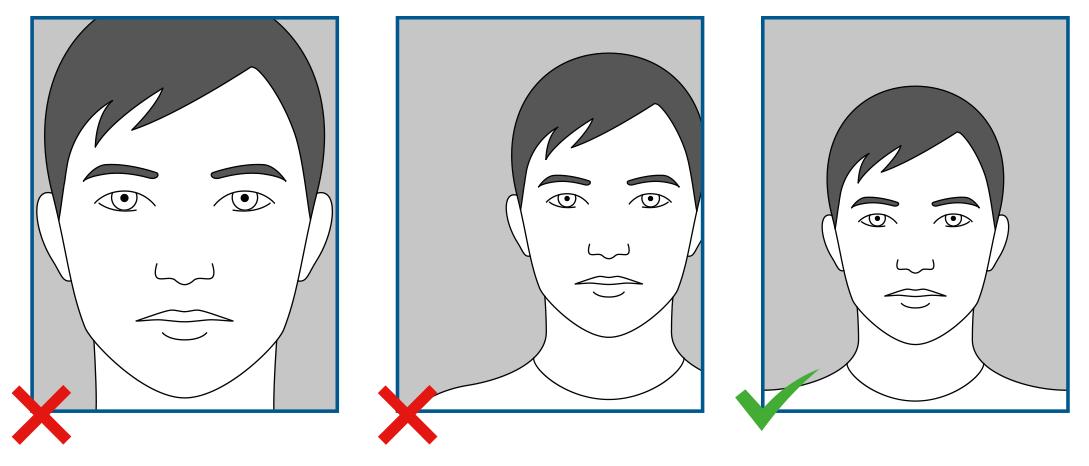
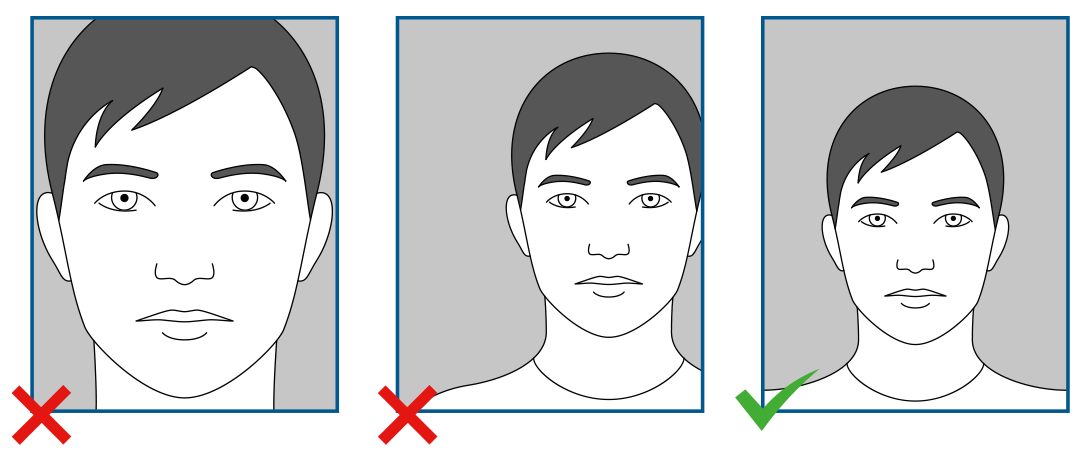
The Schengen standard is 35×45 mm (about 1.38×1.77 inches), with your head — chin to crown — measuring 32–36 mm, roughly 70–80% of the frame height. The photo must be taken within the last 6 months on a light, plain, uniform background. The size traces back to ICAO Doc 9303, the international standard that most visa systems build on; European states then implement it through their own national rules, which is why one or two details differ at the edges.
The Netherlands shows how those edges look in practice. The Dutch government requires the same 35×45 mm print, but for its national identity documents it sets a stricter head size — 26–30 mm chin-to-crown for anyone 11 and older, with face width between 16–20 mm excluding ears — and demands a minimum resolution of 400 dpi. If your photo follows the stricter Dutch reading, it satisfies the wider Schengen norm almost everywhere.
| Authority | Photo size | Head height (chin to crown) | Background | Max age |
|---|---|---|---|---|
| Schengen visa (ICAO-based norm) | 35×45 mm | 32–36 mm | Light, plain, uniform | 6 months |
| Netherlands (national ID documents) | 35×45 mm | 26–30 mm; face width 16–20 mm | Light grey, light blue, or white | 6 months |
| USA (printed passport photo) | 2×2 in / 51×51 mm | 1–1⅜ in / 25–35 mm | White or off-white | Recent photo |
| USA (DS-160 digital) | Square, 600×600 to 1200×1200 px, max 240 KB | Same proportions | White or off-white | Recent photo |
| Canada (printed passport photo) | 50×70 mm | 31–36 mm | Plain white or light | 6 months |
| Canada (visitor visa / TRV) | At least 35×45 mm | 31–36 mm | White or light | 6 months |
| Canada (digital passport renewal) | JPEG, 3:2, min 1,800×1,200 px, max 4,500×3,000; 200 KB–5 MB | 45–50% of photo height | Per official tool | Recent upload |
Source: Government of the Netherlands
One habit worth adopting: measure, do not eyeball. A ruler against a printed photo takes ten seconds and answers the question consulates will not reopen your file to explain.
What are the US passport photo requirements (2×2 inches)?
The US photo is 2×2 inches (51×51 mm) square. Your head must measure 1 to 1⅜ inches (25–35 mm) chin to crown, and your eyes must sit between 1⅛ and 1⅜ inches (28–35 mm) from the bottom edge of the print — a detail amateur photos violate constantly. The background must be white or off-white, plain, and free of shadows, other people, and objects.
Two US rules are stricter than most countries. First, glasses are not allowed — since November 2016, the State Department rejects photos with eyeglasses unless there is a documented medical necessity. Second, for online applications such as the DS-160, the digital file must be square, between 600×600 and 1200×1200 pixels, and no larger than 240 KB — a limit that ordinary phone photos routinely exceed before compression.
Religious head coverings are permitted, provided the full face is visible from chin to hairline and the covering does not cast shadows on the face. The same photo basics apply worldwide: face the camera directly, neutral expression, no uniforms, no headphones, no hats.
What is the Canada visa photo size — 35×45 mm or 50×70 mm?
Both — and confusing them is the single most common Canadian photo mistake. It depends which application you are filing. The visitor visa (TRV) photo must be at least 35×45 mm, with head height of 31–36 mm, on a white or light background, taken within 6 months, with a neutral expression; religious head coverings are acceptable with the full face visible. The printed passport photo is bigger: 50×70 mm (2×2¾ inches), the same 31–36 mm head height, and you submit 2 identical photos.
Canada's digital passport renewal has its own spec list, and it is strict: a JPEG in 3:2 portrait, minimum 1,800 px high × 1,200 px wide and maximum 4,500×3,000 px, file size between 200 KB and 5 MB, chin-to-crown taking 45–50% of the photo height. The rules also exclude anything edited — no scans of printed photos, no filters, and explicitly no AI-generated or AI-altered images. Your expression must be neutral with the mouth closed — no smiling, and glasses are acceptable only if non-tinted and glare-free.
If you file more than one Canadian application in a year — a study permit now, a passport renewal later — plan for two different photo sessions or one compliant digital file you can output at both sizes.
Is hijab allowed in passport and visa photos?
Yes — in the US, Canadian, Dutch, and wider Schengen systems, a hijab or other religious head covering is explicitly allowed, with conditions that are easy to satisfy. The United States permits religious head coverings as long as the full face is visible and no shadows fall across it. The Netherlands allows a head covering only for religious or medical reasons, requires it to be plain and one colour, with contrast against the background and the face fully visible from chin to forehead. Canada accepts religious head coverings worn daily, again with the face fully visible and free of shadows.
Three practical tips make hijab photos pass every system. Choose a plain, solid-colored covering — patterned fabric can fail the "plain" test and confuse automated checks. Make sure the entire face is visible from chin to forehead, including the hairline area where rules mention it, with the covering sitting behind the jaw rather than under it. And light the face evenly from the front so no shadow from the fabric falls on your face or the wall behind you — shadow rejection is the most common failure for covered applicants, and it is a lighting problem, not a clothing problem.
The same logic extends to other coverings: turbans, kippahs, and medical headwear follow the religious-or-medical allowance, while fashion hats, caps, and headbands do not. When in doubt, the government pages linked in the sources answer with official wording.
Can I wear glasses in a Schengen visa photo?
In most Schengen states, including the Netherlands, yes — glasses are optional, but your eyes must be fully visible: no tinted lenses, no frames covering the eyes, and no glare or reflection from lighting. Canada allows non-tinted glasses with no glare. The United States is the strict system here: no glasses at all in passport and visa photos since November 2016, unless you have a documented medical necessity.
The safest international habit is simple: take the glasses off. Glare is one of the top rejection reasons in every system, and it is invisible to you until the photo is checked. If you must wear glasses — strong prescription, medical requirement — position the lighting slightly above eye level and look directly into the lens; then inspect the photo at full size for any bright spot overlapping your pupils.
What background color is required for visa photos?
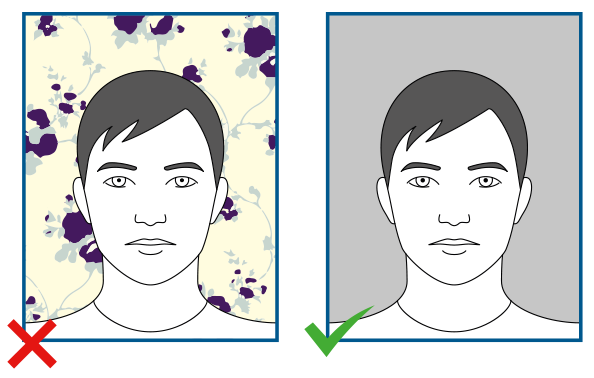
There is no single worldwide color, but the range is narrow and always light. The Netherlands — and much of the Schengen area — accepts light grey, light blue, or white. The United States requires white or off-white. Canada requires a plain white or light background for both passport and visa photos. In every system the background must be uniform: no gradients, no shadows, no other people or objects, no patterns.
Contrast is the hidden rule behind the color rule. Your face, hair, and any head covering must stand out against the background — which is why a plain dark hijab against a white wall passes easily, while a pale scarf against a pale-grey wall can fail an automated contrast check. Shoot facing a clean, evenly lit wall, daytime if possible, with the light source in front of you rather than behind.
Source: Government of the Netherlands
How recent must a visa photo be (the 6-month rule)?
The standard across Schengen states, Canada, and the Netherlands is 6 months: the photo must genuinely reflect how you look now, not your best angle from two years ago. The notable exception for students is Türkiye Bursları, which asks for a photo taken within the last 1 year — one of the friendlier rules in scholarship applications, and one more reason the scholarship photo file is easier than the visa file that follows it.
Retake your photo whenever something material changes: significant weight change, new glasses, beard grown or shaved, a new head covering style. Officers compare the photo to your face at the border or at biometric enrollment, and a mismatch that could have been avoided with one retake can cost you an appointment. If your photo is in any application system already and is approaching the age limit, refresh it before the next submission rather than after a rejection.
What is the DV lottery photo size in pixels (600×600)?
The Diversity Visa (green card lottery) photo must be a square of at least 600×600 pixels — and may run up to 1200×1200 pixels with a maximum file size of 240 KB, matching the DS-160 digital standard. It follows the same composition rules as the US passport photo: head between 25–35 mm proportions, eyes in the correct band, white or off-white background, no glasses, neutral expression.
The stakes justify the care. The program has made about 51,600 visas available in fiscal year 2025–26, following roughly 54,800 per year in FY2020–24 and the classic 50,000 cap before that — and an entry that fails the photo check is disqualified regardless of eligibility. Because the entry window is short and the photo spec is exact, prepare the file before entries open, not during. Current instructions live on the official DV lottery site at dvlottery.state.gov, with historical visa counts documented on Wikipedia's Diversity Immigrant Visa page.
Do Turkish biometric photos need to be 50×60 mm?
For Turkish official documents — residence permit applications, identity cards, and most consular services — the widely required biometric standard is 50×60 mm. Treat that as the size to prepare, but verify on the official portal of the specific authority before you print, because Turkish agencies publish their specs on separate official pages rather than one central English-language list. The same caution applies to Saudi Arabia, where 4×6 cm with a white background is the widely published spec for passports and consular applications — again, confirm on the official portal handling your application before printing.
The general rule for every country not in the table above: find the government page for the exact application type, not the country. Visa photos, passport photos, and residence permit photos in the same country often differ in size, background, and age limits — and the application instructions always override any article, including this one.
Why do visa photos get rejected? 7 official reasons
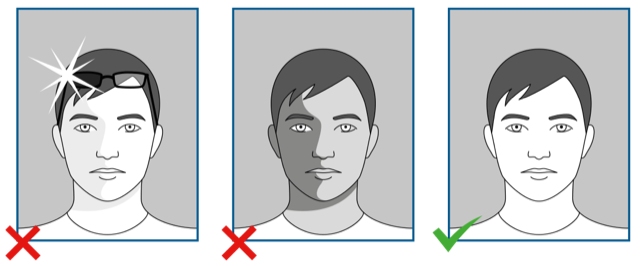
Canada's immigration department publishes pairs of acceptable and unacceptable example photos, and the same failure patterns appear in Dutch and American guidance. These are the seven that cover nearly every rejection:
- Background or contrast problems. Dark, patterned, or shadowed backgrounds, or a face that blends into the wall behind it.
- Glasses glare. Reflection or tint blocking the eyes — an automatic failure in the US, where glasses are banned outright.
- Covered features. Hair, scarf edges, hands, or a phone edge overlapping the face or forehead. Hands propping up a child's chin are a classic parental mistake.
- Smiling or laughing. Canada requires a neutral expression with the mouth closed; visible teeth or a grin fails.
- Off-center face or wrong head size. Head too small, too large, tilted, or pushed to one side of the frame instead of centered.
- Open mouth. Even slightly parted lips can fail automated checks looking for a closed-mouth neutral pose.
- Shadows and low resolution. Shadows on the face or background, underexposure, blur, pixelation, or prints below the required dpi — the Netherlands sets the bar at 400 dpi.
Source: Government of the Netherlands
Notice that all seven are technical, not cosmetic. Nobody rejects a photo for an imperfect complexion — and retouching your face is itself grounds for rejection. Fix lighting, distance, expression, and print quality, and your photo passes like anyone else's.
How do you get one photo that fits every official spec?
Applications multiply: a scholarship file here, a visa there, a residence permit later — each wanting the same face at a different size. The efficient approach is one good base photo, taken once, output many times. Set up facing a plain white wall in daylight, shoulders square, face centered and filling most of the frame, neutral expression, mouth closed, no glasses. Take the photo at high resolution so every crop stays sharp. From that single file you can produce a Schengen 35×45, a US 2×2 at 600×600 pixels under 240 KB, a Canadian 50×70 print, or a Turkish 50×60 — without a studio visit for each.
The fastest way to hit the exact official size is a tool built for exactly this: upload an ordinary phone photo to Truescho's passport photo service, choose your authority, and the tool removes the background to white, adjusts your head height to the official spec, and returns a digital file plus a printable sheet — three sizes for €3, delivered in seconds, with no face retouching at all.
Before you print or upload anything, run this five-point check: right size for this exact application, plain light background with visible contrast, head height within the official range, photo taken within the age limit, and expression neutral with mouth closed. Thirty seconds here saves weeks of re-application. And if the photo is part of a bigger scholarship push, pair it with the full scholarship application documents checklist and the 8-step plan to a fully funded scholarship — the photo is the easiest document in the file, as long as it is done to spec.
Want someone to handle this step for you? Truescho's passport photo tool turns one phone photo into authority-compliant digital files and a printable sheet for €3 — background, head height, and sizing handled automatically.
Frequently asked questions
Is hijab allowed in Schengen visa photos?
Yes. Head coverings worn for religious reasons are accepted across Schengen states and by Canada, provided the full face remains visible from chin to forehead and the head covering casts no shadows on the face. The Dutch matrix used by several consulates shows exactly this: hijab acceptable, face uncovered.
Is hijab allowed in US passport and visa photos?
Yes, for religious reasons. The US requires the full face to remain visible and the head covering to cast no shadows on the face; unlike glasses, which are banned outright, a religious head covering is explicitly permitted.
Can I wear glasses in a passport or visa photo?
Not in US applications — glasses are banned outright since 2016. Elsewhere they are tolerated only without glare or tint and only if the eyes stay fully visible. Because glare is the most common technical failure, the safe move everywhere is to simply remove them.
Is smiling allowed in passport photos?
No. Canada requires a neutral expression with the mouth closed, and visible teeth or a grin is a listed failure pattern in the official Canadian example photos. Keep the expression neutral and the lips together — a natural, closed-mouth look passes everywhere.
Does the photo background always have to be white?
White or off-white is the safe standard — required by the US and by the DV lottery, and used by most Schengen states, which additionally ask for a plain, light background with clear contrast between face and wall. The key word is plain: no patterns, no shadows, no gradients.
Why do visa photos get rejected?
For technical reasons, almost never cosmetic ones: dark or patterned backgrounds, glare on glasses, hair or scarf edges covering the face, smiling or an open mouth, wrong head size or off-center framing, shadows on the face, and low print resolution — the Netherlands sets the bar at 400 dpi. Retouching your face is itself grounds for rejection.
What is the DV lottery photo size in pixels?
A square of at least 600×600 pixels and at most 1200×1200 pixels, with a maximum file size of 240 KB, following the DS-160 digital standard: head between 25–35 mm proportions, eyes in the correct band, white or off-white background, no glasses, neutral expression. An entry that fails the photo check is disqualified.
Do Turkish photos really need to be 50×60 mm?
For Turkish official documents — residence permits, identity cards, most consular services — 50×60 mm is the widely required biometric standard, but Turkish agencies publish specs on separate official pages rather than one central list, so verify on the portal of the specific authority before printing. Türkiye Bursları scholarship photos additionally must be taken within the last year.