
Research Questionnaire Design: Google Forms Steps and an Editable Template
Research questionnaire design starts with the information your study needs, not with choosing a Google Forms theme. Define each construct, write items that respondents can interpret consistently, agree on an ethical collection process, and plan the coding before you publish. The form is the delivery mechanism; it does not establish validity or representativeness.
This guide follows a questionnaire from a research objective to a working Google Forms structure and an SPSS-ready codebook. It includes an original four-domain, 16-item example about university digital-library use. The example is an illustrative draft, not a validated research instrument. Adaptation, expert review, pretesting and any institutional approval remain necessary. Interface guidance and source checks were reviewed on 28 October 2026. Other language versions use independent teaching examples; keep the items and codebook from your chosen version together.
Map the research objective before building the form
Write one sentence describing the population, the experience being studied and the period respondents should consider. For example: “Describe enrolled students' experience of accessing and using the university's digital library during the previous four weeks.” This specifies an experience and timeframe without claiming to measure every aspect of library quality.
Next, distinguish the concepts you want to observe. Access concerns reaching resources. Usefulness concerns whether those resources support academic tasks. Interface interaction concerns finding and navigating material. Support concerns obtaining help. A student can find resources useful while struggling to access them, so these concepts should not automatically become one overall satisfaction score.
| Design decision | Example specification | Consequence for the instrument |
|---|---|---|
| Target population | Currently enrolled students eligible to use the digital library | Eligibility must be checked before the main items. |
| Reference period | Previous four weeks | Repeat this instruction above the item blocks. |
| Unit of response | One student's own experience | Avoid asking students to report what all classmates think. |
| Constructs | Access, usefulness, interface interaction, support | Keep a separate rationale and item set for each domain. |
| Intended analysis | Describe item distributions and explore domain scores after review | Define coding and missing-data rules before collection. |
| Recruitment | An approved sampling and invitation process | An open social-media link is not automatically a probability sample. |
Use your research proposal to check whether each item contributes to the stated objective. If the project is exploratory, acknowledge that scope. Adding more items does not compensate for an unclear question or a population that your recruitment process cannot reach.
Create an original four-domain questionnaire
Begin with an information section explaining purpose, approximate completion burden established during testing, voluntary participation, intended data use, contact details and the relevant privacy arrangements. Do not insert an invented ethics approval number. Use the wording and approval process required by your institution.
Add an eligibility item about recent use. A student who has never opened the library cannot meaningfully rate the search interface. You can route non-users to an appropriate separate section or finish their participation, depending on the approved research question. Do not quietly turn non-use into a negative satisfaction response.
For eligible respondents, introduce the following statement: “Thinking about your use of the university digital library during the previous four weeks, indicate how much you agree with each statement.” Use five ordered options: 1 strongly disagree, 2 disagree, 3 neither agree nor disagree, 4 agree, 5 strongly agree. Provide a separate “Not applicable” option where respondents may lack relevant experience.
| Code | Domain | Original draft item |
|---|---|---|
| ACC1 | Access | I could sign in to the digital library when I needed it. |
| ACC2 | Access | I could open the resources I selected from off campus. |
| ACC3 | Access | The library pages loaded adequately on the device I used. |
| ACC4 | Access | I could reach the full text of resources included in my university's access. |
| USE1 | Usefulness | The available resources supported the topics I was studying. |
| USE2 | Usefulness | The resources helped me identify material relevant to an assignment. |
| USE3 | Usefulness | I found resources at a level appropriate for my coursework. |
| USE4 | Usefulness | The library helped me locate material I could use in academic work. |
| INT1 | Interface interaction | I understood how to enter a search for the material I needed. |
| INT2 | Interface interaction | I could narrow search results using the available filters. |
| INT3 | Interface interaction | I could identify how to open a resource from its search result. |
| INT4 | Interface interaction | I could return to my search results after viewing a resource. |
| SUP1 | Support | I could identify where to request help with the digital library. |
| SUP2 | Support | The help instructions I consulted were understandable. |
| SUP3 | Support | The assistance I received addressed the problem I reported. |
| SUP4 | Support | I could find guidance relevant to the task I was attempting. |
Several support items will not apply to students who never sought help. That is a reason to retain an explicit non-applicable response or an appropriate route, not to force them to choose the neutral midpoint. During review, consider whether the support domain needs a separate eligibility condition and whether some access items overlap too closely.
Keep background items minimal. Programme stage might be relevant to the analysis; a name, student number and exact timetable may not be. Every additional identifying field needs a purpose. Free-text comments can also disclose identities, so invite respondents to avoid names and details about other people.
Review wording, comprehension and measurement separately
Ask reviewers to assess the connection between each item and its intended domain, whether the vocabulary suits the population, and whether any item asks about more than one thing. “The library is fast and easy to use” combines speed and usability. A respondent could disagree with one part and agree with the other, making the answer hard to interpret.
Expert judgement about apparent clarity and relevance contributes to face validity. Content validity concerns coverage of the construct. Construct validity concerns evidence about what the measure represents. Reliability concerns consistency under the relevant conditions. These are related questions, but they are not interchangeable certificates awarded by a pilot or a software output.
The AAPOR survey best-practice guidance supports pretesting with people similar to the intended respondents. Ask a participant to explain what an item means and how they selected their answer. This can reveal that “access” means account permission to one person and internet connectivity to another.
Then test the full workflow: invitation, consent, routing, mobile display, completion, export and withdrawal arrangements where applicable. A pilot can reveal operational problems and provide preliminary evidence; it does not prove that the scale works for every population. For later interpretation, our guide to Cronbach's alpha in SPSS explains why one reliability statistic cannot settle every measurement question.
Build the sections and response controls in Google Forms
Use an account authorized for the project. Create a blank form, give it a meaningful title and add a description. The official Google Forms creation guide explains the basic workflow. Organize the form into information and consent, eligibility, the four item domains, and an optional closing section.
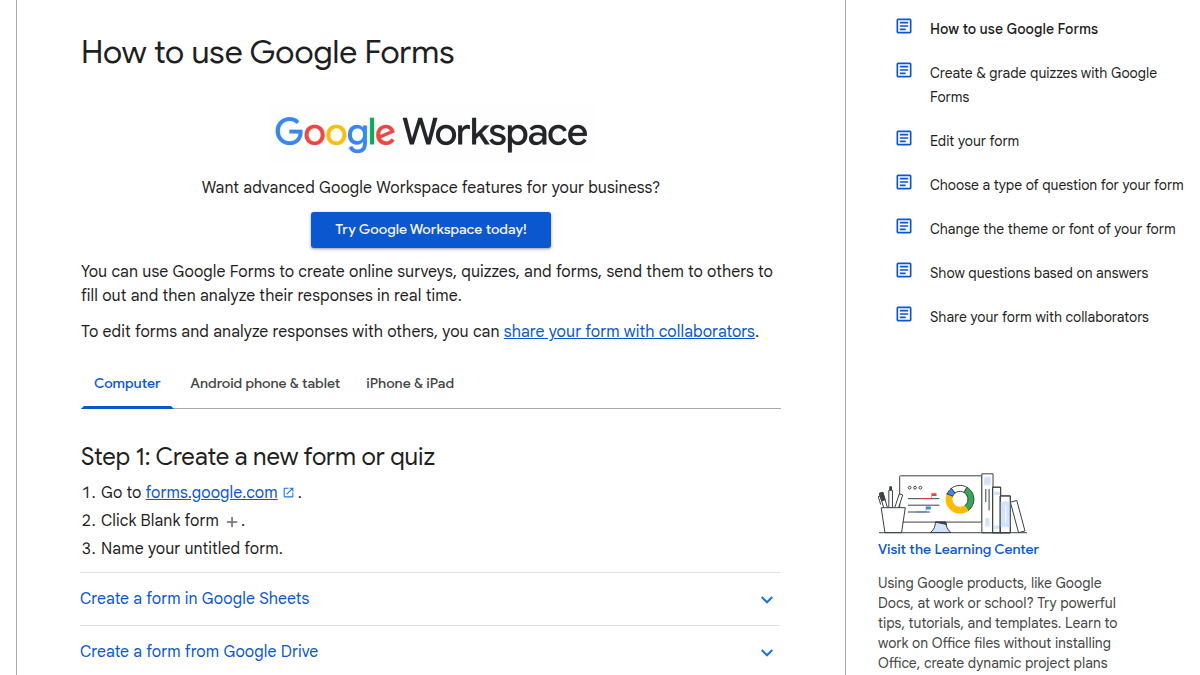
Source: screenshot of Google's official guide to using Forms.
For consent, use a multiple-choice item with a genuine decline option. Configure the answer to send consenting participants to the next relevant section and declining participants to an appropriate ending. Google's section-routing instructions specify that answer-based routing is available for multiple-choice and dropdown items, not a checkbox grid. Test both routes rather than assuming that marking consent “Required” implements the whole process.
For each domain, a multiple-choice grid can place statements in rows and agreement categories in columns. A row accepts one selected category. Do not enable “Limit to one response per column” for a normal Likert item block: several statements may legitimately receive “Agree.” That restriction would force a ranking-like pattern that the instrument does not intend. Consult Google's question-type guidance.
Requiring an answer in every row is a separate choice. Decide whether that is appropriate and whether a non-applicable option is necessary. Do not force sensitive demographic answers or make participation depend on revealing unnecessary personal information. Preview on a phone: a wide grid can be awkward, and individual multiple-choice items may work better for the actual audience.
Source: Google Workspace's official channel, “Make questions mandatory in Google Forms.” This older short demonstration illustrates the Required control; use current Google Help for the present interface and publishing process.
Publish with privacy and access settings that match the protocol
Check the responder access settings before distribution. Google's current publishing and sharing guidance describes publishing the form and making it available to the intended respondents. Copy the responder link, not the editing link, and test it using an account and device representative of your audience.
Limiting a form to one response requires Google sign-in. Google explains that usernames are not recorded unless email collection is enabled, but this does not make a study automatically anonymous. Other fields, linked administrative information or distinctive comments can identify participants. One account also does not prove one unique human across every possible account.
Disable respondent access to response summaries when the project requires confidential responses. A summary can expose written answers as well as charts. Review email collection, response editing, collaborator access and data retention against the approved plan. A platform setting cannot substitute for institutional requirements or establish compliance with every privacy law.
Record the instrument version and the date collection opens. If a substantive wording error appears after launch, pause and decide how to document the change. Silently changing an item halfway through collection can produce answers to different questions under one variable name. Keep an audit trail even when the technical edit takes only a few seconds.
Prepare the codebook before the first response arrives
The spreadsheet must connect each exported column to a documented variable. The table below is a complete item codebook for the illustrative instrument. Use numeric values 1–5 for the agreement categories. If “Not applicable” is offered, map it to 9 and declare 9 user-missing in the analysis file; an unanswered cell remains system-missing. These codes are a proposed project convention, not a Google Forms default.
| Variable | Item meaning | Type and valid values | Measurement | Missing rule |
|---|---|---|---|---|
| ACC1 | Sign-in availability | Numeric integer, 1–5 | Ordinal | 9 user-missing; blank system-missing |
| ACC2 | Off-campus resource opening | Numeric integer, 1–5 | Ordinal | Same rule |
| ACC3 | Loading on the used device | Numeric integer, 1–5 | Ordinal | Same rule |
| ACC4 | Access to included full text | Numeric integer, 1–5 | Ordinal | Same rule |
| USE1 | Relevance to study topics | Numeric integer, 1–5 | Ordinal | Same rule |
| USE2 | Finding assignment material | Numeric integer, 1–5 | Ordinal | Same rule |
| USE3 | Appropriate academic level | Numeric integer, 1–5 | Ordinal | Same rule |
| USE4 | Usability for academic work | Numeric integer, 1–5 | Ordinal | Same rule |
| INT1 | Entering a search | Numeric integer, 1–5 | Ordinal | Same rule |
| INT2 | Narrowing with filters | Numeric integer, 1–5 | Ordinal | Same rule |
| INT3 | Opening a search result | Numeric integer, 1–5 | Ordinal | Same rule |
| INT4 | Returning to results | Numeric integer, 1–5 | Ordinal | Same rule |
| SUP1 | Locating a help route | Numeric integer, 1–5 | Ordinal | Same rule |
| SUP2 | Understanding consulted instructions | Numeric integer, 1–5 | Ordinal | Same rule |
| SUP3 | Help addressing a reported problem | Numeric integer, 1–5 | Ordinal | Same rule |
| SUP4 | Finding task-relevant guidance | Numeric integer, 1–5 | Ordinal | Same rule |
No item in this example is reverse-scored. If you introduce one, document its direction and recoding explicitly: on a five-point scale, the transformation is 6 minus the original valid response. Do not reverse the missing code. Reverse wording can create comprehension problems, so it should serve a measurement purpose rather than merely make the instrument look sophisticated.
A proposed domain score could be the mean of its four valid items when at least three were answered. That is an illustrative rule requiring justification and review. Exclude missing codes before calculating it, and do not average the four domains into a grand score without evidence that such a score is meaningful.
Once data have been collected, Truescho's SPSS statistical-analysis service can help with agreed coding, cleaning, test selection and interpretation. It does not distribute the questionnaire, supply participants, approve research ethics or manufacture findings.
Choose sample size from the study design
A frequently repeated number such as 384 is not a universal requirement for a thesis questionnaire. The necessary sample depends on the target estimate, sampling method, expected variability, desired precision and analysis. A factor analysis, clustered design or comparison between small subgroups needs reasoning beyond a single population-proportion calculator.
For a limited illustration, assume independent simple random sampling to estimate a proportion, 95% confidence, expected proportion 0.5 and margin of error 0.05. The initial calculation is n0 = 1.96² × 0.5 × 0.5 / 0.05² = 384.16. With population size N, use n = n0 / [1 + (n0 − 1) / N], then round the completed-response target upward. These are our calculations under the stated assumptions, informed by the Penn State's lesson on confidence intervals and sample size.
| Eligible population N | Illustrative completed-response target |
|---|---|
| 100 | 80 |
| 200 | 132 |
| 500 | 218 |
| 1,000 | 278 |
| 5,000 | 357 |
| 10,000 | 370 |
| Very large population | 385 |
If 278 completed responses are needed and a 70% response rate is a justified planning assumption, invite at least ceil(278 / 0.70) = 398 eligible people. Nonresponse bias does not disappear because the final count meets a target. Posting an unrestricted link and receiving 398 convenient responses does not create a random sample with a defensible 5% margin of error.
Export to Sheets and preserve a traceable analysis file
Open the Responses area and select the response destination through the relevant menu. Create a new spreadsheet or connect an appropriate existing one. Google's response-destination instructions explain the available choices. Protect access to both the form and the separate linked spreadsheet.
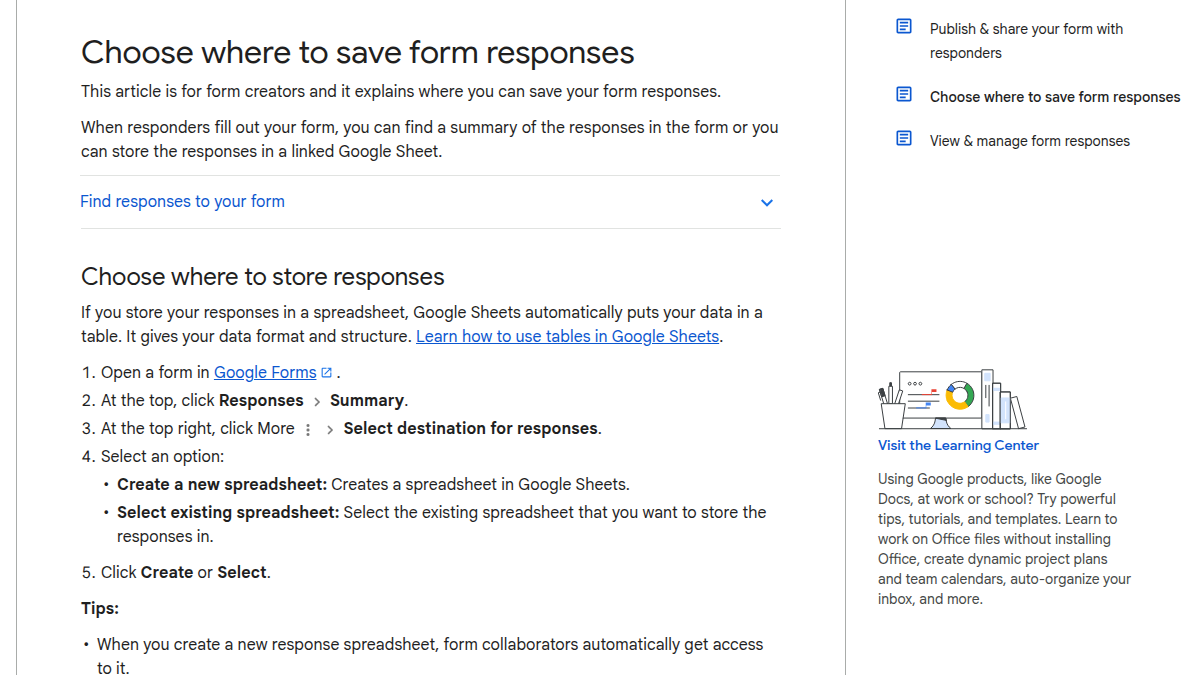
Source: screenshot of Google's response-storage guidance.
Save an untouched raw export before cleaning. In a working copy, rename columns consistently, convert labelled answers using the codebook, check impossible values and document exclusions. Keep the original text where mapping decisions might need review. A timestamp is useful for collection monitoring, but it is not a substitute for a participant-selection plan.
Import the working Excel file using the workflow described in IBM's SPSS Excel-import documentation. Check worksheet selection, variable names, value labels, measurement levels and user-missing codes after import. For the next stage, follow our SPSS questionnaire-analysis guide; for interpreting related published instruments, use the literature-review comparison approach.
Before launch, confirm that every item has a variable, every response option has a code, both consent routes work, mobile display is readable, and the export can be analysed without guessing. Have someone complete a test response and trace it through the entire pipeline. Delete or clearly isolate test submissions before authorized collection begins.
Frequently asked questions
Can I use Google Forms for a dissertation questionnaire?
It can be a suitable delivery tool when your institution permits it and its access, privacy and storage arrangements fit the project. You still need a defensible instrument, recruitment plan and approval process. Choosing Forms does not establish that the study is ethical, representative or statistically valid.
Does switching off email collection make responses anonymous?
Not necessarily. Names in comments, detailed demographics, account restrictions or links to other records may identify people. Review the whole information flow. Describe the study as anonymous only when that description is justified; otherwise explain confidentiality and the access controls actually used.
Why should I leave one-response-per-column switched off?
A Likert grid allows several statements to receive the same rating. Restricting each column to one response prevents that and changes the task. Use the restriction only when your instrument intentionally requires a ranking-like allocation, not because it sounds like a general data-quality setting.
Is a neutral answer the same as a missing answer?
No. The neutral midpoint is a substantive response on the scale. An unanswered item and a non-applicable experience have different meanings. Give them distinct coding rules and exclude missing codes from score calculations rather than treating them as an additional agreement value.
Does a successful pilot mean the questionnaire is validated?
No. A pilot can identify confusing wording, routing problems and practical collection issues. Validity requires evidence appropriate to the construct and intended interpretation. Record what the pilot tested and what remains uncertain instead of describing completion without technical errors as full validation.
How many responses do I need for a Likert questionnaire?
There is no universal number. The simple-random-sample illustration above concerns estimating a proportion under explicit assumptions. Hypothesis testing, subgroup comparisons, scale development and non-probability recruitment require different considerations. Establish the analysis and sampling design before adopting a target from a table.
Can I change an item after people have responded?
Technical editing is possible, but a substantive change can make responses incomparable. Follow the approved protocol, document the version and consider whether collection should pause. Retain a record of which wording respondents received rather than combining different versions without explanation.
Finish the instrument before collecting evidence
A reviewable questionnaire has a clear objective, interpretable items, tested consent and access routes, a documented codebook and an analysis plan. Complete those pieces together. When your responses are ready for agreed statistical work, request SPSS analysis support with the questionnaire, dataset and research hypotheses so the proposed analysis can be checked against the actual study.