
On August 5, 2026, Meta announced two new releases simultaneously: Muse Spark 1.2, the latest update to its flagship coding-focused AI model, and Muse Code (in beta), a terminal-based coding agent designed for complex, long-horizon software engineering tasks. The announcement represents a significant strategic step in Meta's AI strategy, entering direct competition with tools like Claude Code and GitHub Copilot.
What Is Muse Code and Why Is It Different?
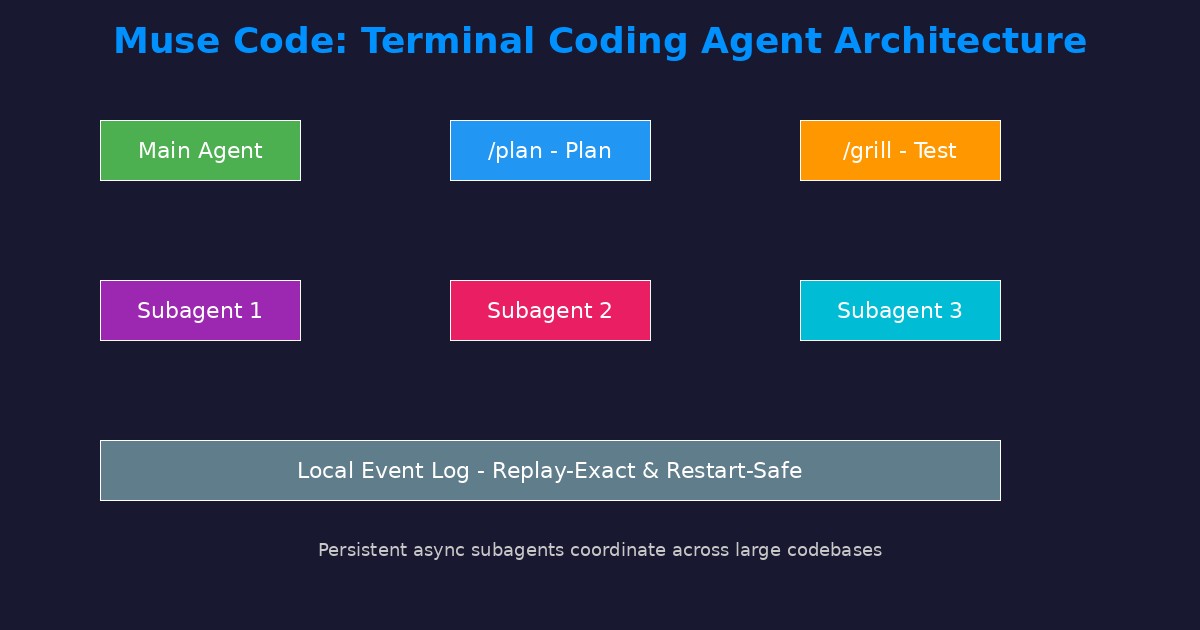
Muse Code is not just another code-completion assistant. It is a full terminal coding agent that plans, writes, tests, and debugs code autonomously across large codebases. The fundamental difference from previous tools is its ability to coordinate persistent subagents that stay active throughout the entire session. This means the agent does not forget context or lose progress between tasks — it maintains a continuous state that allows it to work on complex projects for hours or even days.
How Muse Code Works
When given a software engineering task, Muse Code does the following:
1. Planning: Creates an approval-gated plan using the /plan command. It breaks the large task into small, executable, verifiable steps.
2. Coordinated Execution: Distributes tasks across subagents working in parallel, significantly accelerating completion compared to sequential work.
3. Testing and Verification: Uses /grill to stress-test each step, verifying every modification before moving to the next.
4. Completion: Uses /goal to drive toward the final objective, ensuring all requirements have been met.
The Local Event Log
One of the most technically impressive features of Muse Code is its local event log. This log records every model call, every tool run, every approval, and every edit. The result is a system that is restart-safe: if the program crashes or the connection drops, work can resume exactly where it left off (replay-exact).
This feature is critical for long-horizon tasks. Imagine a programmer working on a task for 6 hours when the power goes out. With the local event log, work can resume without losing any progress. This puts Muse Code in a different category from previous tools that lose their state at any interruption.
Technical Specifications in Detail
Muse Spark 1.2: A Model Built for Coding
Muse Spark 1.2 is not a general-purpose model — it was specifically designed for coding tasks. Its key characteristics:
- Co-training: Trained jointly with Muse Code for optimal pairing performance. This means the model understands the context of working inside a coding agent, not just programming in the abstract.
- Long-Horizon Training: Trained on whole-repository generation, large end-to-end projects, and auto-research tasks. This type of training is fundamentally different from training models on short code snippets.
- Self-Improvement Loop: Meta used the previous version (Muse Spark 1.1) to generate challenging coding environments and complex instruction templates, then graded candidate solutions to produce scalable training data. This is an innovative approach where the old model contributes to training the new one.
- Context Compaction: Uses planning, goal conditioning, and context compaction techniques to work efficiently on long tasks without running out of context window.
Muse Code: The Practical Agent
- Installation: Via the official installation script from dev.meta.ai, supporting macOS and Linux
- Supported Systems: macOS and Linux (Windows not currently supported)
- Local Event Log: Records every model call, tool run, approval, and edit
- Safe Design: Restart-safe with replay-exact recovery
Benchmark Results
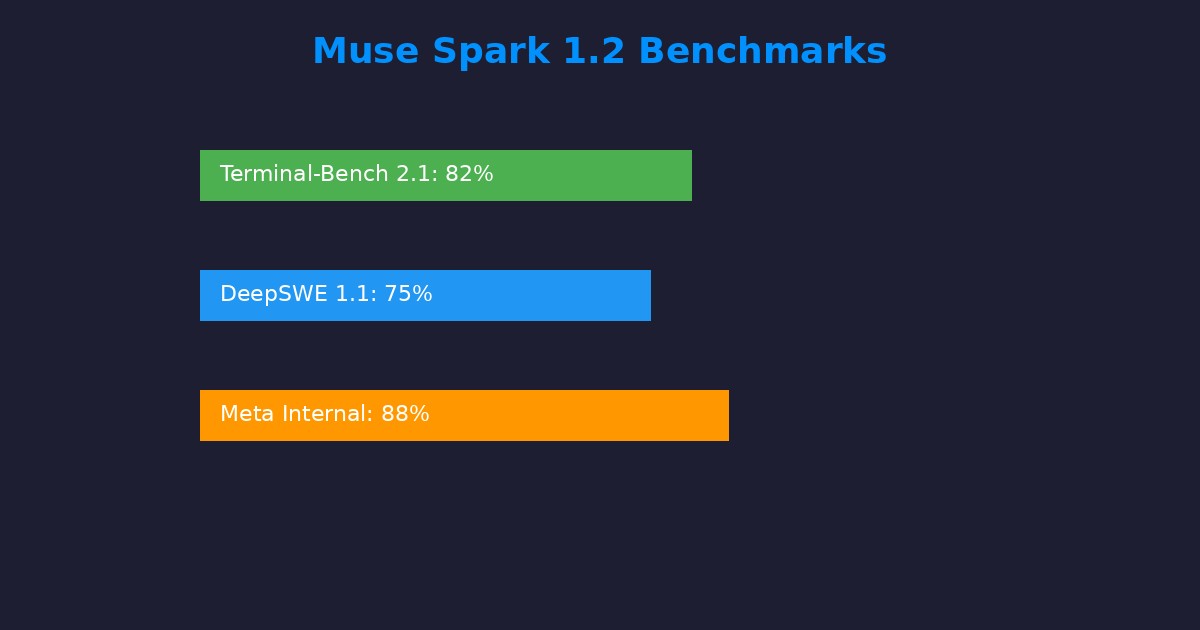
Muse Spark 1.2 participated in three major benchmarks:
- Terminal-Bench 2.1: Measures the model's ability to execute real software tasks in the terminal, compared against the latest coding models in the world
- DeepSWE 1.1: Evaluation of deep, complex software engineering tasks including bug fixing and refactoring
- Meta Internal Coding Bench: An internal Meta benchmark covering diverse programming scenarios
Additionally, Muse Spark 1.2 entered independent LMarena rankings:
- 4th place in Overall ranking — a strong competitor in the top-tier model category
- 14th place in the Code category — clear specialization in coding tasks
- Now available in Agent Arena for evaluating agentic capabilities
Ranking #4 on LMarena is a notable achievement, placing Muse Spark 1.2 in the same category as the world's top models like GPT-5, Claude Opus, and Gemini 3 Pro.
Case Study: 24-Hour GPU Kernel Optimization
One of the most technically compelling demonstrations was testing Muse Code's ability to iteratively optimize GPU kernels over 1000+ tool calls spanning up to 24 hours. The task was optimizing KDA and MLA kernels on NVIDIA Hopper GPUs (the latest generation of high-performance GPUs).
KDA (Key-Value Decay Attention) Results
The model paired a chunk-parallel preparation kernel with a sequential inter-chunk scan. It used KDA-specific optimizations like re-centering gated cumulative decay. These are algorithmic-level improvements, not just surface-level tweaks.
MLA (Multi-Head Latent Attention) Results
The model designed a two-kernel Triton pipeline, reusing shared KV latent as both key (K) and value (V) simultaneously. This type of optimization requires deep understanding of GPU memory architecture and how to reduce redundant data transfers.
Final Result: The agent continued to achieve substantial improvements over the baseline implementation throughout the entire 24-hour period. This proves that Muse Code is not just a quick code assistant — it is capable of sustained work on tasks requiring patience and precision.
How to Access and Use
Installing Muse Code
Muse Code is currently available as a beta release. To install:
- Open terminal on macOS or Linux
- Run the official installation script from dev.meta.ai
- Follow the on-screen instructions
After installation, the available bundled commands are:
- /plan — Create an approval-gated project plan
- /grill — Stress-test the plan under heavy load
- /goal — Autonomously drive toward a specific objective
Muse Spark 1.2 via API
The model is also available through Meta Model API with expanded global access. Developers worldwide can use it in their own applications. There are no geographic restrictions on access.
Pricing and Requirements
Meta did not announce specific pricing in the announcement post. This may mean the beta is free, but pricing may be applied later. The model is available today in Muse Code and in Meta Model API.
What Does This Mean for Developers?
For Software Development Teams
Muse Code represents a paradigm shift in how development teams work:
- Give high-level directives and let the agent execute
- Review plans before execution via the /plan system
- Stress-test solutions via /grill
- Reduce time spent on routine tasks like writing tests and documentation
This dramatically accelerates development, especially in large projects involving multiple teams.
For Independent Developers and Entrepreneurs
An independent developer can now get an autonomous coding assistant that works across large repositories. This reduces the need for large teams and enables individual developers to accomplish projects at the scale of a full team. For entrepreneurs, this means building software products faster and at lower cost.
Competitive Advantage vs. Claude Code
Muse Code enters direct competition with Claude Code from Anthropic, which launched earlier in 2026. Key differences:
- Muse Code: Persistent subagents, restart-safe design, deep integration with Muse Spark 1.2, co-training approach
- Claude Code: Greater market maturity, larger community, VS Code integration, better documentation
The choice depends on specific project needs. For long-horizon tasks requiring persistence, Muse Code appears stronger. For integration with traditional development environments, Claude Code may be more suitable.
Quick Comparison with Competitors
| Criterion | Muse Code + Spark 1.2 | Claude Code | GitHub Copilot | Cursor |
|---|---|---|---|---|
| Type | Autonomous terminal agent | Autonomous terminal agent | IDE-integrated assistant | AI-powered IDE |
| Subagents | Yes (persistent) | Yes | No | Limited |
| Bundled Commands | /plan, /grill, /goal | Various | Completion, chat | Various |
| Platforms | macOS, Linux | macOS, Linux, Windows | All platforms | All platforms |
| Pricing | Not announced | $20/month (Pro) | $10-39/month | $20/month |
| Restart-Safe | Yes (replay-exact) | Uncertain | Not applicable | Not applicable |
| LMarena Overall | #4 | Not ranked | Not applicable | Not applicable |
Case Study: The Demo Video
In the official demonstration, Muse Code was given a fly-through home video of a vacation rental property — a video showing a home inside and out. The agent:
- Analyzed the video content: Extracted relevant information such as number of rooms, area, design, and special features
- Wrote a complete web page: Created a professional property marketing page with a booking system
- Designed the frontend: Wrote professional CSS and JavaScript code reflecting the property's aesthetics
This example illustrates Muse Code's ability to transform multimodal content (video) into complete, practical web applications without any human intervention. The ability to understand video and write code in the same task is a significant advantage.
Limitations You Should Know
- Beta Status: Muse Code is still in beta, meaning potential bugs and incomplete features. It is not recommended for critical production environments until the final release.
- Supported Platforms: Works only on macOS and Linux. Windows developers need to use WSL (Windows Subsystem for Linux) or wait for official Windows support.
- Pricing Unannounced: Unclear costs make budgeting difficult for larger teams that need a clear budget.
- Meta Ecosystem Dependency: The model and tool are tied to Meta's ecosystem. This may raise concerns about vendor lock-in and data privacy.
- English-First: The interface and commands are in English. Developers who prefer Arabic commands or who face language barriers may need to adapt.
- No Traditional IDE Support: Muse Code works from the terminal only and does not currently integrate with VS Code, IntelliJ, or any other IDE. Developers who rely on IDEs may find the transition difficult.
Frequently Asked Questions
Is Muse Code free?
Meta has not announced final pricing yet. The beta version is available for free installation, but there may be costs associated with API usage at the final release.
Does Muse Code replace programmers?
No. It changes the nature of work. The programmer becomes a supervisor and director of the agent rather than a manual code writer. Creative and architectural tasks, strategic decision-making, and quality review still require human input. What changes is speed and efficiency.
How does Muse Code compare to Claude Code?
Both are terminal-based coding agents. Muse Code features persistent subagents and a safe local event log (restart-safe). Claude Code has a larger community, more market maturity, and broader integration. The choice depends on project needs.
Does Muse Code support specific programming languages?
Muse Code is designed to work across full repositories in multiple languages (Python, JavaScript, TypeScript, Java, Go, Rust, and others). The underlying model (Muse Spark 1.2) was trained on code generation across various languages.
What are the hardware requirements?
You need a macOS or Linux machine with internet connectivity for API access. No local GPU is required as processing happens on Meta's servers. Disk space is needed for installation and the local event log.
Can it be used in commercial projects?
You should review Meta's terms of service. The beta version may have restrictions on commercial use until the final release. Large companies may need separate enterprise agreements.
What is the difference between Muse Spark 1.1 and 1.2?
Muse Spark 1.2 is a coding-focused update. The main improvement driver is co-training with Muse Code and the self-improvement loop using 1.1 to generate training data for 1.2. The result is a significantly better model for long-horizon coding tasks.
Conclusion
The launch of Muse Spark 1.2 and Muse Code represents a major investment from Meta in the future of AI-assisted programming. The persistent subagent architecture and safe local event log are technical features that differentiate it from competitors and open new possibilities for working on complex, long-duration coding tasks.
For developers, this means a powerful new tool for increasing productivity and accelerating development. However, waiting for the final release, reviewing pricing, and testing the tool on real projects is the prudent approach before full production adoption. The competition between Meta, Anthropic (and Google and OpenAI) in this space means tools will improve rapidly, and the ultimate beneficiary is the developer.