
Meta AI's Mac App: Screen Sharing, System-Wide Dictation, and Business Tools, Explained
On August 19, 2026, Meta announced its first desktop app for Meta AI — a native Mac client that does more than mirror the chat window. Two headline capabilities put it in direct competition with paid tools: screen and window sharing, so the assistant can see what you see and discuss it, and system-wide voice dictation that summons a compact Meta AI prompt bar from anywhere in macOS. Alongside the app, Meta rolled out business integrations — connecting Instagram and Facebook accounts, Meta ad campaigns, and Google Workspace to the same assistant.
The launch is several days old now, and most coverage stayed at headline depth. This guide (updated August 23, 2026) goes deeper: what the app actually does, how to get it, where it is available, what it means that Muse Spark powers the screen awareness, and an honest comparison with the ChatGPT and Gemini desktop apps — limitations included.
What exactly launched? (the announcement, fact-checked)
The app is the desktop version of the same Meta AI assistant millions of people already use inside WhatsApp, Instagram, and Facebook — now in a standalone macOS app. Based on the consistent reporting of The Verge, TechCrunch, Engadget, and a hands-on test by TestingCatalog, the first release (build version 1.0) includes:
- Screen awareness: share a specific window or your whole screen from the prompt bar, and the assistant uses its contents as context — it can look at your spreadsheet, design, or web page and answer questions about it.
- System-wide dictation: voice input that works across all Mac apps, not just inside Meta AI, invoked through a system shortcut that brings up a compact prompt bar wherever you are.
- A familiar interface: the app closely resembles Meta AI on the web with largely the same functionality, including support for Artifacts.
- The model: screen-content analysis runs on Meta's Muse Spark model (per TechCrunch), part of the Muse family that Meta expanded in early August with Muse Code and Muse Spark 1.2.
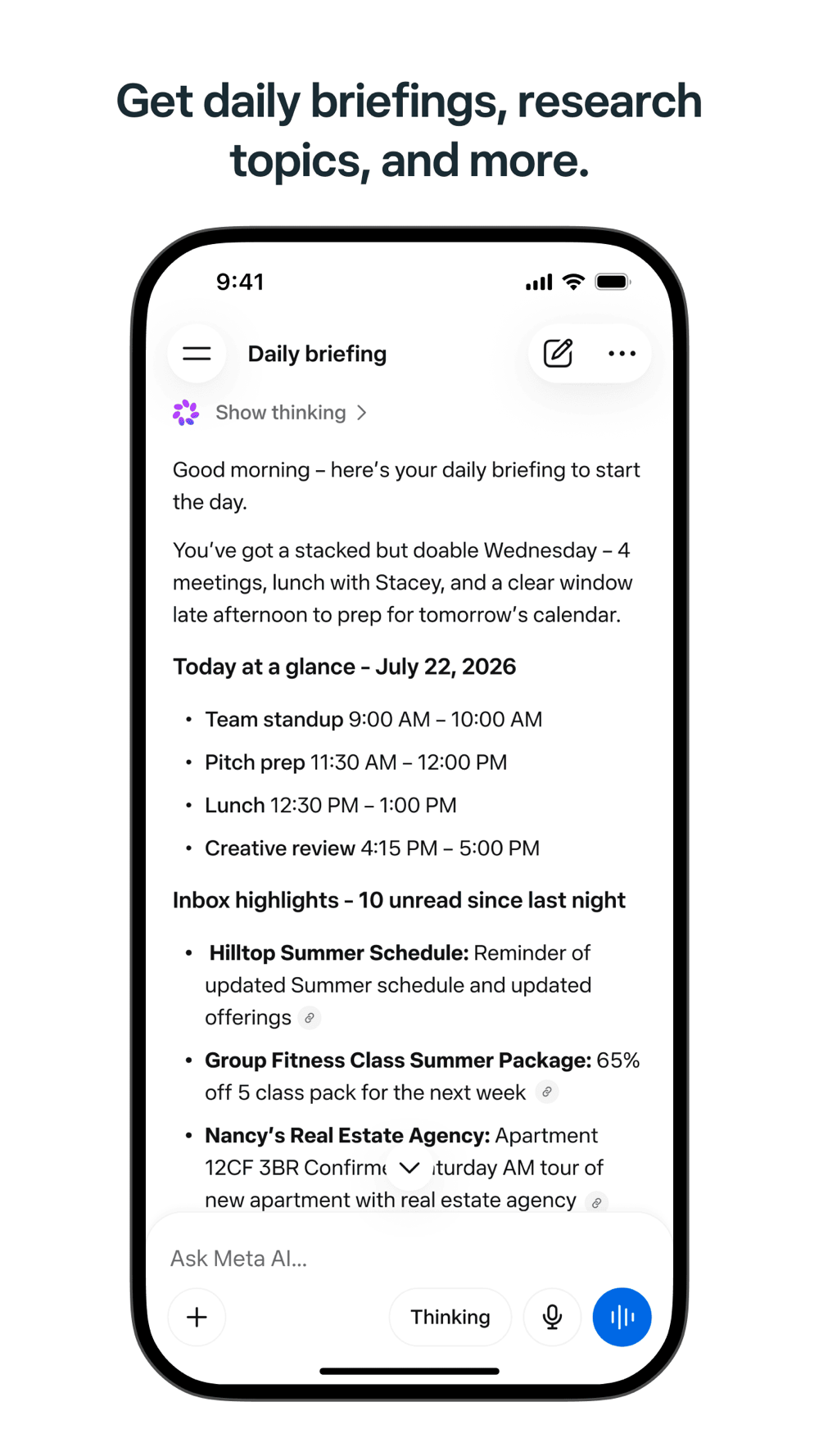
The desktop app also arrived as part of a broader business update: Meta AI on web, mobile, and Mac can now connect to Instagram and Facebook business accounts, Meta ad campaigns, and Google Workspace (Gmail, Docs, Sheets, Slides). Merchants and creators can ask the assistant to analyze post reach, likes, shares, and saves, suggest what to publish next, pull publicly available competitor intelligence, generate decks, documents, and spreadsheets, and even run recurring tasks such as a weekly performance report.
Source: Official Meta AI App Store listing — Meta Platforms
Why a Mac app matters strategically
A "Mac app" sounds minor. It is not. Before August 2026, every major AI rival already had a desktop presence — ChatGPT, Claude, and Gemini all ship desktop apps, and some (ChatGPT and Claude) go further with computer control, letting the agent operate your machine. Meta, despite running one of the most-used AI assistants on the planet through its family of apps, had nothing on the desktop.
The new app closes that gap with a distinctly different philosophy. As Engadget's coverage put it, the app "watches, but does not touch" — it sees your screen when you share it and makes suggestions, but it does not (yet) control your computer or drive your browser. TestingCatalog's hands-on summarized the competitive picture bluntly: with Muse Code already in Meta's stack, the missing piece is integration rather than underlying capability.
The commercial context is explicit. On Meta's Q2 2026 earnings call, CEO Mark Zuckerberg described selling AI agents to businesses — automating work on their behalf — as a big opportunity. A desktop app with ad-account and Workspace integrations is the first tangible step of exactly that strategy: an assistant that sits where work happens and already speaks the language of Meta's advertising ecosystem.
The Muse model family, briefly
Screen awareness in the app runs on Muse Spark, one of the models in the Muse family that has become the backbone of Meta's consumer AI stack in a matter of weeks. Muse Spark — updated as version 1.2 in early August — is the multimodal understanding model that "reads" the window or screen you share and turns it into conversational context, per TechCrunch's reporting. Its sibling Muse Code is the family's programming model, aimed at developer products. The strategic read: Meta is not renting third-party models for its desktop client; it is imposing its own family, which means the app's future quality tracks the pace of Muse itself rather than Meta's deals with outside model providers.
How to get the app (step by step)
- Check your machine: the app is for macOS only — there is no Windows version in this round. Update macOS to a recent release before installing.
- Download from the official channel: Meta distributes the desktop app through its official download page (meta.ai), and availability has been rolling out gradually by region since launch — coverage confirms it opened in select regions first. If the link is not live for your country yet, wait for the expansion; do not use third-party mirrors.
- Sign in with your Meta account: the same Facebook/Instagram identity you use in the mobile app — conversations sync across devices.
- Grant the two permissions: on first run the app asks for Screen Recording and Microphone access in macOS System Settings (Privacy & Security). Both are required for the app's two headline features.
- Connect your tools: from settings, link Google Workspace or your business Instagram/Facebook accounts, then start with a simple question about your last seven posts' performance.
What this means for you
- A capable free desktop assistant: the app is free, like Meta AI generally, which alone makes it a direct alternative to paid "sees your screen" tiers on rival assistants. If you already live in WhatsApp and Instagram, the learning curve is close to zero.
- For merchants and creators: this is the strongest angle. If you run an online store or a services page and manage Meta ads, connecting your account means plain-language performance reports and content suggestions without opening dashboards. One caution: the assistant summarizes; you still own every budget decision — verify numbers before acting on them.
- Language support: Meta's models handle many languages for chat, but the newest app features (screen analysis, business tooling, ad terminology) work best in English. Test with a real task in your language before making it a default.
- Privacy expectations: screen sharing happens only with explicit permission per session, but Meta AI usage falls under Meta's consumer data policies — less conservative than some competitors. For sensitive work (contracts, client data), review our Claude AI plans and pricing guide or the Claude vs ChatGPT comparison for Arabic and multilingual content.
Privacy, step by step: what actually reaches Meta
Separate the three permissions involved before making the app part of your workday:
- Screen Recording — a system-level permission you grant once in macOS settings, but actual sharing happens session by session: the assistant only sees your screen when you explicitly share it in that session.
- Microphone — required for dictation; macOS shows its active-microphone indicator in the menu bar whenever the app is listening.
- Connected business data — linking Instagram, ad campaigns, or Google Workspace means the assistant reads those accounts' data to generate reports; it is an opt-in connection you can revoke in settings.
The real objection is policy, not mechanics: Meta AI usage falls under Meta's consumer data policies, and the company's commercial data history is well documented. For sensitive work — contracts, client records, negotiations — the practical rule is to share screens containing only non-sensitive material, or keep a more conservative tool for those cases.
A day with the app: what daily use actually looks like
Assembled from the hands-on coverage, a realistic scenario for a small online-store owner: in the morning you hit the shortcut from any app and ask by voice how yesterday's ads performed — system-wide dictation captures the question, and the assistant answers from your connected campaign data. Midday you open your sales spreadsheet, share the window, and ask for a trend analysis — no exporting, no screenshots, no copy-paste. By end of week, a scheduled recurring task delivers the weekly performance report without being asked. That resident-assistant experience was, until last month, the preserve of paid tools — its being free is the loudest message in this launch.
Quick comparison: desktop AI assistants on the Mac (August 2026)
| Criterion | Meta AI (new) | ChatGPT for Mac | Gemini for Mac |
|---|---|---|---|
| Price | Free | Free tier + ~$20/month | Free tier + ~$20/month |
| Screen awareness | Yes (window/screen sharing) | Yes | Yes |
| Computer control | Not yet | Yes | Limited/expanding |
| System-wide dictation | Yes | Via third-party tools | Yes (added recently) |
| Business/ad integrations | Instagram/Facebook/Meta ads + Google Workspace | Strongest for developers (extensions) | Google Workspace |
| Standout use case | Everyday Meta-ecosystem users + merchants | Writing, research, coding | Study, Gmail, Workspace |
If you are a student, also see our coverage of the free one-year Gemini offer for university students and Meta's own AI image generation tools explained.
Source: Official Meta AI App Store listing — Meta Platforms
What the app does well (from practical coverage)
- Speed of access: the system shortcut summoning the compact prompt bar makes the assistant feel like a colleague sitting next to you rather than an app you open — this is the experience that tools like Wispr Flow and Superwhisper sell as paid subscriptions, here for free.
- Instant visual context: instead of copying text or uploading screenshots manually, you share the window directly — dramatically easier for reviewing a spreadsheet, a design, or code.
- Plain-language business reporting: "How did my posts do last week?" followed by suggestions grounded in reach and saves is faster than decoding analytics dashboards for small business owners.
- Cross-device continuity: a conversation started on your phone continues on the Mac — useful for tasks that begin on the move and end at the desk.
Honest limitations before you rely on it
- Gradual regional availability: the launch covers select regions; the download link may not appear in your country immediately. Avoid unofficial mirrors entirely.
- No computer control yet: unlike ChatGPT and Claude, Meta's app sees but does not act. If you want deep workflow automation on your machine, this is not that — yet.
- Mac only: no Windows or Linux client in this round.
- Limited coding workflows: despite Muse Code existing in Meta's stack, the app does not offer the integrated developer experience of its rivals — TestingCatalog's assessment is blunt on this point.
- Data policy posture: Meta advertises enterprise-grade protections for its AI tools, but the company's commercial data history makes it a less conservative choice than some alternatives for sensitive material.
- Version 1.0: expect small bugs, frequent updates, and feature churn. Do not build a critical workflow on it alone.
Frequently asked questions
When did the Meta AI Mac app launch?
Meta announced the app on August 19, 2026 — its first desktop client — as an initial version 1.0 build.
Is the Meta AI Mac app free?
Yes. Like Meta AI generally, the desktop app requires no subscription, subject to Meta's usage and regional policies.
How is the app different from using meta.ai in a browser?
Beyond the standalone interface, the app adds screen/window sharing as context for the assistant and system-wide dictation across all Mac apps via a shortcut that summons a compact prompt bar anywhere.
Does the Mac app control the computer like ChatGPT's desktop app?
No. In its first version the app "sees" your screen when you share it and makes suggestions, but it does not control your device or browser — a gap technical coverage notes explicitly.
Can you connect Instagram or ad accounts to the app?
Yes. The same August update lets Meta AI connect to business Instagram and Facebook accounts, Meta ad campaigns, and Google Workspace, enabling performance analysis, content suggestions, and document and deck creation.
Which AI model powers the app?
Meta uses its Muse model family; screen-content analysis runs on the Muse Spark model, according to TechCrunch's reporting.
What is the difference between Muse Spark and Muse Code?
Muse Spark is the multimodal understanding model that analyzes screen and document content behind the app's visual context; Muse Code is the programming model in the same family, aimed at developer products rather than the desktop assistant.
Does the app cost anything or require a subscription?
No. The app and its announced features — screen sharing, system-wide dictation, business account connections — are free under Meta's usage policies; the company monetizes its business and ads ecosystem rather than individual subscriptions.
The bottom line
Meta AI's Mac app is more than a new release: it is Meta's declaration that it is finally entering the "assistant that lives on your computer" contest that OpenAI, Anthropic, and Google have been running without it — armed differently, with a fully free product and native ties to the world's largest social and advertising network. For anyone on a Mac, it is the cheapest way to try a screen-aware assistant; for merchants and creators, it may be the fastest route to understanding their account performance. If you need deep automation or strict privacy, the rivals still lead — at least until Meta's next version.
Updated August 23, 2026 — based on The Verge, TechCrunch, Engadget, and TestingCatalog coverage (August 19–21, 2026) and Meta's official App Store listing.
Sources
- Official Meta AI listing — Meta Platforms, Inc., App Store
- The Verge: "Meta AI is getting a Mac app" — Emma Roth, August 19, 2026
- TechCrunch: "Meta AI's new Mac app wants you to talk to your apps" — August 20, 2026
- TestingCatalog: hands-on with the app after launch (v1.0, screen sharing, system-wide dictation) — August 19, 2026
Start Your Journey with Truescho
Discover more free tools and honest reviews in the Truescho AI tools hub, or compare the leading assistants in What Is Claude AI and How to Use It for Free.