
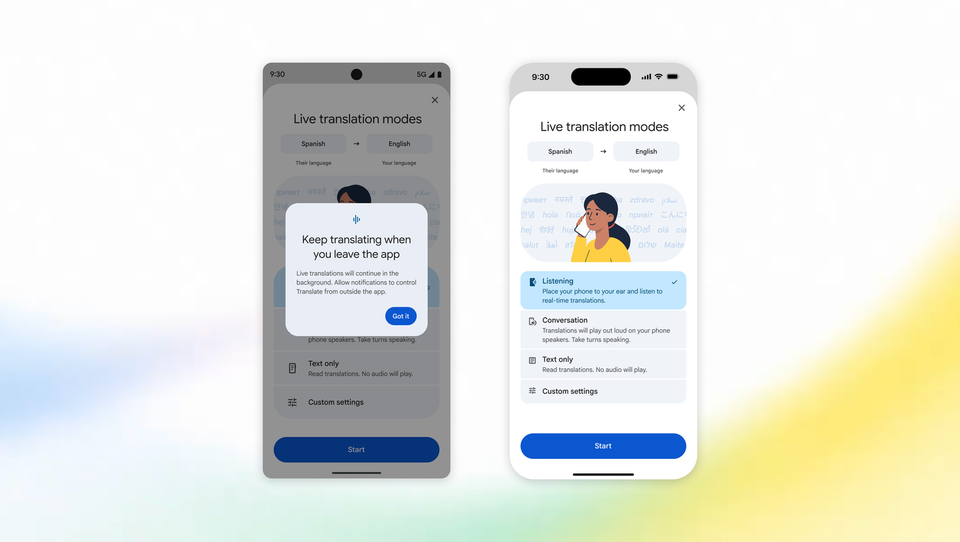
Google announced two upgrades to live translation in Google Translate on Thursday, September 4, 2026: Android phones can now keep live translations running in the background even with the screen locked, and iPhone users worldwide can hear translations directly through the phone's earpiece. Live translate converts spoken audio across more than 70 languages in near real time, and the two updates fix the two complaints users raised most: translations stopping the moment you leave the app, and needing earbuds to hear anything in noisy places.
The announcement came from Google's official blog, written by Sasha Kapur, with an official explainer video from Google's own YouTube channel. The reasoning behind the first feature came straight from the company's data: more than a third of live translation sessions now last longer than five minutes, meaning people are using the feature for long, real conversations rather than quick one-liners.
Source: Google's official YouTube channel
What Exactly Did Google Announce?
Both updates concern Live Translate, the feature that converts spoken speech between two languages almost instantly. Here is precisely what changed:
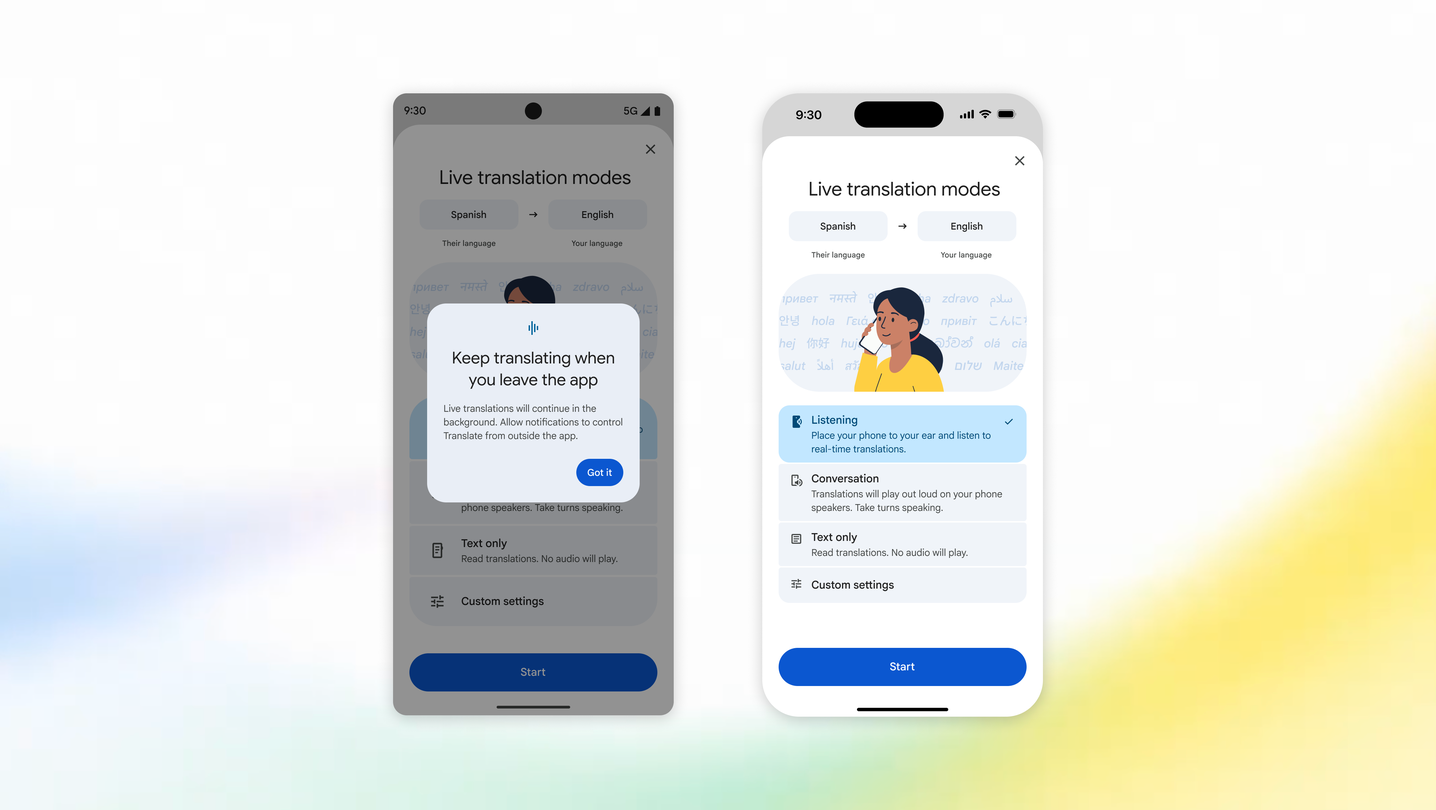
- On Android: live translations now keep running in the background while you use another app or lock your screen entirely. Google describes it as ideal for longer sessions where you need to multitask.
- On iOS: live translations now reach users worldwide directly through the phone's own earpiece. You hold the phone to your ear, exactly as you would during a phone call, and hear the translation privately.
- The earpiece mode already existed on Android before this update; the news is its global arrival on iPhone.
- Background support on iOS has not shipped yet — Google only says it is "coming soon," with no date attached.
When do these features genuinely matter? Picture yourself at a crowded airport trying to follow gate announcements in an unfamiliar language, or on a guided walking tour abroad: you raise the phone to your ear and simply follow along, no earbuds, no loudspeaker translation for everyone around you. Those are the two exact scenarios Google highlighted in its announcement.
Source: Google's official blog
Quick Table: What Is Available on Each Platform?
| Feature | Android | iOS (iPhone) | Status |
|---|---|---|---|
| Live translation while multitasking (background) | Available now | Not yet available | Google confirms iOS support is "coming soon" |
| Translation continuing with the screen locked | Available now | Not yet available | Part of the same update |
| Translation through the phone earpiece | Was available before the update | Available now, worldwide | The new part is its arrival on iOS |
| Number of live-translate languages | 70+ languages | 70+ languages | Per Google's official statement |
| Need for external earbuds | Not required | Not required | A key advantage of the iOS update |
The practical takeaway from the table: Android users received the half that matters most to them (continuity), while iPhone users received the listening method (earpiece) and are still waiting for continuity.
How Do You Get Started?
Enabling the new behaviors requires no technical skill, but it does assume an up-to-date app:
- Update the Google Translate app from your device's app store — these rollouts are gradual and may not have reached your account yet.
- Open the app, pick your two languages, and enter the conversation or live-translate mode.
- On Android: start the session, then leave the app or lock the screen; translation keeps working from the background.
- On iPhone: during a session, raise the phone and press it to your ear as you would on a call; the translation switches to the internal earpiece.
- If nothing appears immediately, wait a few days — Google typically stages these rollouts by region and device.
Live translation is free inside the app with no subscription required, which alone makes it one of the most valuable tools any international student or traveler should master before departure.
What Does This Mean for You?
If you are a student studying far from home — say, a student from Lagos enrolled in Berlin, or one from Manila starting in Melbourne — these features quietly shrink the daily language gap: start a live translation session and let it run in the background while you take notes in another app. If you attend conferences or client meetings in a second language, earpiece mode on iPhone means you no longer need to remember earbuds before every session.
Background continuity also suits anyone who works from their phone while translating: hold a conversation while checking email or maps without the translation dropping. Students preparing for study abroad can pair these features with the free resources in our AI study tools and browse international scholarships and opportunities that we update continuously.
Quick Comparison: How Does It Stand Against Alternatives?
Google is not alone in this space, but the update raises the bar:
- Versus Samsung's Galaxy AI live call translation: Samsung's feature works on its own devices and some languages process offline, while Google Translate runs on both Android and iOS regardless of manufacturer — though it leans more heavily on connectivity.
- Versus Microsoft Translator: Microsoft's app focuses on group conversations with multiple speakers, which remains its strength, but it does not yet offer an equivalent of iPhone earpiece mode or the newly announced background continuity.
- General machine translation quality has reached a solid level for everyday use across major apps, while sensitive contexts — medical, legal, official documents — still call for certified human translators.
The deciding factors remain: does your device support the competing feature at all, how many languages do you actually need, and do you mostly work online or offline.
Limitations Worth Knowing Before You Rely on It
Honesty first: background support on iOS has not launched, and no timeline has been given. Live translation generally requires an internet connection, and its language list is not the full list of languages in the app. Extremely noisy environments remain hard for any speech translation, and accuracy on deep technical terminology still trails a professional human interpreter. Finally, none of this turns your phone into a certified translator for official paperwork — for visas, transcripts, and legal documents, certified translation remains the requirement.
Frequently Asked Questions
Does the new live translation work offline?
Mostly no. Real-time speech translation across 70+ languages relies primarily on cloud processing. The app does offer offline text translation for some languages after you download their packs. If you are heading somewhere with weak coverage, download your language pack for offline texts and treat live translation as a bonus when the network allows.
Are the two new features free?
Yes. Live translation inside Google Translate is completely free, and Google has announced no fees for it. Both updates — background mode on Android and earpiece mode on iOS — extend that same free feature. All you need is an updated app on a device that supports it.
How do I turn on translation through the iPhone earpiece?
After updating the app and entering live-translate mode with your two languages, raise the phone and press it to your ear during the session; the translation moves to the internal earpiece as in a phone call. No Bluetooth earbuds needed. If it does not work immediately, confirm the app is updated and that the rollout has reached your region — the deployment is staged.
Is my language included in live translation?
Google states that live translation supports more than 70 languages without publishing a detailed list inside the announcement itself. The exact, current list appears inside the app when you select your two live-translate languages, and it keeps expanding. Major world languages are broadly covered; the safest check is the app itself.
When does background translation arrive on iPhone?
There is no official date yet. Google used only the phrase "coming soon" in its September 4, 2026 announcement. iPhone users today get earpiece mode worldwide, and background support remains on the roadmap for a later update.
Your Next Step
Before your next study-abroad intake or international meeting, spend ten minutes tonight: update Google Translate, run one live session between your language and your target language, and test earpiece mode on your iPhone or background mode on your Android. Then complete your toolkit with the free AI tools on Truescho and explore fully-funded scholarships and study-abroad programs to plan your next move on solid ground.
Sources: Google's official blog — live translation upgrades and Google's official YouTube channel, September 4, 2026.