
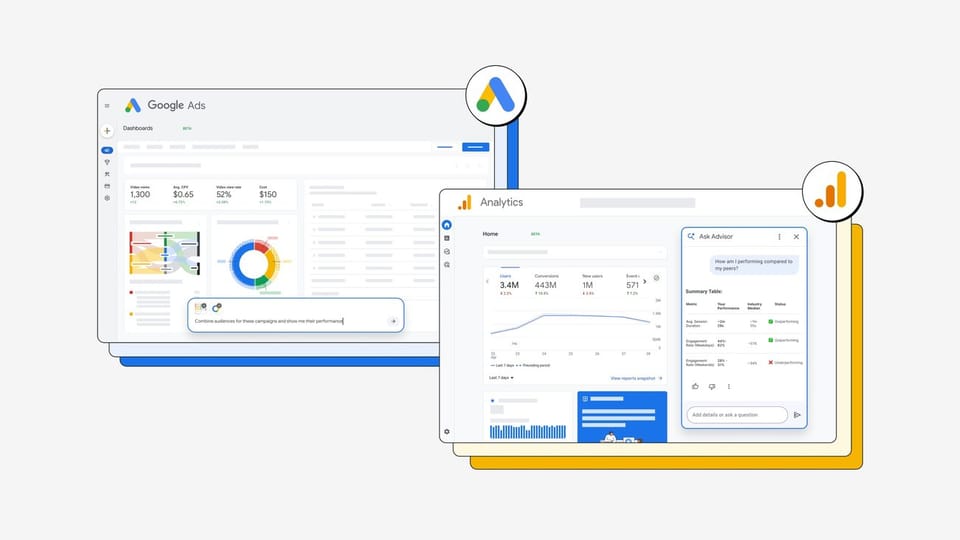
How many times this month did you open your advertising platforms with a simple question — "why did performance dip?" — and leave without a clear answer? On August 10, 2026, Google took its most direct swing yet at that eternal marketing pain point: it expanded Ask Advisor, its Gemini-powered AI agent, across Google Ads and Google Analytics with new agentic capabilities — AI summaries at the top of the Analytics homepage, personalized insight cards in Ads, text-prompt visual Dashboards, and a benchmarking feature that compares your campaigns against anonymized averages from similar businesses. The announcement was signed by Josh Moser, Senior Director of Product Management at Google, and extends the original Ask Advisor launch of May 20, 2026. This detailed explainer — last updated August 2026 — walks through the four new capabilities exactly as Google documented them, positions them against the ChatGPT-style analysis workflows marketers have improvised, and states plainly who these tools serve well and who still needs more.
What Is Ask Advisor and Where Did It Come From?
Ask Advisor is an AI agent embedded inside Google's own marketing products — not an external button or a bolt-on integration, but a question-analyze-act capability living natively in the Google Ads, Google Analytics, and Merchant Center interfaces. It first launched on May 20, 2026, and its founding idea is that a professional marketer does not need yet another report to read, but, in Google's official phrasing, an agent that "puts those answers and actions directly into marketers' hands."
The technical foundation is Gemini, consistent with the rest of Google's 2026 intelligence stack. What changed on August 10 is the shift from "ask and it answers" to "it works alongside you agentically": the agent now anticipates your questions with proactive insights, converts raw data into presentation-ready outputs, and benchmarks your performance against an external reference set of similar companies.
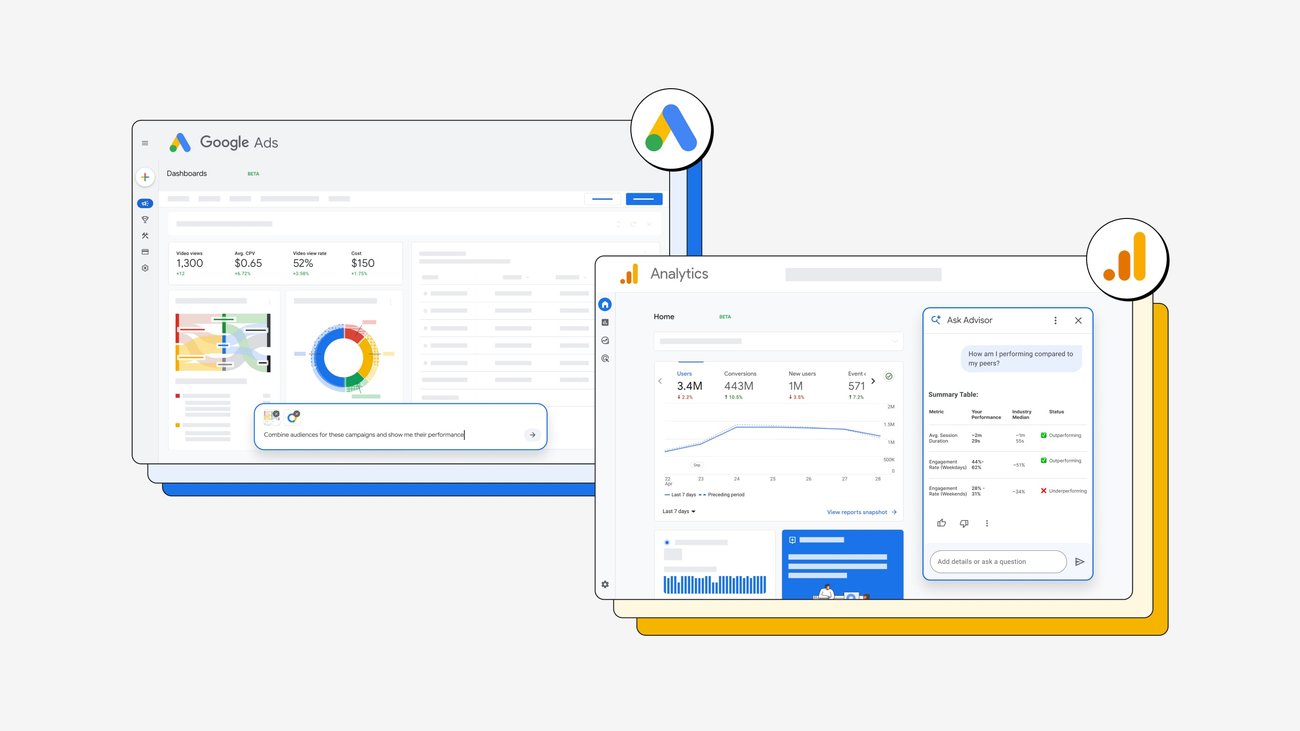
Source: The Official Google Blog — Ask Advisor updates
The Four New Capabilities in Detail
1. Smart summaries atop the Google Analytics homepage
Instead of opening report after report hunting for what changed, Analytics now surfaces an AI summary at the top of its homepage covering "important updates since you last logged in": seasonal peaks in sales, traffic shifts, and — more usefully — what you should actually do about them. One click carries the full context straight into Ask Advisor for deeper analysis. You can also opt into notifications by phone or email at a frequency you choose, so the summaries reach you without opening the platform at all.
2. A revamped Google Ads homepage with personalized insight cards
The Google Ads homepage has been redesigned around AI-powered insight cards personalized to your specific business: how competitors are affecting your impression share, and which trends could improve your campaigns. Above the cards sits a prompt box where you type your own question — "which trend would lift my conversions this month?" — and the agent generates an insight grounded in your data rather than generic industry filler.
3. Dashboards built from a text prompt
At reporting season, the traditional options were bleak: export to spreadsheets and grind through manual chart-building, or settle for annotated screenshots. Now, in Google Ads (and coming soon to Analytics, per Google's announcement), you type a request in plain language and your raw data becomes clear visualizations — and every report automatically generates a real-time summary explaining the "why" behind the numbers, ready to present to a manager, a client, or a budget committee.
4. Benchmarking against similar businesses
Finally, Analytics inside Ask Advisor gained a comparison feature that measures your campaign performance against anonymized averages from similar businesses. The question that used to require paid industry reports — "is my 2% conversion rate good or bad?" — now has an in-platform reference point, helping you locate where genuine improvement headroom lies instead of guessing.
A Voice From the Field
Google's announcement carries a customer quote from Kevin Marshall, Paid Media Director at Gardyn: "Ask Advisor has become my go-to for a directional check on paid media performance… That speed matters because it gives me time to dig deeper and make shifts that improve performance sooner." The essential message: the value is not "knowing everything" but reclaiming the routine audit hours that eat a marketer's week.
What This Means for You: The New Map for Working Marketers
- Availability. The new capabilities are rolling out inside Google Ads and Analytics accounts directly, with no regional restrictions announced — insights and chat features generally work for accounts worldwide. Start from the official "Just Ask Advisor" entry point inside your Ads account.
- Language. Ask Advisor's interface and analysis are English-first; Arabic or other non-English campaigns are read without problems, but the agent's sharpest outputs come from clear English prompts.
- Who benefits first. Independent marketers managing multiple client accounts who need faster reporting; and small agencies competing with larger shops on reporting quality — the Dashboards feature alone compresses their biggest bottleneck.
- The economic truth. The tools are built into the platform with no separately announced extra cost, but real value assumes your tracking is clean and accurate — an intelligent agent on top of messy tracking produces confident-sounding nonsense.
Source: The Official Google Blog — Ask Advisor launch
Quick Comparison: Ask Advisor vs the Alternatives
| Criterion | Ask Advisor (Google) | ChatGPT/Claude for campaign analysis | Traditional BI tools | A human account analyst |
|---|---|---|---|---|
| Where data lives | Inside the platform itself — zero export | Requires CSV export and upload | Connects to multiple sources | Asks you for reports |
| Tied to execution actions | Directly, inside Ads | Text analysis only | Visualization only | Varies |
| Competitor reference | Official similar-business benchmarks | Only if you supply outside data | Requires external data | Personal experience |
| Learning curve | Low — natural language | Low | High | Not applicable |
| Best for | Advertisers primarily on Google platforms | Open-ended multi-platform analysis | Companies with data teams | Relationships and strategy |
Note the strategic difference: Ask Advisor's strength is not raw intelligence alone — it is that the agent lives where your first-party data already lives, with no export step that breaks privacy and wastes time. Conversely, anyone running campaigns across Google plus Meta plus TikTok will still need outside analysis to assemble the full picture.
Honest Limitations Before You Rely on It
- The agent is only as good as your tracking. AI summaries reflect the quality of your tracking configuration and goals; audit measurement before blaming the agent.
- Directional, not gospel. Even Google's own customer quote calls it "a directional check" — big decisions still require human digging afterward.
- Anonymous benchmarks have edges. Comparing against anonymized "similar businesses" is useful context, but it will not tell you who your actual competitors are or what their strategy is.
- Structural bias toward the Google ecosystem. Every recommendation generated inside Ads carries a built-in incentive toward spending more on Google channels — treat it as a knowledgeable guide, never a neutral fiduciary.
- Tools of the week do not replace craft fundamentals. A marketer who cannot read CPA and ROAS independently will accept agent insights without discrimination — and the agent does not carry budget accountability.
A Practical Case: One Week Inside a Small Agency
Let us make this tangible. Picture a three-person agency in Dubai or Riyadh managing twelve client accounts on Google. Before the August update, a typical reporting week looked like this: twelve manual export sessions, twelve dashboards assembled in spreadsheets, and four hours every Thursday evening writing the "explanation" for each client. After the update:
- Monday. You open Analytics and the smart summary cards atop the homepage greet you: "strong organic-search lift on client X, and a conversion decline on client Y since Tuesday." Instead of random browsing, your day starts with a ready priority list.
- Tuesday. For a client complaining about lost impression share, you type into the Ads prompt box: "how are competitors impacting my impression share and why?" — and receive an insight card grounded in the account's own data, which you present at the midday meeting.
- Wednesday. Monthly reporting season. Instead of hand-building twelve dashboards, you write one prompt per client requesting the monthly performance dashboard with visualizations and the automatic summary, then add your human analytical paragraph on top of the generated one — two hours instead of two days.
- Thursday. Before renewing a major client's contract, you open the similar-businesses benchmark to demonstrate that "their 3.1% conversion rate beats their industry average" — an argument with an official reference point instead of "our gut says it's good."
The takeaway from the case: the agent did not "replace" anyone at the agency; it converted most routine production hours into analysis and selling hours — which is precisely the definition of value for a small shop competing on quality.
Before You Ask the Agent: Fix Your Tracking First
Every Ask Advisor capability stands on one foundation: the quality of your account data. This is a ten-minute checklist that should precede any serious reliance on agent insights:
- Confirm GA4 is active and linked to your Ads account — cross-platform insights will not complete without it.
- Review conversion events and their priorities: is the primary conversion (purchase, form, call) defined as "primary" and not double-counted?
- Clean up your UTM tagging across campaigns: conflicting sources produce conflicting summaries.
- Audit bot and spam traffic exclusions so the similar-business comparisons are not distorted by junk traffic.
- Enable the longest available data retention in GA4 settings; longer archives make historical insights deeper.
A simple rule: every hour spent on this checklist raises the quality of every insight the agent generates afterward — and the reverse is exactly as true.
A Quick Timeline: How We Got Here
| Date | Milestone | What it added |
|---|---|---|
| May 20, 2026 | Original Ask Advisor launch | Q&A agent inside Ads, Analytics, and Merchant Center |
| July 2026 | AI Max smart-testing expansion | Campaign A/B testing before scaling — covered separately |
| August 10, 2026 | The current agentic update | Homepage summaries, insight cards, Dashboards, and similar-business benchmarking |
The trajectory is unmistakable: from "I answer your questions" to "I guide you before you ask" in under three months — a development cadence that now forces marketers to review their toolchain every quarter, not every year.
Frequently Asked Questions About Ask Advisor
What is Ask Advisor?
A Google AI agent built on Gemini that operates inside Google Ads, Google Analytics, and Merchant Center; it launched on May 20, 2026, and was expanded on August 10, 2026 with new agentic capabilities for insights, reporting, and benchmarking.
How do I enable Ask Advisor in my account?
It appears inside the Ads and Analytics interfaces as the rollout reaches your account; start from the official "Just Ask Advisor" link in Google Ads or the agent icon inside Analytics, depending on what your account shows during the staged rollout.
Does Ask Advisor work with non-English campaigns?
Yes — it reads and analyzes non-English campaign data without issue, though the most precise interaction comes from English prompts. Arabic ad content itself is no barrier to generating insights.
What is the difference between the new Dashboards and standard Ads reports?
Standard reports are assembled manually from predefined components, while the new Dashboards are generated from a single text prompt and automatically add a real-time summary explaining the "why" behind the figures.
Is the similar-businesses benchmarking available to everyone?
Google announced it inside Ask Advisor in Google Analytics as part of the August 10, 2026 update; staged rollouts can take time before appearing in every account.
Does it replace a human performance analyst?
No. It compresses routine auditing and prepares summaries, but spending strategy, market context, and client judgment remain human decisions — the real winner treats the agent as an assistant, not a replacement.
Conclusion: A One-Way Trend
While the AI advertising race heats up over copywriting assistants and the smart A/B testing we documented in our AI Max testing coverage, the Ask Advisor expansion is a reminder that the real fight is over the "analysis and recommendation layer": whoever owns the advertiser's data owns the advertiser's trust. Your practical next step: open Analytics, check the new smart summaries atop your homepage, and generate your first Dashboard with a single prompt before your next meeting — then judge for yourself where the agent stands in your workflow.
And because advertising tooling will keep evolving, invest in your marketing foundation: browse the certified digital marketing courses catalogued on Truescho — an intelligent agent multiplies the power of a skilled marketer, but it never substitutes for the absence of one.