
New Connected Apps in Gemini (August 2026): Full List and How to Enable Them
Last updated: August 2026
Booking a dinner table, buying concert tickets, renting a car, summarizing your meetings, updating your website — until recently that meant ten browser tabs and a dozen apps. On August 12, 2026, Google announced on its official blog a new slate of connected apps coming to Gemini, rolling out over the following weeks. The idea: instead of the assistant merely answering questions, it executes actions inside external services you connect — reserving restaurants, booking experiences and doctor appointments, summarizing meetings, editing your site — all from one conversation window. This guide walks through the complete official list, the exact enable steps, a security checklist before you connect anything, and an honest breakdown of which services work internationally and which are region-locked.
The full official list of new connected apps
The announcement came at Google's Made by Google event, authored by Mai Lowe, Group Product Manager for the Gemini app. Google presents it as a continuing expansion: in July 2026 the company had already connected Dropbox, Zillow Rentals, and Viator. The August batch adds four categories:
| Category | Apps | What you can do |
|---|---|---|
| Productivity & creativity | Granola, Otter.ai, Wix | Summarize meetings and edit your website |
| Local & entertainment | Fever, GetYourGuide, Localiza, OpenTable (UK), Ticketmaster | Book local experiences, rent a car, reserve dinner, find event tickets |
| Music | iHeartRadio, Pandora | Discover stations and stream your playlists |
| Home, health & lifestyle | Angi, Thumbtack, Zocdoc | Find a home professional or book a doctor's appointment |
The direction is unmistakable: Gemini is shifting from an assistant that answers to an agent that acts. That is not marketing language — it is a list of services growing month over month, each one turning a category of "things you would do in another app" into "things you can ask for in a sentence."
For context on where this fits in the app's evolution, our guide to Gemini on mobile in 2026 covers the voice and Live foundations this builds on, and our Gemini Pro vs Ultra comparison explains which tiers matter if you plan to lean on these features daily.
How to enable connected apps, step by step
The activation itself is simple, but the order saves you retrying later:
- Update the app first. Open your app store and make sure Gemini is on the latest version. Features roll out gradually; if you do not see the Apps section yet, you are in a later wave of the "coming weeks" Google described.
- Open your profile in the app. Tap your picture in the top corner, then app settings.
- Find the connected apps section. You will see the services available in your region — and this matters: the list shows what is actually offered to you, not everything announced globally.
- Connect the service you want. Tap it (say, Wix or Otter.ai), sign in with your account there, and approve the requested permissions.
- Test with a compound request. Do not stop at "connect Wix." The real test is "read the services page on my Wix site and suggest a sharper headline" — that is where connecting makes a visible difference.
- Audit permissions monthly. Return to settings once a month and disconnect anything you no longer use; every live connection is data another party can see.
One practical detail: connections live at the account level. Use Gemini on your phone and laptop and your connected services appear on both. If you use a shared work setup, connect professional services (like a meeting summarizer) to your personal work account rather than a company-wide one.
Source: Google Official Blog — New connected apps are coming to Gemini
What this means for you, by use case
- Freelancers and small agencies: connecting Granola or Otter.ai means you can ask "what decisions were made in last week's client meetings?" and get an answer grounded in real transcripts instead of memory. Connecting Wix turns the assistant into a website editor: fix copy, summarize service pages, propose improvements — from chat.
- Travelers and planners: Fever, GetYourGuide, and Ticketmaster make "find a family-friendly event Saturday under $50 and get tickets" a legitimate single request instead of an evening of tab-hopping. Localiza covers car rental, primarily relevant for travel in Latin America.
- Busy professionals: Zocdoc for doctor appointments and Angi or Thumbtack for finding home-service pros — "find an electrician available tomorrow and book it" is now the intended interaction, mainly across the US for now.
- Music listeners: iHeartRadio and Pandora move from "open another app" to "play a calm cello station" executed directly.
- Students: automatic meeting and lecture transcription through the connected productivity services pairs naturally with the study workflows in our guide to using Gemini free as a student — the lecture gets transcribed and summarized without extra tooling.
A realistic day with connected apps
To make it concrete, picture a consultant with clients in three time zones. Monday morning she opens Gemini, which is connected to Otter.ai: nine meetings from last week collapse into one table she requests with "give me open decisions from the UK client meetings." Then the client's Wix site: "read the services page and propose three clearer headline options" — drafts to review before publishing. For a US trip, Zocdoc and Angi coordinate the visiting team: a medical check-up before departure, a technician to prep the event booth. In the evening, a single request to Pandora sets the background station.
Four external tools, one conversation window, zero tab-switching. That is the promise — with the honest caveat that service availability is still being drawn region by region.
Quick comparison: built-in features vs connected apps
| Aspect | Built-in features (images, Live) | Connected apps |
|---|---|---|
| What they do | Generate and analyze inside Gemini | Execute actions in external services |
| Connection needed | No | Yes, your account in each service |
| Privacy scope | Within Gemini's policy alone | Each service sees the requests that concern it |
| International availability | Nearly universal | Partial, varies by service |
| Example | "Summarize this file" | "Book me a table at 8" |
The practical rule: built-in for production and analysis, connected for booking and execution. The combination is strongest — summarize your booking emails, then build the evening from them.
Honest limitations you should know before connecting
- OpenTable is UK-only in this batch, and Zocdoc, Angi, and Thumbtack are US-centric services — their value shows up when you travel or serve US/UK customers.
- Ticketmaster, iHeartRadio, and Pandora are tied to specific broadcast and ticketing regions; availability depends on the country of each service account.
- Outside the US/UK, the immediately useful category is productivity: Wix, Otter.ai, and Granola work globally as digital services, which is where international users gain the most today.
- Connections share data: linking a service means your requests and relevant data pass through at least two parties. Do not connect sensitive financial services, and review what each side can see.
- Agents misread sometimes: the assistant executes what it understood. Before confirming any final booking, review date, time, and party size. A good personal rule: always ask for the details on screen before execution.
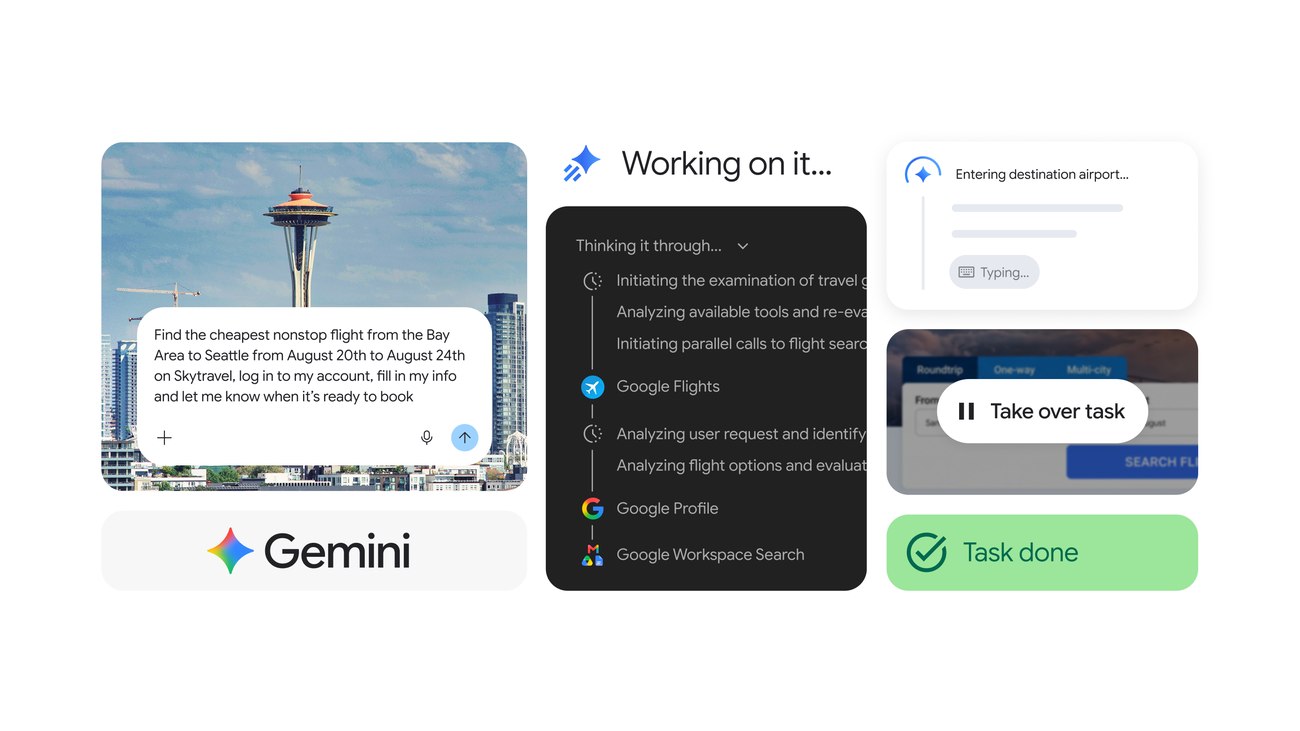
One separate geography note from Google's July update: Gemini Spark, the background-action feature, is not available in the European Economic Area, the United Kingdom, Switzerland, or Nigeria — evidence that availability maps are drawn service by service, not in one global switch.
Source: Google Official Blog — Gemini Spark: new Chrome browsing integration
Do you need a paid plan for this?
The base app and a good share of execution requests work on the free tier with limits; higher capacities and priority access to new features come with the paid tiers. Heavy daily users hit the free limits quickly, and the experience gap is real. If you want the paid tier without official pricing, there is the option of a shared Gemini Advanced subscription via the Truescho shop at a substantially reduced rate, with fast delivery and WhatsApp support. Before deciding, our practical Gemini vs ChatGPT comparison can confirm Google's ecosystem is the right fit for how you actually work.
Frequently asked questions
How do I connect apps to Gemini?
Update the Gemini app to the latest version, tap your profile picture, and open the apps section in settings. You will see the connected-apps list available in your region. Pick a service, sign in with your account there, approve the permissions, and then test with a real compound request like "summarize my meetings via Otter.ai this week."
Which apps connect to Gemini in 2026?
The August 2026 batch adds Granola, Otter.ai, and Wix for productivity; Fever, GetYourGuide, Localiza, OpenTable (UK), and Ticketmaster for local bookings and entertainment; iHeartRadio and Pandora for music; and Angi, Thumbtack, and Zocdoc for home and health. Earlier in July, Google had connected Dropbox, Zillow Rentals, and Viator.
Can Gemini actually book a restaurant for me?
Yes, where the relevant service is available. With OpenTable connected, asking Gemini to reserve a table is the intended interaction — currently for UK locations in this rollout. The assistant passes the request to the connected service; you should still confirm date, time, and party size before finalizing any booking.
Is connecting apps to an AI assistant safe?
It is as safe as the permissions you grant and the services you choose. Each connected service sees the requests that concern it, so connect reputable services only, avoid sensitive financial accounts, enable two-factor authentication on your Google account first, and audit the connection list monthly to remove anything dormant.
Does Gemini work with Spotify or WhatsApp?
Neither Spotify nor WhatsApp is in the official August 2026 connected-apps list. Music streaming currently runs through iHeartRadio and Pandora. For messaging, no WhatsApp integration was announced — treat any third-party claim of one as unverified until it appears in Google's official list.
When will these features actually reach my phone?
Google said the rollout happens "over the next few weeks" from the August 12, 2026 announcement, and it is gradual — different regions and accounts get access on different schedules. Two habits keep you ahead of the curve: keep the app updated to the latest version, and check the apps section in your account settings periodically. When a new service appears there, it has genuinely reached you — that list, not tech news headlines, is the authoritative signal for your account.
Can I disconnect an app later?
Yes, and unlinking is even simpler than connecting: open the apps section in settings, pick the service, and remove the connection. A monthly review of the list is worth the two minutes it takes — every dormant connection you remove shrinks the data surface each connected party can see, and keeps your setup limited to the services you actually use that month.
Your pre-flight checklist
- [ ] Updated the Gemini app and opened the apps section to see what is genuinely available in my region
- [ ] Connected one globally available service (Wix or Otter.ai) and tested one real request
- [ ] Reviewed permissions for every new connection and removed dormant ones
- [ ] Enabled two-factor authentication on the Google account before connecting anything
- [ ] Tried one compound request that chains two steps (summarize, then execute)
- [ ] Set a personal rule: no final booking confirmation without seeing details first
Start with one service. Master it for a week, then add the next — that is how connecting turns from a settings novelty into a productivity habit.
Sources
- Google Official Blog — New connected apps are coming to Gemini — the official announcement with the full list
- Google Official Blog — Gemini Drops, July 2026 — the earlier Dropbox, Zillow Rentals, and Viator connections
- Google Official Blog — Gemini reaches 1 billion monthly users — the scale of the ecosystem these apps plug into