
Gemini Agentic Video Understanding (2026): Up to 88% Fewer Tokens
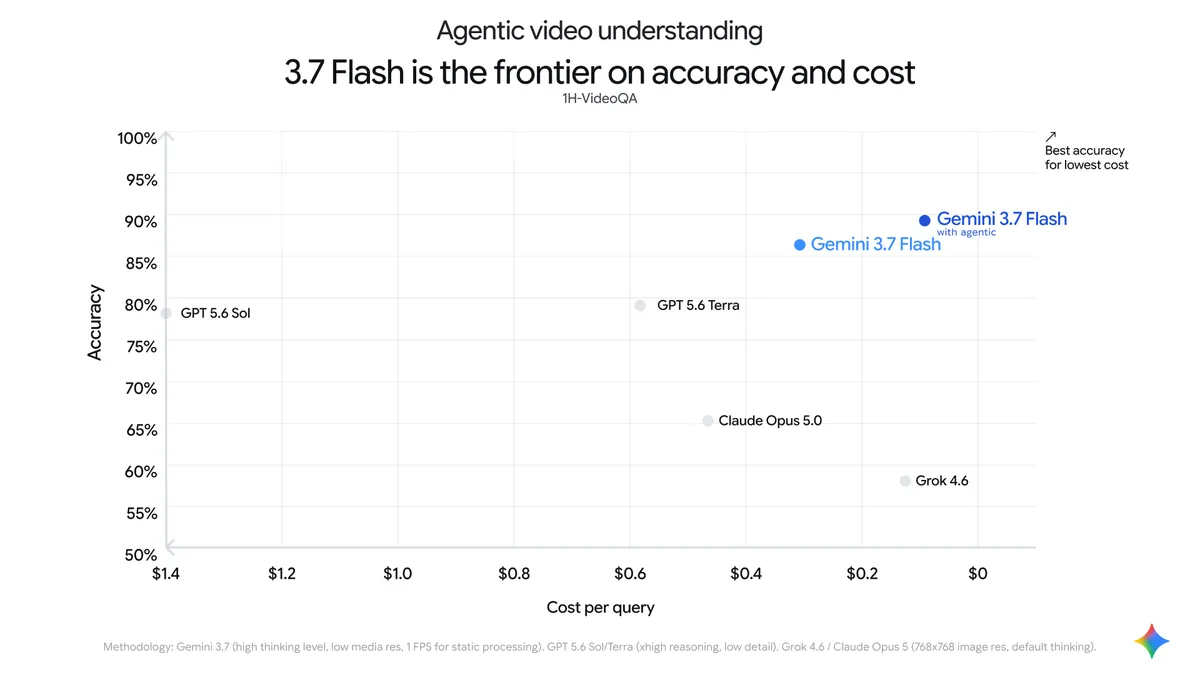
What if analyzing a two-hour lecture video with AI cost less than a fifth of what it does today — and produced better answers? On September 1, 2026, Google launched agentic video understanding across its latest Gemini Flash models, and the official numbers claim exactly that: up to 88% better token efficiency and roughly 7% higher quality on long-form content. This guide explains what changed, how it works under the hood, and whether you should switch your video pipeline to it.
How did Gemini analyze video before this launch?
To understand why this launch matters, you need to know how the old way worked. Gemini's default mode — now called static — treats video as a stack of images: it extracts frames at a fixed rate of one frame per second (1 FPS), places them all into the model's context in a single pass, adds a single-channel 1 Kbps audio track, and stamps a timestamp every second. Your question gets answered after the model has "watched" everything, whether it needed to or not.
For a ten-second clip, that is perfectly fine. For a two-hour webinar, it means thousands of frames loaded up front — a token bill that scales with the length of the video rather than the difficulty of the question. That cost structure is why serious video-analysis products stayed expensive for years.
What is agentic video understanding, exactly?
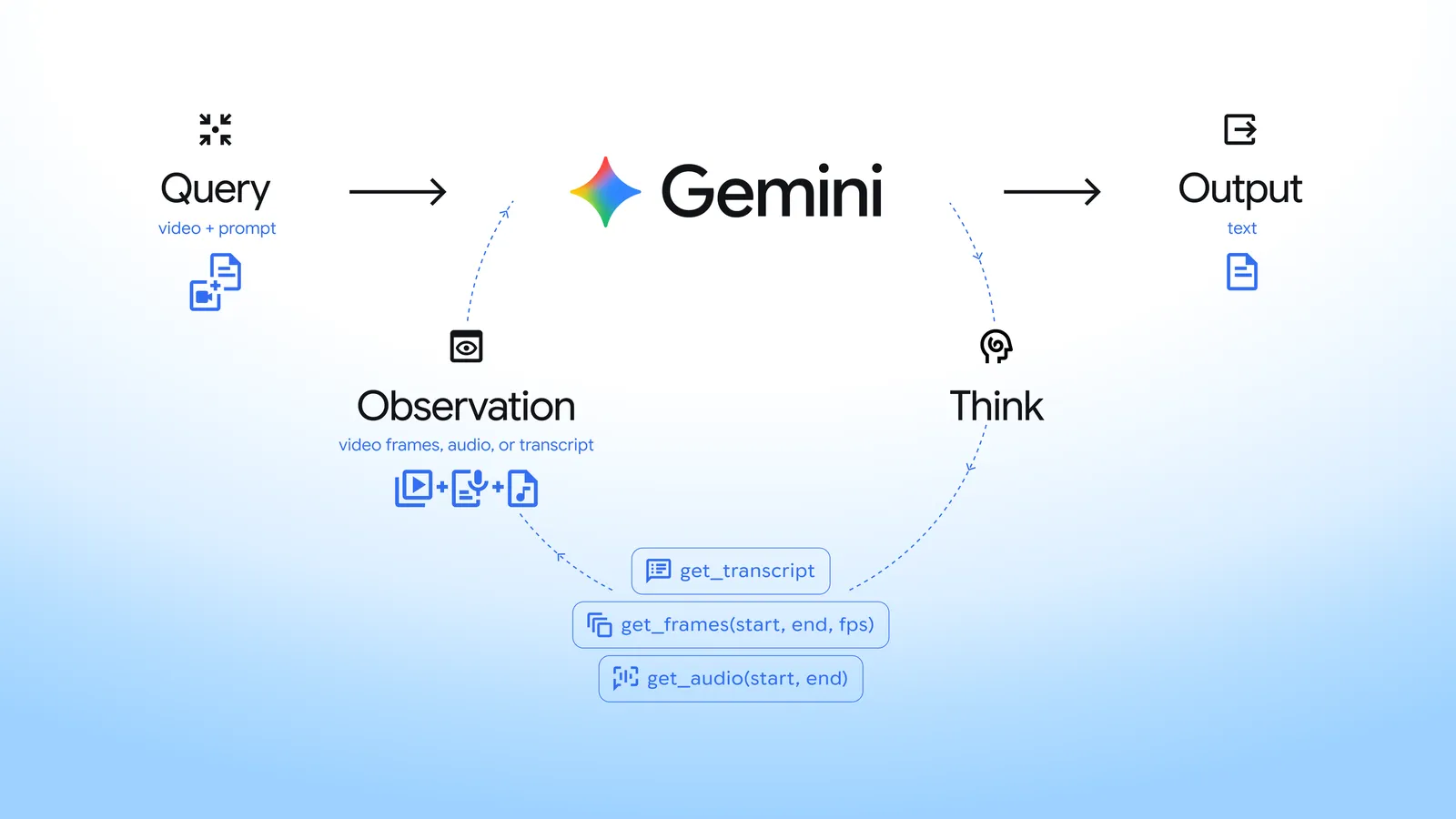
Agentic mode flips the logic. Instead of loading everything first, the model decides where to look. Ask it about one moment in a two-hour video and it navigates the timeline dynamically, requesting only the transcripts, frames, or audio segments it actually needs, and adapting frame rate and resolution on the fly — much like a human skims a recording and pauses only at the relevant part.
Source: Google Blog — Introducing agentic video understanding with Gemini
Under the hood, the official API documentation describes two measurable components: the model's navigation reasoning is billed as thought tokens (total_thought_tokens), while the frames, audio, and transcripts it fetches on demand are billed as tool-use tokens (total_tool_use_tokens). You can verify that agentic processing actually ran by checking for processing_call and processing_result steps in the interaction's step list.
Which Gemini models support it?
Per Google's developer documentation (last updated September 3, 2026):
| Capability | Official detail |
|---|---|
| Agentic mode | Gemini 3.8 Flash, 3.7 Flash, 3.6 Flash, and 3.5 Flash Lite — plus all later models |
| Static mode | All Gemini models |
| Video length | Up to 3 hours (low media resolution) or 1 hour (high resolution) on 1M-context models |
| Recommended for short clips (<5 min) | Static mode |
| Recommended for long-form | Agentic mode |
If you are building on one of Google's newest Flash models — like Gemini 3.8 Flash — the capability is already in your model; it is a request-level setting, not a different model ID.
How do you enable it?
One parameter. On the video input object in your request, set "processing": "agentic". It is independent of the media_resolution setting, so you can tune both together. A practical checklist:
- Update your client library to a version supporting the current media processing interface.
- Upload the video via the Files API, or pass a direct URL.
- Add
"processing": "agentic"to the video input object. - For long processing jobs, use streaming or background execution mode so the session does not time out.
That last step is not a nicety — long-form agentic analysis makes multiple internal round-trips, and synchronous requests are the first thing to break.
Is agentic always better than static?
No, and Google says so itself. The official guidance: for latency-sensitive queries on clips under five minutes, stay on static. Agentic navigation adds reasoning and tool round-trips that can slightly increase time-to-first-token on short clips. The wins — the 88% token efficiency and ~7% quality lift — are measured on long-form content, which is what the mode was designed for.
| Dimension | Static mode | Agentic mode |
|---|---|---|
| Analysis style | All frames (1 FPS) in one pass | Dynamic navigation, on-demand loading |
| Token consumption | Scales with full video length | Up to 88% lower on long-form |
| Long-form quality | Baseline | ~7% higher per Google's evals |
| Time to first token | Fastest on short clips | Slightly higher on short clips |
| Clipping and custom FPS | Supported | Not supported — static only |
| Best for | Clips under 5 minutes, frame-precision tasks | Lectures, webinars, meetings, long broadcasts |
Source: Google Blog — Introducing agentic video understanding with Gemini
What does an 88% token saving mean in practice?
Tokens are the billing unit of API usage. If your product currently spends hundreds of dollars a month summarizing recorded classes, support calls, or event footage, an efficiency jump of this size moves the economics from "pilot project" to "production line item" — especially for teams in emerging markets building on global APIs where every dollar of compute matters three times as much against local revenue.
Combine it with Google's companion audio capability — Gemini 3.5 Transcribe for speech-to-text — and you get a complete pipeline: video in, searchable transcript and structured answers out. It is the same philosophy behind the study tools we track at Truescho: raw recordings becoming study material that answers questions.
Three pipelines teams are already building with this
The theory becomes useful when it turns into shipped software. Three realistic builds, each achievable with currently available capabilities:
Build one — a lecture-indexing platform. An education provider records a 90-minute class weekly and wants students to ask "when did the professor explain the sampling theorem?" The working pattern: upload recordings to the Files API once at publish time, run each video through agentic mode with one broad indexing question ("extract the main topics with their timestamps"), store the result, then answer student queries against that index first — falling back to the full video only when needed. Indexing happens once; every student question after that is cheap.
Build two — internal search over a media archive. A studio holding 500 hours of footage needs "every clip where speaker X appears before 2020." No complex system required: pass the descriptive metadata first, filter candidates by keyword, then run agentic mode with a targeted question on the shortlist only. You get the long-form cost benefit without ever paying to analyze the entire archive.
Build three — call-center compliance checks. A support center records thousands of minutes daily and must verify agents followed the script. The practical trick: do not summarize whole calls — ask the agentic model to verify specific moments (greeting, price disclosure, consent request), and let it jump to each one across the timeline. Run it in background mode because batches are large, and audit a daily sample rather than every call if volume demands it.
How to measure the saving in your own workload
Google's 88% and 7% figures come from its own long-form benchmarks. Do not budget against someone else's numbers — run this twenty-minute experiment before migrating any pipeline:
- Pick 10 videos that represent your real mix (short and long, varying audio quality).
- Send identical questions through both modes and record total tokens — including thought tokens — for each run.
- Rank the answers blind, without knowing which mode produced which, for a fair quality read.
- Compute cost per thousand questions under each mode, and leave headroom because model pricing changes.
A pattern worth knowing from early usage: questions that need "the full event understood" (a general summary) save less than targeted questions about specific moments — because a targeted question is exactly what lets the model load the minimum content.
What limitations should you plan around?
Be clear-eyed before you rebuild your pipeline. First, agentic mode ships on the Flash family — 3.8, 3.7, 3.6 Flash, and 3.5 Flash Lite — with no Pro-model availability announced in this launch. Second, clipping intervals and custom frame rates only work in static mode. Third, in stateless multi-turn follow-ups you must resend the processing_call and processing_result steps with each new request; skip them and the video context silently disappears — no error, just degraded answers. Fourth, the navigation thinking itself consumes thought tokens, so the headline saving applies to long-form workloads, not universally. Finally, the 88% and 7% figures are Google's own evaluations on long-form benchmarks; your results will vary with your content and your questions.
When would a typical team actually use this?
Picture the standard cases: an education platform with thousands of recorded lectures, a media archive that needs scene-level search, a compliance team reviewing recorded calls, a sports analytics startup clipping match footage. All of them share one shape — long videos, specific questions, and a budget that used to scream. That shape is precisely what agentic mode was built for. And with Gemini's reach expanding after the app passed a billion monthly users, expect these capabilities to surface in more consumer and enterprise surfaces over time.
Frequently asked questions
What is agentic video understanding in Gemini?
A capability Google launched on September 1, 2026 that lets Gemini Flash models analyze video by navigating the timeline themselves — loading only the frames, audio, and transcripts needed to answer a given question, instead of processing every frame up front. Google's official numbers: up to 88% better token efficiency and about 7% higher quality on long-form content.
Which models support agentic video understanding?
Per the official documentation updated September 3, 2026: Gemini 3.8 Flash, 3.7 Flash, 3.6 Flash, and 3.5 Flash Lite, plus any later Gemini releases. Static mode remains available on all Gemini models.
How do I turn on agentic video processing?
Set "processing": "agentic" on the video input object in your API request. The setting is independent of media resolution and can be combined with it. For long videos, run the request in streaming or background mode to avoid session timeouts during processing.
Does the 88% token saving apply to every video?
No. The figure is Google's measured result on long-form content, which is the mode's design target. On short clips the saving may be minimal, thought tokens still accrue, and time-to-first-token can increase. Google's own guidance recommends static mode for latency-sensitive tasks on clips under five minutes.
Can I use clipping or custom frame rates with agentic mode?
Not in this launch. Clipping intervals (start and end offsets) and custom FPS settings are supported in static mode only, per the official documentation. If your workflow depends on frame-level precision controls, keep those tasks on static processing.
Can I pass a YouTube link instead of uploading the file?
The official documentation notes that YouTube URL input is available as a separate, free preview feature, distinct from agentic processing itself. In practice you can analyze YouTube-hosted content without uploading the file, but because it is labeled a preview, its terms may change — treat it as a convenience for testing, not a foundation for a critical production system without a fallback (file upload via the Files API).
Is agentic video understanding available in the Gemini mobile app?
The launch and documentation cover the developer API surface. No dedicated end-user interface inside the Gemini app was announced as part of this release; it is built on the current Flash model family for API and enterprise use.
Sources
- Google Blog — Introducing agentic video understanding with Gemini — the official launch announcement (September 1, 2026)
- Google AI for Developers — Video understanding documentation — official technical reference for both modes and the enabling parameter
- Truescho — Gemini 3.5 Transcribe guide — the speech-to-text companion capability
The question nobody has answered yet
Every efficiency gain in AI eventually gets absorbed — not into lower bills, but into higher volume. When video analysis costs five times less, the market will not analyze the same number of videos for less money; it will analyze five times more video. The unanswered question is what that does to the value of recorded knowledge itself: when every lecture, meeting, and archive becomes queryable at negligible cost, the advantage shifts from those who can afford the processing to those know what to ask. Sharpening that skill — asking — starts with tools built for it: explore Truescho's AI study assistants and scholarship and research opportunities while the rest of the market catches up.