
On August 26, 2026, Google announced Gemini 3.5 Transcribe, its most precise speech-to-text model to date — a system designed not just to transcribe but to convert raw audio directly into polished, formatted text. Published on the official Google blog by the Gemini Audio team, the launch puts the model in public preview for developers through the Gemini API, while simultaneously rolling out across everyday Google surfaces. This guide breaks down what the model actually does, its officially measured accuracy, where you can use it today, and the honest limitations worth knowing before you rebuild a workflow around it.
Source: The official Google blog
Source: The official Google blog
What Exactly Is Gemini 3.5 Transcribe?
The fundamental difference from conventional speech recognition is intent. Google describes the new model as its "most precise speech-to-text model yet," built for intelligent voice interactions. Traditional systems struggle with background noise, specialized jargon, and disfluency cleanup; Gemini 3.5 Transcribe converts raw audio straight into accurate, polished, formatted output. In practice, that means a lecture or meeting recording comes back as readable text — not a stammering first draft that costs you an hour of editing.
The Official Numbers: Accuracy Close to the Ceiling
Google published concrete benchmarks in the announcement, measured by the independent evaluator Artificial Analysis:
- Word Error Rate (WER) of 4.0% in streaming mode and 2.6% for non-streaming use cases — accuracy above 95% even in the worse case.
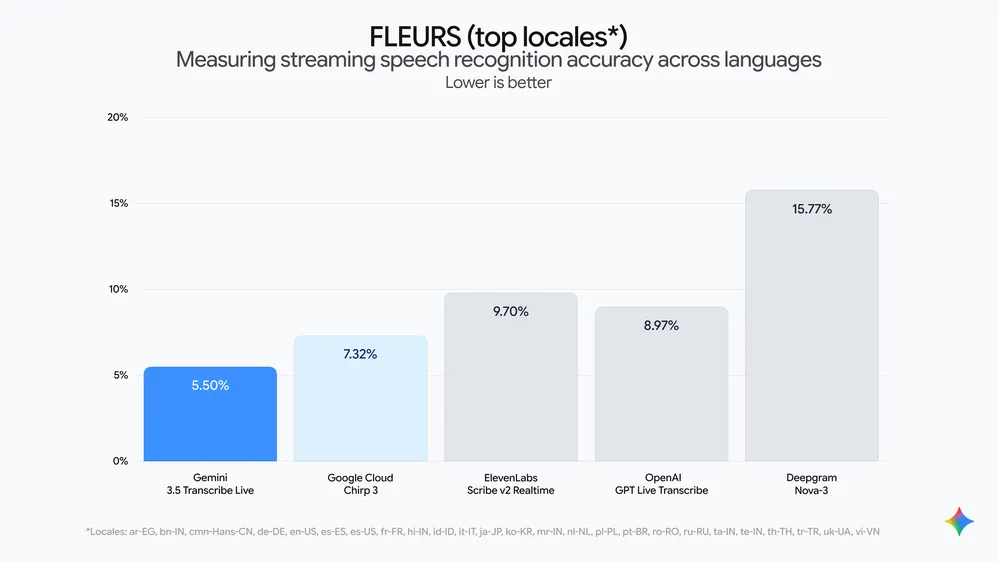
- On the FLEURS benchmark across a set of top languages and locales: 5.50% WER streaming and 5.04% WER non-streaming, improving over the previous transcription model, Chirp 3.
- Time to final transcription improves by 70% versus Chirp 3 — the gap that matters most for live applications such as real-time captioning and voice agents.
- The model holds its accuracy in noisy, real-world environments and reliably captures alphanumeric entities like postal codes and order IDs.
Six Capabilities That Separate It From a Normal Transcriber
- Smart transcription: it removes filler words ("ums" and "ahs"), understands self-corrections on the fly — say "let's meet Tuesday—no, Wednesday" and only Wednesday survives — and auto-formats the output.
- Function calling: the model can delegate complex tasks such as image generation and file analysis to other Gemini models. Currently available in the Gemini app on macOS.
- Custom vocabulary: feed it your organization's terminology and it adapts transcriptions to your spellings — a significant advantage in medical, legal, and technical domains.
- More than 85 languages, detected automatically, with explicit handling of "regional accents and diverse dialects," and live language switching mid-stream without breaking transcription.
- Multi-speaker identification: pre-recorded audio gets per-speaker attribution with word-level timestamps, stable for up to three speakers (three-plus remains experimental).
- Two developer surfaces: continuous bidirectional streaming with sub-second latency through the Live API using
gemini-3.5-transcribe-live, and pre-recorded processing for meetings and call logs through the Interactions API usinggemini-3.5-transcribe, with speaker attribution and timestamps included.
Early ecosystem partners building on the Live API include Agora, Fishjam, LangChain, LiveKit, Pipecat, Vercel, and Vision Agents, with positive early feedback from Vivo, Intellitek Health, and Lingopal on latency, accuracy, and language breadth.
What This Means for You in Practice
- For students: recording and transcribing lectures into organized notes becomes materially faster, with 85+ languages supported by the model itself. If you use Gemini for study already, our separate coverage of Google's free 12-month AI offer for university students explains how to get the paid tiers free for a year.
- For professionals: meetings and calls can become attributed, timestamped minutes — and the launch pairs naturally with the new Gemini Live productivity features announced the same day.
- For developers: the model is in public preview in Google AI Studio and Google Antigravity, ready for voice agents, real-time captioning tools, and post-call analytics pipelines. Google also highlighted in-page dictation in AI Studio's Build mode for vibe-coding apps by voice.
- For privacy-sensitive teams: if a cloud API is not acceptable, open-source alternatives exist — though you trade away the polish layer. The open-model landscape is covered in our State of Open Models report from summer 2026.
Quick Comparison: Gemini 3.5 Transcribe Versus the Alternatives
| Criterion | Gemini 3.5 Transcribe | Chirp 3 (previous) | Open-source ASR options |
|---|---|---|---|
| Streaming WER | 4.0% (Artificial Analysis) | Officially improved upon | Varies by deployment |
| Time to final text | 70% faster than Chirp 3 | Baseline | Depends on your hardware |
| Filler removal + formatting | Built in | Not a core feature | Requires post-processing |
| Languages | 85+ with auto-detection | Smaller footprint | Model-specific |
| Hosting | Google cloud | Google cloud | Self-hosted |
Where This Sits in Google's Strategy
The launch is not an isolated bet. Google explicitly frames 3.5 Transcribe as the model that already powers new voice capabilities like Rambler on Android and voice features in the Gemini app on macOS — meaning millions of users touch this model without ever knowing its name. On top of Antigravity, it pairs screen context with transcription for pinpoint accuracy on file names and active documents. The developer story is equally deliberate: by exposing the same underlying model through the Live API with sub-second latency, Google is inviting startups to build voice-native products on Google's rails rather than assembling their own speech stack. Early partners spanning real-time infrastructure (Agora, LiveKit), agent frameworks (LangChain, Pipecat), and deployment platforms (Vercel) signal that the company wants an ecosystem, not just a feature. For anyone choosing a speech-to-text foundation in late 2026, the practical question is no longer only "which API is most accurate" but "which ecosystem carries the model into the surfaces my users already live in."
How to Use It Today — Step by Step
- As a developer: open Google AI Studio, switch to Build mode, and pick the right model string (
gemini-3.5-transcribefor recordings,-livefor streaming). Public preview applies. - On Android: the new Rambler feature in Gboard turns long spoken thoughts into well-formatted text, strips filler words, and accepts voice-driven edits — rolling out in select countries and languages.
- On a Mac: the Gemini app transcribes free-flowing speech into clean text and runs voice commands with screen context, in English for now.
- In Chrome: talk-to-type in any web field is officially "coming soon."
Honest Limitations Before You Commit
- The Gemini macOS app runs in English only at launch, and Rambler on Android ships in select countries and languages — full arrival on these surfaces in other languages is not guaranteed today, even though the underlying model handles 85+ languages through the API.
- The enterprise track runs through the Gemini Enterprise Agent Platform, with Gemini Enterprise for Customer Experience "coming soon."
- Attribution for more than three speakers is officially experimental.
- Google did not publish a standalone pricing table inside the launch post; billing follows the published Gemini API pricing pages — verify current rates before committing a large project, and do not rely on secondhand numbers.
Frequently Asked Questions
Is Gemini 3.5 Transcribe available in languages other than English?
Yes. The model auto-detects and transcribes more than 85 languages, including regional accents and dialects, per Google's official announcement.
What makes it different from normal dictation?
Normal dictation transcribes almost literally. This model removes fillers, formats text, understands self-corrections, and can delegate tasks like image generation to other Gemini models.
Does it cost money to use?
Developer usage runs through the Gemini API under Google's published API pricing. Consumer surfaces like Rambler and the macOS app ride the free and paid Google app tiers depending on the surface.
When does talk-to-type arrive in Chrome?
Google says it is "coming soon" without a specific date; it will enable dictation into any web field.
Can it handle multi-speaker meetings?
Yes, stably for up to three speakers with word-level timestamps and per-speaker attribution; beyond three is experimental.