
Every hosting company has an entry tier, and entry tiers come in two species: genuinely usable plans the vendor is happy to keep you on, and loss-leaders engineered to frustrate you upward. This review answers which species EasyWP Starter belongs to. We go through the plan specification by specification — the free first month, the 10 GB of NVMe storage, the ~50K monthly visitor guidance, the three-layer caching, the security stack — and finish with an explicit verdict on who should buy it, who should skip straight to Turbo, and a 60-day test plan that makes the decision for you. All prices and limits were verified from Namecheap's official pages on August 21, 2026.
Verdict Up Front
EasyWP Starter is a legitimate entry tier, not a crippled one. It runs on the same containerized Namecheap Cloud infrastructure, the same NVMe storage, the same three-layer server-side caching, the same free CDN and automatic updates as the expensive tiers. What separates it from Turbo and Supersonic is capacity (CPU, RAM, storage) and two premium add-ons (automatic malware cleanup, the Brizy builder) — not the fundamentals. For a first website, a portfolio, a service-business site, or a blog, it is one of the strongest value propositions in managed WordPress hosting right now. For a serious WooCommerce catalog or a 100K-visit publication, it is the wrong tool — and we will say exactly where that line sits.
Score for its actual target user (first site / small business site): 8.5/10. Score if forced onto a growing store: 6/10.
The Specification, Verified
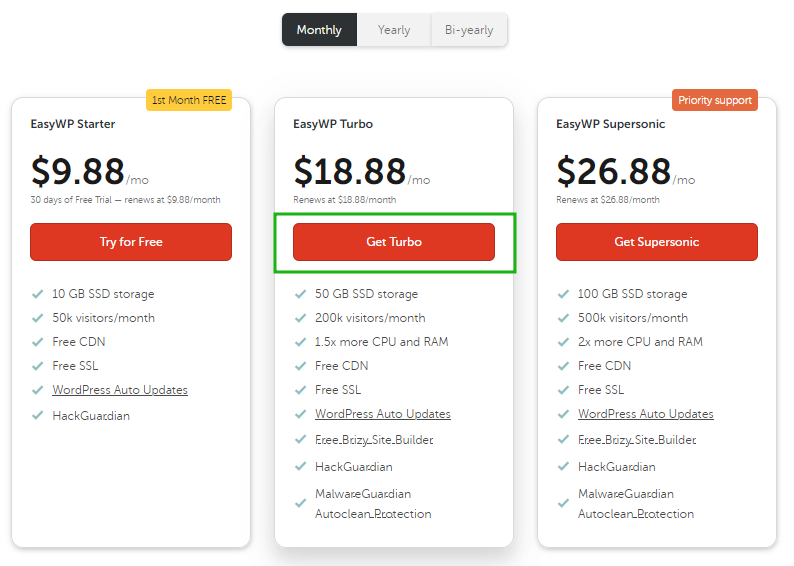
| Spec | Starter (verified 2026-08-21) |
|---|---|
| Price | $0.00 first month (free trial), then $9.88/month |
| Billing | Monthly by default; switchable to annual/bi-yearly |
| Storage | 10 GB NVMe |
| Bandwidth | Unlimited |
| Visitors | Unlimited, with ≈50K/month official recommendation |
| Websites | 1 WordPress site per subscription |
| SSL | Free Let's Encrypt (Namecheap-registered domains) |
| CDN | Free (Namecheap domains / FreeDNS-pointed domains) |
| Caching | 3 server-side layers (Varnish, OPcache, Redis) |
| Security | HackGuardian; automatic core updates |
| Malware autoclean | Not included (Turbo and Supersonic only) |
| Backups | One-click backup and restore from the dashboard |
| Access | SFTP + database access |
| Cancel/refund | 30-day refund on initial purchase; auto-renew toggle |
Read the table twice and notice what is not metered: bandwidth and visitor counts. Entry tiers at many competitors cap visitors (Namecheap's own comparison table shows GoDaddy and WP Engine entry tiers at 25K/month caps); Starter does not, with a recommended-comfort figure instead. That single structural difference is most of the reason this plan punches above its price.
The Free First Month: Terms Worth Knowing Precisely
The trial is the plan's sharpest weapon, so know its edges:
- It applies to the monthly Starter plan only — no free month on Turbo or Supersonic.
- One trial per business or household, per the official terms.
- It is a limited-time offer — its existence today is not a promise about next quarter.
- Officially, the trial "is considered a purchase," meaning introductory offers cannot be applied at renewal after it.
- The trial itself is not refundable (nothing was paid); the real refund right is the 30-day window on your first paid cycle.
Practical translation: you get a free month to build and measure, and if you continue, a further 30 days of refund protection. That is two months of effectively risk-free evaluation — unusually generous, and the correct way to use it is testing with your real theme, real plugins, and real content, not a placeholder site.
Is 10 GB of NVMe Actually Enough? The Real Math
The number that scares buyers is almost never the real constraint. Here is what 10 GB means in practice:
- A clean WordPress install with a well-chosen theme and a moderate plugin set: well under 0.5 GB.
- The heavy item on any site is media. A properly compressed web image runs 100–300 KB. A thousand such images = roughly 100–300 MB. Even an image-heavy site with 2,000 optimized assets typically lands at 2–4 GB all-in.
- What actually blows through 10 GB: uncompressed camera originals, locally hosted video (never do this on any entry plan anywhere — embed from YouTube/Vimeo instead), and hoarded backup archives.
Rule of thumb: if your current media library, compressed, is under ~5 GB, you have generous headroom. And because the storage is NVMe rather than SATA SSD, database-driven operations (every page render WordPress does) benefit from the faster I/O — you feel this in admin-dashboard snappiness and checkout latency more than in raw page-size downloads.
The 50,000-Visitor Question: What Happens When You Outgrow It
Officially: bandwidth is unlimited and visitors are unlimited, with ≈50K/month as the recommended comfort zone for the tier. So what actually happens at 60K? Your site does not get suspended. What happens is gradual: page-response times start creeping up during traffic spikes, cache hit-rates matter more, and a heavy plugin that was invisible at 20K visits starts showing its cost.
The signal chain to watch, in order: (1) sustained traffic crossing ~40–50K for two consecutive months, (2) rising time-to-first-byte during peaks despite image compression and plugin pruning, (3) WooCommerce checkout slowdowns under concurrent load. Any one of those is the platform telling you the upgrade decision has arrived. None of them is an emergency; all of them are measurable in advance — which is what separates an upgrade from a migration panic.
And the upgrade itself is an in-dashboard affair: Starter → Turbo keeps your site, domain, and content intact while resources step up. That asymmetry — cheap to start, painless to grow, expensive only when your traffic proves the expense — is the signature of an honest entry tier.
What Starter Deliberately Omits (and Whether You'll Miss It)
An honest review names the omissions without drama:
- MalwareGuardian autoclean — automatic malware cleanup is Turbo/Supersonic-only. On Starter, your recovery tool is the one-click restore from a clean backup. This makes backup discipline a genuine security practice here, not a formality. If your site takes unmanaged plugin risks routinely, this omission matters more to you.
- Brizy site builder — bundled free on Turbo and above. On Starter you build with WordPress itself and whatever page editor you choose from the official repository. For most users this is a non-issue; for absolute beginners who want drag-and-drop-first, it nudges the value toward Turbo.
- The bundled domain and email offers — these attach to annual/bi-yearly Turbo and Supersonic plans only. On monthly Starter, budget your domain and mailbox separately (a .com runs roughly $10–12/year plus ICANN's $0.20).
- One website — the whole EasyWP line is one site per subscription. Two sites = two subscriptions; at that point, run the arithmetic against multi-site shared plans for your specific case, which we do in our small-sites hosting analysis.
- Domain scope of free CDN/SSL — currently smoothest on Namecheap-registered domains; external domains work via FreeDNS pointing, with external-domain SSL officially "in development." If your domain lives elsewhere, verify this path before purchasing.
None of these five is hidden; all are documented. The pattern of the omissions tells you the tier's intent: Starter is built for one real website run well, not for a portfolio of micro-sites or a risky plugin zoo.
The 60-Day Starter Test Plan
Make the plan prove itself on your workload, not on its marketing:
- Days 1–7: launch on the free month with your real theme and top plugins. Take a baseline backup. Measure homepage and key inner-page load with a free speed tool; record the numbers.
- Days 8–30: publish real content, compress every image before upload, keep the plugin count honest (disable what you have not used in two weeks). Open one genuine support ticket — a small, real question — and time the response. Test one backup-and-restore cycle on a staging clone if you can afford an hour; knowing restore works before you need it is worth the hour.
- Days 31–60 (first paid month, inside the refund window): watch peak-hour response times and any error logs. Compare against your day-7 baseline.
- Day 60 decision: numbers flat and site snappy → stay, and set your renewal-date reminder. Metrics creeping while traffic is still modest → your plugin stack or theme is the suspect; fix that before blaming the plan. Metrics creeping with genuine traffic growth → upgrade to Turbo with data in hand.
This plan costs you $9.88 maximum to execute and converts a subjective "seems fast" into an evidence-based keep/upgrade/leave decision. That is the entire point of a monthly entry tier done right.
https://www.youtube.com/watch?v=lkyy_29A36I

A Note on the Day-to-Day: Living with the Dashboard
Reviews rarely mention the surface you will actually touch daily, so here it is. The EasyWP dashboard is task-shaped rather than server-shaped: create a site, back it up, restore it, flip maintenance mode, check resource usage, connect a domain, grab SFTP credentials. There is no cPanel, no file-manager archaeology, no "which icon do I click to find PHP version" moments — because none of those concepts exist at this layer. Official knowledge-base articles walk through each task individually, including a dedicated guide on monitoring your resource usage and analytics from the dashboard, which is precisely the screen that tells you — weeks in advance — whether your traffic curve is quietly writing a Turbo upgrade into your future.
Two dashboard habits close the loop. First, after any significant design change, hit the clear-cache button pinned at the top of the WordPress admin; stale cache is the number-one false alarm of "my change did not save." Second, when you check resource usage, note the trend rather than the absolute number — 40% average utilization with a rising spike pattern is more predictive than a one-off 70% blip on your busiest day. The dashboard gives you the instrumentation; the trend line gives you the decision.
Who Should Skip Starter and Buy Turbo Directly
Three profiles should pay the $18.88 renewal from day one:
- Established WooCommerce stores with hundreds of products and layered checkout/shipping plugins — 2× CPU and 1.5× RAM are cheaper than abandoned carts.
- Sites already above ~50K monthly visits migrating in — there is no virtue in paying $9.88 for two weeks before the inevitable upgrade.
- Buyers who want the annual-cycle bundles (free/discounted domain, free mailbox year, Brizy) — those attach to annual Turbo/Supersonic only, and the bundle math can exceed the tier difference.
For the full plan-by-plan comparison across the whole company, see our best Namecheap plan guide; for the service's architecture and philosophy, start with What Is EasyWP? A Practical Beginner's Guide; for every price in the lineup including renewal gaps, see EasyWP Pricing 2026.
Frequently Asked Questions
Is EasyWP Starter good for a first website?
Yes — it is close to the ideal first-website hosting product: free first month, one-click WordPress setup, automatic updates, server-side caching you never configure, and a 30-day refund window after that. The failure modes that typically wreck beginner sites (bad caching plugins, missed updates, no backups) are structurally removed.
Can Starter run WooCommerce?
Small stores: yes, workably. Serious catalogs with heavy plugins: buy Turbo instead — the CPU/RAM step-up and automatic malware cleanup are worth more than the price difference the first time checkout slows on a sale day.
What happens if I exceed the storage?
Media-heavy growth hits the 10 GB ceiling before anything else. Compress images, host video off-platform, and prune plugin leftovers. If you are genuinely using 10 GB of optimized content, the site has almost certainly outgrown the tier's CPU comfort zone too — both point to Turbo.
How does Starter compare to Namecheap shared hosting?
Managed vs. unmanaged. Starter: WordPress-only, zero server work, NVMe, server-level caching, one site. Shared: cPanel freedom, multiple sites, and manual responsibility for updates/caching/SSL plumbing. Choose by whether you want to run a website or a server. Our small-sites analysis works through the crossover math.
Is the free month really free?
Yes — $0.00 at checkout on monthly Starter, full plan features. Conditions: one per business/household, limited-time offer, and it counts as a purchase, so no additional intro discount applies at the renewal after it.
How do I cancel Starter?
Soft cancel: switch off auto-renew (Apps → Subscriptions) and the site runs to the end of the paid term. Hard cancel: via 24/7 support — documented to delete the site and content permanently upon processing, so export first. Refunds: 30 days from initial paid purchase, 24 hours after a renewal.
Does Starter include email?
Not a mailbox — no EasyWP tier is an email host per se. The Business Email Launch offer (one mailbox free for a year) attaches to annual/bi-yearly Turbo and Supersonic. On Starter, use domain email forwarding free, or buy a mailbox, or connect Google Workspace.
Will my site be slow on the cheapest tier?
The fundamentals that make WordPress fast on this platform — NVMe storage, Varnish/OPcache/Redis caching, free CDN — are tier-independent. What the higher tiers add is raw capacity for concurrent load. A lean site on Starter will outrun a bloated site on Supersonic; plan choice sets your ceiling, site hygiene sets your reality.
Final Assessment
EasyWP Starter passes the only test an entry tier should face: would we put a real first business site on it tomorrow? Yes — with compressed images, a lean plugin set, scheduled backups, and a renewal-date reminder. The free month plus 30-day refund makes trying it a near-zero-risk decision, and the capacity line where Turbo becomes necessary is measurable well in advance. The plan is honest about what it is; this review's job was to make you equally clear about what you need.
Start your test month via the official Namecheap offer through Truescho, and let your own 60-day numbers make the final call.
Sources
- https://www.namecheap.com/hosting/wordpress/ — Official EasyWP Starter specifications, free-trial terms, and tier comparison (verified 2026-08-21)
- https://www.namecheap.com/support/knowledgebase/article.aspx/10015/2239/what-is-easywp-plugin — Official article: the three-layer caching architecture and plugin policy
- https://www.namecheap.com/support/knowledgebase/article.aspx/9883/2280/easywp-how-to-create-a-wordpress-site-video/ — Official creation and setup flow
- https://www.namecheap.com/support/knowledgebase/article.aspx/10289/2288/easywp-how-to-cancel-a-subscription/ — Official cancellation and refund terms