

Claude in Google Docs, Sheets and Slides 2026: Setup, Pricing and What Paid Users Get
On October 6, 2026, Anthropic announced that Claude now works inside Google Docs, Google Sheets and Google Slides. The integration arrives as a Google Workspace add-on in public beta, adds a Claude sidebar to each of the three apps, and — in the other direction — lets Claude itself open and edit your Google files. It is included at no extra cost for every paid Claude plan: Pro, Max, Team and Enterprise. The free plan is excluded, and on Team and Enterprise workspaces an Owner or Primary Owner has to enable connectors before anyone can use it. This guide covers exactly what launched, how to set it up, what Claude can do in each app, and where the beta still stumbles.

Source: Anthropic Help Center
What Was Announced Exactly
The official announcement, published October 6, 2026, describes two connected capabilities. First, a Workspace add-on puts Claude inside Docs, Sheets and Slides as a sidebar you can work with without leaving the file. Second, the connection runs both ways: inside Claude itself, you can now open and edit Google files, so the assistant is not trapped on one side of the fence. The launch was covered widely within a day — 9to5Google ran a detailed report, and The Verge and VentureBeat both wrote it up as well.
The practical significance is bigger than it may sound. Before this, working with Claude on a Google file meant a ritual of copying, exporting or screenshotting — and the result of that ritual then had to be carried back into the document by hand. The add-on removes the round trip. A draft can be revised in place, a spreadsheet can be interrogated while you look at it, and a slide deck can be restructured without a single download.
Two caveats belong in the first paragraph of any honest coverage. The integration is a public beta, so behavior and limits may shift as Anthropic collects feedback. And if you went looking for an official video walkthrough, there isn't one: as of October 7, 2026, no official YouTube video for this launch exists, so the Anthropic Help Center article is the authoritative reference — treat anything else you find as unofficial.
The Two Official Paths: the Add-on Inside Google vs Connectors Inside Claude
It helps to think of the launch as two doors into the same room. Through the first door, you stay inside Google: install the add-on, open a Doc, Sheet or Slide deck, and work with Claude from the sidebar alongside your file. Through the second door, you stay inside Claude: connectors let Claude open and edit your Google files from its own interface, pulling a spreadsheet or presentation into a conversation when that is the more natural place to work.
The second path has one rule worth underlining. Access through the Drive connector follows the original sharing permissions of each file — Claude can reach what your account could already reach, and nothing more. That design choice matters for anyone who has heard loose talk about AI tools "scanning your Drive": here, the connector inherits your existing permission structure rather than bypassing it.
Which door should you use? For focused work on a single live document — tightening a paragraph, fixing a formula, restructuring one deck — the sidebar keeps you in context. For multi-file work, research that pulls from several sources, or longer analytical tasks, opening files inside Claude is usually the smoother route. Sign-in supports SSO alongside standard Claude accounts; API keys, Bedrock and Vertex sign-ins are not supported for this integration.
Setup Step by Step
Setup takes a few minutes if your account meets the requirements. Any Google account that is allowed to install Marketplace apps works — Anthropic names no specific Workspace edition as a prerequisite — and administrators can also deploy the add-on for their whole domain or for specific groups, which we cover in the admin section below.
Installing from the Marketplace
The add-on installs from its official Google Workspace Marketplace listing. Open the listing while signed in to the Google account you plan to use, click through the install flow, and confirm. If the option to install is greyed out or missing, that is usually a sign that your administrator has restricted Marketplace apps — a workplace policy question, not a bug.
Opening Claude from the Extensions Menu
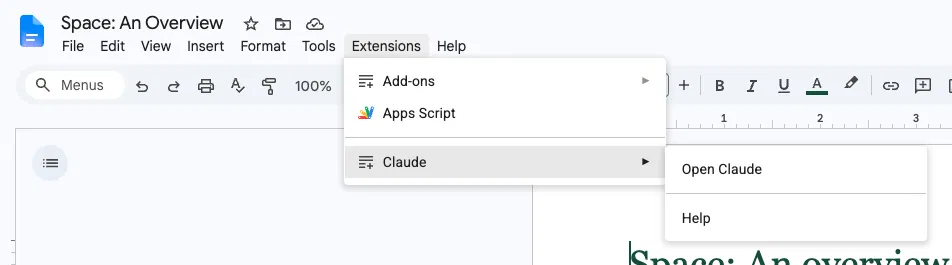
With the add-on installed, open a Doc, Sheet or Slide deck and go to Extensions > Claude > Open Claude. The sidebar appears beside your file.
Source: Anthropic Help Center
Approving the Two Permissions
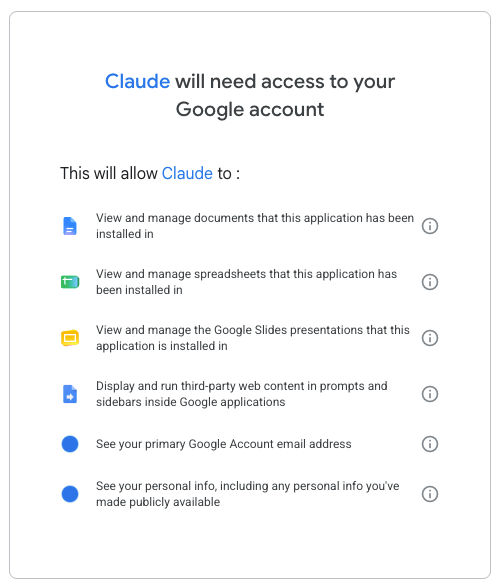
The first time you open the sidebar, Google will ask you to approve two permissions. Approve both and the add-on is connected. The prompt is a standard Google consent screen, and it appears only at first use.
Source: Anthropic Help Center
Signing In
The final step is signing in with a Claude account. This is where the plan requirement bites: the account needs to be on a paid plan — Pro, Max, Team or Enterprise — because the free plan is not included in the beta. Workspaces on Team or Enterprise have one extra gate: an Owner or Primary Owner must enable connectors before members can sign in and use the integration.
Which Plans Include It
The pricing picture is unusually simple, and worth stating precisely because early coverage tends to muddy it: the integration is included in paid plans at no extra cost. Anthropic has not published an additional figure for it, because there is none — it rides on the plan you already have.
| Plan | Integration included | Extra cost | Condition |
|---|---|---|---|
| Pro | Yes | None | Sign in with your Claude account |
| Max | Yes | None | Sign in with your Claude account |
| Team | Yes | None | Owner or Primary Owner must enable connectors first |
| Enterprise | Yes | None | Admin enables connectors; compliance features extend to the add-on |
| Free | No | — | Not part of the beta |
For students and researchers, that plan-gating is the real decision point. If you already pay for Claude, the add-on is simply there to install; if you are on the free plan and wondering whether upgrading is worth it for document work alone, our guide to Claude Pro for students works through the study use cases that justify it — and the structured study tracks at https://truescho.com/en/courses are a practical way to test those use cases on real coursework before committing to a subscription. You should not trust any page quoting a separate "add-on price" for this integration.
What Claude Does in Each App
The capabilities differ by app in ways that match how each app is actually used, which suggests the design went through real workflows rather than a generic template.
In Google Docs
Claude makes in-place edits to text and surfaces suggestion cards — you can review what it proposes rather than accepting changes blind. Editing runs in two modes: "Ask before edits," the default, checks with you before each change; "Accept all edits" lets it work through a document continuously. For anything with your name on it, the default mode plus a read-through remains the sane workflow; "Accept all edits" earns its keep on large mechanical cleanups.
In Google Sheets
This is where the integration gets genuinely useful rather than merely convenient. Claude can write formulas, build pivot tables and create native charts — the chart point matters because the output stays an editable Sheets chart, not a pasted image. Beyond that, Sheets gains a Python environment for cleaning and merging data, which covers the unglamorous half of spreadsheet work: de-duplicating records, reconciling two exports, reshaping a table nobody wants to reshape by hand.
In Google Slides
Claude builds slides that follow the presentation's existing theme, so additions do not arrive as design orphans, and it runs self-checks for overlap and contrast — two of the most common ways an AI-generated deck betrays itself. Anyone who has had to manually fix text colliding with a chart on slide fourteen will recognize the value of a generator that checks its own layout.
Two limits apply across all three apps. Each operation runs under a 6-minute ceiling, so large jobs need to be broken into steps rather than fired off as one giant request. And per-file chat history is stored in the browser only — it does not sync to your account, so clearing browser data clears the history, and moving between machines means starting a fresh conversation with the file.
For Teams: the Admin's Role
On Team and Enterprise plans, the integration starts switched off. An Owner or Primary Owner has to enable connectors before anyone in the workspace can use it — a deliberate gate that gives administrators control over when and how the capability lands.
Admins also have deployment options on the Google side. The add-on can be deployed domain-wide or scoped to specific groups, which lets an organization pilot it with, say, the research team before rolling it out company-wide. On Enterprise, the security posture extends to the add-on: the Compliance API, CMEK (customer-managed encryption keys) and OpenTelemetry monitoring all carry over to it, so the integration inherits the workspace's existing compliance configuration rather than creating a parallel one.
That combination — connector gating on the Anthropic side, group-level deployment on the Google side, inherited compliance on Enterprise — makes this one of the more controllable AI rollouts a workspace admin will encounter. The main planning question is not whether it can be locked down, but which teams get it first.
Common Problems and Fixes
The beta has a short but real list of failure modes. Almost all of them resolve in a minute once you know what you are looking at:
| Symptom | Likely cause | Fix |
|---|---|---|
| Claude does nothing in Firefox | Firefox is unsupported — only Chrome, Edge and Safari work | Switch to one of the three supported browsers |
| No Claude entry under Extensions | Add-on not installed, or admin restricts Marketplace apps | Install from the official listing; if blocked, ask your admin |
| Sign-in rejected on Team or Enterprise | Connectors not enabled for the workspace | An Owner or Primary Owner must enable connectors first |
| API key or Bedrock/Vertex login fails | Those sign-in methods are not supported | Sign in with a Claude account or SSO |
| Long task stops midway | 6-minute limit per operation | Break the job into smaller steps |
| Conversation with a file gone | Per-file chat history lives in the browser only | Reopen the file and start a new conversation |
One more entry belongs on this list even though it is not a bug: there is no official YouTube walkthrough of the launch as of October 7, 2026. If a video presents itself as the official one, it isn't — anchor to the Help Center article instead.
Claude or Gemini Inside Your Documents?
The obvious question after this launch is how it compares with using Gemini, Google's own assistant, inside Google's own apps — and the honest answer is that the choice hinges less on features and more on which ecosystem you are already paying for and which model you prefer working with. Gemini's advantage is nativity: it is built by Google into the Workspace environment, with no add-on to install and no separate subscription to carry. Claude's pitch is different: bring a specific assistant you may already use for research, writing and analysis into the files where the output has to live, with review modes like "Ask before edits" and the Python environment in Sheets as the differentiators.
For students, the calculus tends to be practical. If your coursework already runs on Google's ecosystem, prompt techniques for Gemini that work for students may get you most of the way without another subscription. If you have built your workflow around Claude — drafting, feedback loops, data cleaning — the add-on removes the copy-paste tax you have been paying. And if you are deciding whether a paid plan is worth it for the study year ahead, the student guide to Claude Pro plus the structured courses at https://truescho.com/en/courses will do more for your results than any single feature comparison. One small tip for the spreadsheet-inclined: if you use Claude to rebuild a grade sheet with formulas, a GPA calculator is a quick way to sanity-check the output before you trust it.
What Comes Next
The state of the integration on October 7, 2026 is a promising baseline rather than a finished product. The pieces that exist — both directions of file access, per-app capabilities matched to real workflows, enterprise compliance inheritance — are the hard parts done early. The pieces that will decide how widely it gets adopted are the ones beta users will watch: whether the 6-minute operation limit loosens, whether browser support widens beyond Chrome, Edge and Safari, whether per-file history ever syncs beyond a single browser, and whether an official video library follows the launch.
For now, the reasonable posture is to try it on real work early, keep the Help Center article within reach, and treat the beta's rough edges as information about where this class of tooling is heading. Deep workspace integration of this kind is clearly no longer a fringe idea — it took Anthropic and Google, nominal rivals, roughly one product cycle to make files flow in both directions — and the winner of that convergence is anyone whose work has been stuck halfway between a document and a chat window.
Frequently Asked Questions
Q: How do I enable Claude in Google Docs?
Install the Claude add-on from its official Google Workspace Marketplace listing, then open a document and go to Extensions > Claude > Open Claude. Approve the two permissions when prompted and sign in with a Claude account on a paid plan. The sidebar then appears beside your document, ready to use.
Q: Is Claude for Google Workspace free?
There is no separate price, but there is a subscription requirement. The integration is included at no extra cost in all paid Claude plans — Pro, Max, Team and Enterprise. The free Claude plan is not included in the beta, so free users need a paid plan to sign in and use the add-on.
Q: Which plans include the integration?
All paid plans: Pro, Max, Team and Enterprise. On Team and Enterprise workspaces, an Owner or Primary Owner must enable connectors before members can use it. Individual plans (Pro and Max) can enable it directly. The free plan is excluded from the beta entirely.
Q: Can Claude edit Sheets formulas and pivot tables?
Yes. Inside Google Sheets, Claude can write formulas, build pivot tables and create native charts that remain editable in Sheets. It also has access to a Python environment for cleaning and merging data. Operations are subject to a 6-minute per-operation limit, so very large jobs should be split into steps.
Q: Why doesn't Claude appear in my Extensions menu?
Usually one of three things: the add-on is not installed yet (install it from the official Marketplace listing), your administrator has restricted Marketplace app installs, or you are using Firefox — which is unsupported. Claude works in Chrome, Edge and Safari only.
Q: Does it support API keys or Bedrock sign-in?
No. The integration supports signing in with a Claude account or via SSO. API keys, Bedrock and Vertex sign-ins are not supported for the Docs, Sheets and Slides add-on, so developers hoping to reuse existing API credentials will need a standard Claude account subscription instead.