
Cheap Canva Pro 2026: Get Annual Subscription for €19 Instead of $120
Last updated: July 2026
Canva Pro's official price of $119.99/year is a serious barrier for millions of students, freelancers, and small business owners across Africa, South Asia, Southeast Asia, and Latin America. When your monthly income is measured in hundreds — not thousands — of dollars, paying $120 upfront for a design tool feels unrealistic. That is exactly why searches for cheap Canva Pro have surged in 2026, with users in Nigeria, India, the Philippines, Pakistan, and beyond looking for a legitimate way to access premium design features without draining their budgets.
The good news? A legitimate, safe, and affordable alternative exists. Instead of paying the official $120, you can get a full Canva Pro annual subscription for just €19/year through Truescho's digital shop — a global student platform that offers shared digital subscriptions at practical prices. That is a saving of 82%+, putting industry-leading design tools within reach of creators worldwide.
Yes, you can get Canva Pro for €19/year from Truescho instead of the official $120. The subscription is delivered via a legitimate Canva email invite, works on both desktop and mobile, and includes every Pro feature — Magic Studio AI, 100 GB storage, 100+ million stock assets, and Brand Kit — for a full 12 months.
What Is Canva Pro and How Do the Official Plans Compare?
Canva Pro is the paid tier of Canva, the world's most popular browser-based design platform with over 265 million monthly active users and 31 million paid subscribers as of late 2025. It unlocks premium templates, AI-powered design tools, massive stock libraries, brand management features, and significantly more storage than the free version.
Canva offers four main plans in 2026. Here is how they compare officially:
| Plan | Monthly Price | Annual Price | Best For |
|---|---|---|---|
| Free | $0 | $0 | Individuals testing Canva |
| Pro | $12.99/month | $119.99/year | Individual professionals and students |
| Teams | $10/user/month | $120/user/year | Small teams (minimum 3 users) |
| Enterprise | Custom pricing | Custom pricing | Large organizations with SSO and security needs |
Source: Style Factory Productions
The Free plan includes 5 GB of storage, basic templates, and limited stock assets. Pro jumps to 100 GB of storage, unlocks the full Magic Studio AI suite, and grants access to over 100 million premium photos, videos, and graphics. For a deeper comparison, check out our Canva Pro vs Free breakdown.
The official annual price of $119.99 translates to roughly €110 depending on exchange rates. For someone in Lagos, Manila, or Dhaka, that is a significant expense — which is why so many users search for cheaper alternatives.
Why Everyone Searches for a Cheaper Canva Pro
The reality is stark: Canva Pro's pricing is calibrated for Western markets. A freelance designer in the United States earning $4,000/month can absorb a $120 annual fee without much thought. But for a student in Nigeria earning the equivalent of $200/month, or a content creator in Pakistan making $300/month, that same $120 represents a meaningful chunk of income.
Canva reported $3.5 billion in revenue in 2025, largely driven by subscribers in high-income markets. Meanwhile, the platform's fastest-growing user bases are in emerging economies where the official price is simply out of reach. This has created a massive demand for affordable Canva Pro access, and a parallel market of digital subscription stores has emerged to fill the gap.
The numbers tell the story. Canva boasts 3.6 million+ templates, 141 million+ stock assets, and 6,000+ fonts — but most of these are locked behind the Pro paywall. Free users get access to only a fraction of the library, making the upgrade essential for anyone doing professional-level design work.
For students and educators, Canva does offer a free Education plan — but it is restricted to K-12 teachers and their students in approved schools. University students, self-taught designers, nonprofit workers, and freelancers in unapproved institutions are left paying the full price or finding alternatives. Learn more about affordable digital subscriptions that make sense for international users.
By the way, if you are looking for Canva Pro at 82% off, Truescho's digital shop offers it for €19/year instead of the official $120, with a 30-day guarantee and 20-minute delivery. Message on WhatsApp to order now.
Comparison: Ways to Get Canva Pro at a Lower Price
Not all methods of getting a discounted Canva Pro subscription are equal. Some are safe and reliable; others carry real risks. Here is a detailed comparison of every common approach:
| Method | Price | Safety Level | Duration | How It Works |
|---|---|---|---|---|
| Official Canva | $119.99/year (~€110) | Fully safe and official | 12 months | Direct subscription from canva.com |
| Truescho Shop | €19/year | Safe — 30-day guarantee, WhatsApp support | 12 months | Legitimate email invite from a Canva Teams seat |
| Other digital stores | €15–€40/year | Varies widely — some reliable, many risky | 6–12 months | Email invite, but guarantees vary |
| Free trial (official) | $0 | Fully safe | 30 days only | Sign up with a credit card, cancel before renewal |
| Shared credentials | €5–€10 | Risky — account can be banned | Unpredictable | Someone shares their login, violates Canva terms |
| "Lifetime" offers | €20–€50 one-time | Scam risk — very high | Often nothing | Fake promises; Canva has no lifetime plan |
The key distinction is between legitimate email invites (where you use your own Canva account and receive a Pro seat) and shared logins (where you use someone else's credentials). The first method is safe and compliant; the second violates Canva's terms of service and can result in account suspension.
Truescho uses the email invite method exclusively. You keep your own Canva account, your own designs, and your own data — you simply receive a Pro seat that activates all premium features.
What Exclusive Features Does Canva Pro Offer in 2026?
Canva Pro in 2026 is far more than a template library. It is a complete AI-powered creative suite that rivals professional tools like Adobe Photoshop and Illustrator — at a fraction of the cost. Here is what you get when you upgrade:
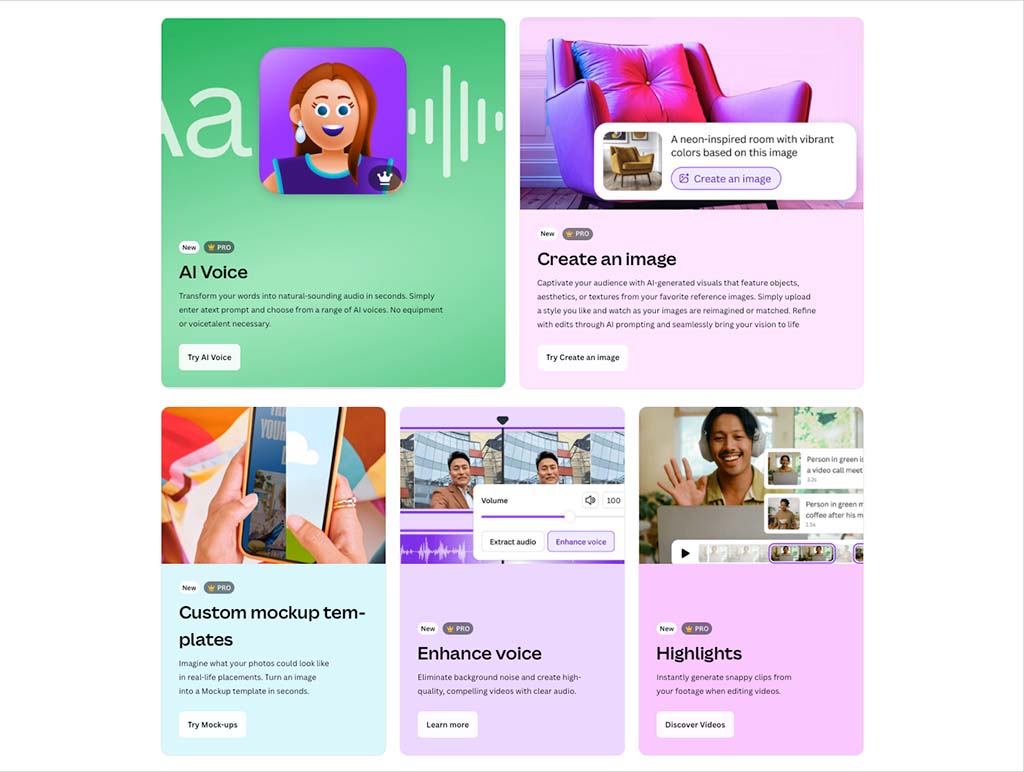
Magic Studio AI Suite
Magic Studio is Canva's flagship AI toolkit, included with every Pro subscription. It features:
- Magic Design — Type a prompt and Canva generates a complete, editable design
- Magic Write — AI copywriting tool that generates and refines text in 17 languages
- Magic Resize — Instantly convert a design from one format to another (e.g., Instagram post to Facebook cover)
- Magic Switch — Transform an entire design's language, tone, or dimensions with one click
- Magic Grab, Magic Expand, Magic Edit, Magic Eraser — AI-powered image manipulation tools
- Magic Morph, Magic Animate, Magic Charts — Advanced visual transformation tools
Source: Canva Design School on YouTube
Source: Style Factory Productions
Dream Lab
Dream Lab is Canva's AI image and video generation engine, powered by advanced diffusion models. Pro users can generate high-quality images and short video clips from text descriptions, opening up creative possibilities that previously required specialized software.
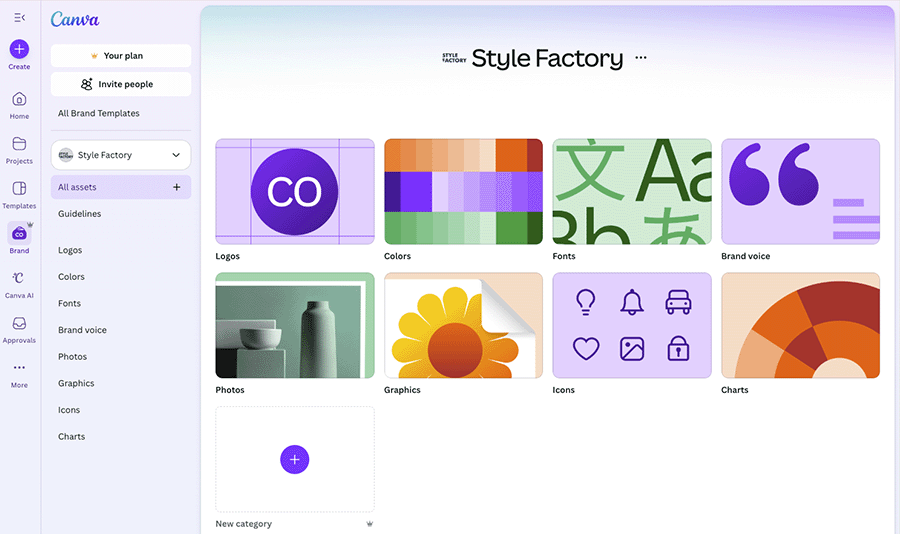
Brand Kit
Pro users can set up 5 Brand Kits, which include custom color palettes, uploaded fonts, and brand logos. This ensures every design stays on-brand automatically — essential for freelancers managing multiple clients or small businesses maintaining visual consistency.
Source: Style Factory Productions
Massive Content Library
Pro unlocks access to over 141 million stock photos, videos, graphics, and audio tracks, plus 3.6 million+ premium templates and 6,000+ fonts. The free tier only scratches the surface of this library.
Cloud Storage and Collaboration
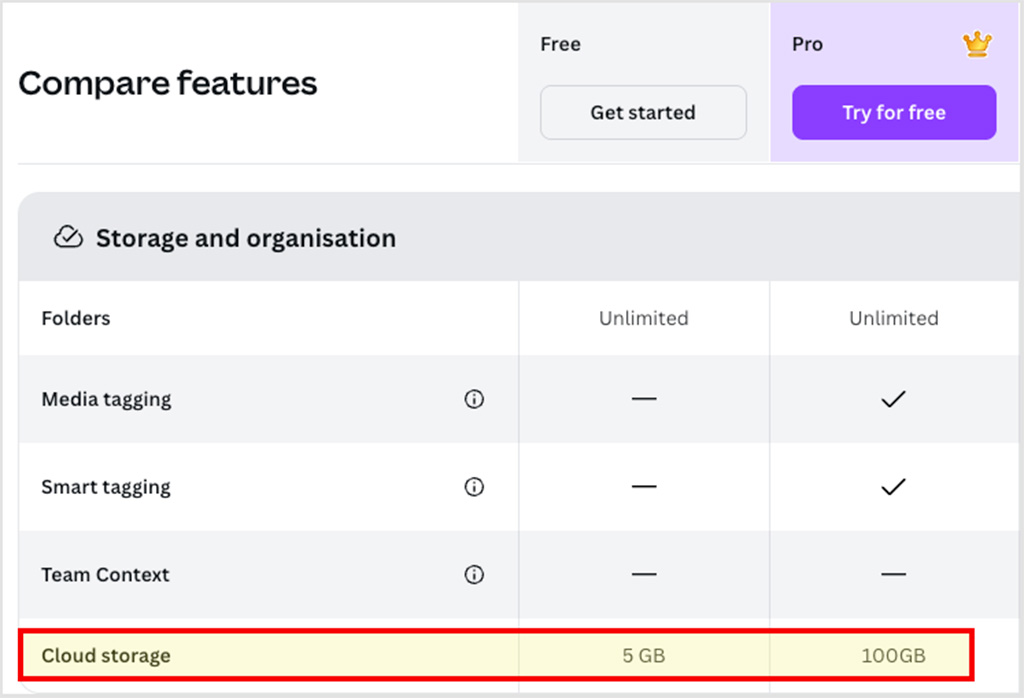
Pro accounts get 100 GB of cloud storage (compared to 5 GB on Free). You also get version history, the ability to schedule social media posts directly from Canva, and real-time collaboration with team members.
Source: Style Factory Productions
New for 2026: AI Pass and Canva Code
Canva now offers an AI Pass add-on that delivers 40x more AI generations than standard Pro, plus Canva Code for turning data into interactive visualizations. The platform also integrated Affinity professional design tools and Leonardo.Ai for enterprise users.
All of these features — the full Magic Studio suite, Dream Lab, Brand Kit, 100 GB storage, the premium content library — come standard with every Canva Pro subscription, including the €19/year plan from Truescho.
How to Get Canva Pro for €19 from Truescho — Step by Step
Getting Canva Pro at 82% off through Truescho is straightforward. The entire process typically takes about 20 minutes from payment to activation. Here is exactly what to do:
Step 1: Visit the Truescho Digital Shop
Go to truescho.com/en/shop. Truescho is a global all-in-one student platform that offers shared digital subscriptions — including ChatGPT Plus, YouTube Premium, Gemini Advanced, and Canva Pro — at prices designed for international users.
Step 2: Find Canva Pro in the Catalog
Browse the shop and locate the Canva Pro product. The listed price will be €19/year — a full 12-month subscription. Read the product description to confirm what is included (it is the complete Pro plan with all features).
Step 3: Contact Truescho on WhatsApp
Click the WhatsApp button or go directly to wa.me/905317001402. A support agent will confirm availability, answer any questions, and guide you through the payment process. The team communicates in English and responds quickly.
Step 4: Complete Your Payment
Truescho accepts multiple payment methods suitable for international users. Once your payment is confirmed, the activation process begins immediately.
Step 5: Receive Your Canva Email Invite
Within approximately 20 minutes, you will receive an email from Canva at the address you provided. This email contains a legitimate invitation link to join a Canva Pro team. The subject line typically reads something like "You have been invited to join a Canva team."
Step 6: Accept the Invitation
Click the link in the email. If you already have a Canva account, simply log in. If not, create a free Canva account first, then accept the invite. Once accepted, your account is instantly upgraded to Canva Pro — all features unlocked.
Step 7: Enjoy Full Canva Pro for 12 Months
That is it. Your Canva Pro subscription is now active for a full year. You will have access to Magic Studio, Brand Kit, 100 GB storage, the complete stock library, and every other Pro feature. Your designs, uploads, and brand assets remain in your own account.
For a broader look at safe purchasing practices, see our guide on how to buy Canva Pro annually and safely.
Canva Pro Pricing Comparison in 2026
Let us break down the numbers clearly. Here is how the options stack up side by side:
| Provider | Annual Price | Savings vs Official | Guarantee | Delivery Time |
|---|---|---|---|---|
| Official Canva | $119.99 (~€110) | — | Canva's standard support | Instant |
| Truescho | €19 | 82%+ (save €91) | 30-day guarantee | ~20 minutes |
| Other stores | €15–€40 | 60–85% | Varies (often none) | 10 min – 24 hours |
| Free trial | $0 | 100% (30 days only) | Official | Instant |
| Canva for Education | $0 | 100% (if eligible) | Official | Requires verification |
The math is simple. If you go the official route, you pay €110 per year. Through Truescho, you pay €19 per year. That is a saving of €91 — money that could go toward other essential tools, courses, or living expenses.
Over three years, the savings compound dramatically:
- Official Canva for 3 years: €330
- Truescho for 3 years: €57
- Total savings: €273
For freelancers and students who need multiple subscriptions, pairing Canva Pro with other tools makes even more sense. Explore our list of the best shared digital subscriptions for international users.
Is Buying Canva Pro via Email Invite Safe?
This is the most common question, and it deserves a direct answer. Yes, buying Canva Pro via a legitimate email invite is safe — but the key word is legitimate.
Here is how it works technically. Canva allows Teams plan subscribers to invite members to their workspace. When you purchase through Truescho, you are added as a member of a Canva Teams workspace. You receive an official email from Canva (not from Truescho) with an invitation link. You accept it using your own Canva account.
Your data stays yours. Your designs, uploads, and brand assets are in your own account. The team workspace is simply the vehicle that delivers the Pro features to your account.
That said, not every seller operates ethically. Here is what separates a safe provider from a risky one:
- Safe providers use official Canva email invites, offer a written guarantee, provide contactable support, and deliver within a reasonable timeframe
- Risky providers share login credentials, offer "lifetime" access (which Canva does not sell), have no contact information, or disappear after payment
Truescho falls firmly in the safe category. Every purchase comes with a 30-day guarantee — if your Pro access is lost within that period, you get a replacement or a refund. Support is available via WhatsApp, and most deliveries happen within 20 minutes of payment confirmation.
Why Buy from Truescho?
Truescho is not just another digital store. It is a global student platform built specifically for users in emerging markets who need premium digital tools at accessible prices. Here is what sets it apart:
- 82%+ savings — Canva Pro for €19/year instead of $120 official
- 30-day guarantee — Full replacement or refund if anything goes wrong
- ~20-minute delivery — Most subscriptions are activated within 20 minutes of payment
- WhatsApp support — Real humans answering your questions in real time at wa.me/905317001402
- Legitimate method — Uses official Canva email invites, not shared logins
- Multiple products — Also offers ChatGPT Plus, YouTube Premium, Gemini Advanced, Shahid VIP, and more
Truescho's mission is simple: make premium digital subscriptions accessible to everyone, regardless of geography or income level. The platform serves users across Africa, South Asia, Southeast Asia, the Middle East, and Latin America.
Visit the Truescho digital shop to browse all available subscriptions.
Sarah from Manila: A Graphic Designer Who Saved €91 a Year
Sarah is a 24-year-old freelance graphic designer from Manila, Philippines. She designs social media graphics, presentation decks, and marketing materials for small businesses — mostly clients she finds through online freelancing platforms.
For two years, Sarah used Canva's free tier. She made it work, but the limitations were frustrating: only 5 GB of storage, no access to premium templates, no Brand Kit for her clients, and no Magic Resize when she needed to adapt one design across multiple platforms. She had calculated that upgrading to Pro would cost her about 7,200 Philippine pesos per year at the official rate — money that felt hard to justify when her monthly income fluctuated.
Then a fellow designer in a Facebook freelancing group mentioned Truescho. Sarah checked the Truescho shop, contacted them on WhatsApp, and within 20 minutes had Canva Pro active on her account for €19 — roughly 1,250 pesos.
The difference was immediate. With Magic Resize, she could turn one Instagram post into a Facebook cover, a story, and a Twitter banner in seconds. Brand Kit let her maintain consistent visuals across all her clients. The 100 GB storage meant she never had to delete old projects. And the premium stock library gave her access to photos and videos she previously could not afford.
In her first month with Pro, Sarah landed two new clients because her portfolio looked more polished. She estimates the upgrade paid for itself within one week.
Canva Pro for Students and Teachers: Is There a Free Alternative?
Canva does offer free access to specific groups, but the eligibility requirements are strict and leave out a large portion of international users.
Canva for Education
Canva for Education is 100% free for K-12 teachers and their students. It includes all Pro features — Magic Studio, premium templates, and collaboration tools. However, you must be a teacher at an approved school, and your students must be part of your class roster.
The limitation: University students, self-taught learners, and professionals taking online courses do not qualify. If you are a 19-year-old studying computer science in Mumbai or a 23-year-old learning digital marketing in Nairobi, Canva for Education is not available to you.
Canva for Nonprofits
Registered nonprofits can get Canva Pro free for up to 50 users. This is a generous program, but it requires official nonprofit status recognized by Canva's verification process — something many small community organizations in developing countries do not have.
Canva's 30-Day Free Trial
Canva offers a 30-day free trial of Pro, which is a great way to test the features. But it requires a credit card, automatically charges you $119.99 at the end of the trial, and is limited to one trial per account.
The Practical Solution
For the millions of students, freelancers, and creators who do not qualify for free programs, Truescho offers the most practical path forward: full Canva Pro for €19/year, which is less than $1.60 per month. That is a price that works in any economy.
If you are exploring alternatives to expensive software subscriptions, also check out our guide to Office 365 alternatives for students.
Warning: Watch Out for These Scam Offers
The demand for cheap Canva Pro has attracted scammers. Before you buy from any source, watch for these red flags:
1. "Lifetime" Canva Pro Offers
Canva does not sell lifetime subscriptions. Any seller claiming to offer lifetime Pro access is either lying or operating a scam that will eventually collapse. These offers typically disappear within weeks, leaving buyers with nothing.
2. Shared Login Credentials
If a seller gives you a username and password to a Canva account that is not yours, you are violating Canva's terms of service. These accounts can be — and frequently are — banned without warning. You also have no privacy, as the account owner can see your designs.
3. No Guarantee or Refund Policy
Reputable sellers stand behind their products. If a store offers no written guarantee, no refund policy, and no way to contact them after purchase, walk away. A 30-day guarantee like Truescho's is the minimum standard.
4. Prices That Are Too Good to Be True
If someone offers Canva Pro for €5 or €10 per year, ask yourself how that is economically possible. Legitimate Canva Teams seats cost real money. Prices far below market rate usually indicate stolen accounts, hacked credentials, or pure scams.
5. No Contact Information
A legitimate store should have a working WhatsApp number, email address, or live chat. If the only contact method is a web form that never gets a response, that is a warning sign.
6. Requests for Your Canva Password
No legitimate seller needs your Canva password. The email invite method only requires your email address. If anyone asks for your password, it is a phishing attempt.
7. Sellers on Informal Marketplaces
Random sellers on Telegram groups, Facebook comments, or Discord servers offering Canva Pro are high-risk. Stick to established platforms with verifiable track records like Truescho.
Frequently Asked Questions
How much does Canva Pro cost per year in 2026?
The official Canva Pro price is $119.99/year (approximately €110) for an individual subscription. Through Truescho, you can get the same 12-month Canva Pro subscription for €19/year, saving over 82%.
Is Canva Pro worth it in 2026?
Yes. Canva Pro includes the full Magic Studio AI suite, 100 GB cloud storage, over 141 million premium stock assets, Brand Kit, Magic Resize, and scheduled publishing. For anyone creating professional designs regularly, the features easily justify the cost — especially at Truescho's €19/year rate.
How can I get Canva Pro cheap or discounted?
The most reliable way is through a legitimate email invite from a trusted digital store like Truescho, which offers Canva Pro for €19/year. You can also use Canva's 30-day free trial, or check if you qualify for Canva for Education or Canva for Nonprofits.
Can I buy Canva Pro through an email invite from a third party?
Yes, this is a safe and legitimate method. Canva Teams subscribers can invite external users to their workspace. When you purchase from Truescho, you receive an official Canva email with an invite link. You accept it using your own Canva account, and Pro features activate instantly.
Is Canva Pro free for students and teachers?
Canva for Education is free for K-12 teachers and their students in approved schools. University students, freelancers, and self-taught learners do not qualify. For those who do not meet the eligibility requirements, Truescho offers Pro access for €19/year.
How many templates and stock assets are in Canva Pro?
Canva Pro provides access to over 3.6 million premium templates and more than 141 million stock photos, videos, graphics, and audio tracks. The free plan only includes a small fraction of this library.
What are Magic Studio AI tools in Canva Pro?
Magic Studio is Canva's AI toolkit, included with every Pro subscription. It features Magic Design (AI-generated layouts), Magic Write (AI copywriting), Magic Resize (instant format conversion), Magic Edit and Magic Eraser (AI image manipulation), plus Dream Lab for AI image and video generation.
Can I share Canva Pro with my team members?
The official Canva Teams plan allows sharing among team members (minimum 3 users at $10/user/month). If you get Pro through Truescho's email invite method, you receive an individual Pro seat within a Teams workspace — your designs remain private to your own account.
Conclusion
Canva Pro is one of the most powerful creative tools available in 2026 — but at $119.99/year, it is priced beyond what most international users can comfortably afford. The official pricing assumes a Western income level and ignores the reality of creators in Lagos, Manila, Dhaka, Karachi, and dozens of other cities where Canva use is growing fastest.
The solution does not have to involve risk or compromise. Through Truescho's digital shop, you can get a legitimate, full-featured Canva Pro subscription for just €19/year — a 82%+ discount with a 30-day guarantee, WhatsApp support, and approximately 20-minute delivery. You keep your own account, your own designs, and your own data. No shared logins, no scams, no uncertainty.
Whether you are a student building a portfolio, a freelancer serving clients, or a small business owner managing your brand, affordable Canva Pro access is within reach. Stop overpaying for the tools you need to create.
Get Canva Pro Now at the Best Price Available
Canva Pro from Truescho: Price €19/year instead of $120 official · 30-day guarantee · ~20min delivery · WhatsApp support
Order Now via WhatsApp or visit Truescho Digital Shop