
Turnitin AI Writing Percentage: What It Means and What to Do
Last updated: November 2026
Picture the email: your supervisor has opened your thesis chapter in Turnitin, the similarity box says 14%, and a second box beside it says something about AI. You wrote every sentence yourself. Which number matters, and what is it even measuring?
The Turnitin AI writing percentage is not the similarity score, and the two numbers are independent. Similarity measures how much of your text matches other sources. The AI indicator estimates how much of your prose looks machine-generated. Neither has a universal "acceptable" value: your institution decides, and Turnitin itself says the AI score is not proof and not a grade.
Everything below comes from Turnitin's own documentation and from university websites, read on 5 November 2026. Where I could not verify something, I say so.
The short answer, and when it applies
The answer above holds if your school, journal or employer uses Turnitin and has switched on the AI writing feature, and if your document has at least 300 words of long-form prose. In that case the rules and numbers Turnitin publishes apply exactly as written.
It does not apply in three situations. First, if your institution uses a different detector, which has its own scale and thresholds that I have not examined. Second, if your text is very short or mostly lists and tables, because the model does not work on that kind of writing the same way. Third, if administrators have disabled the indicator, which they are allowed to do.
There is also a vocabulary trap. In some university regulations, especially in Saudi Arabia, the similarity score is called the "citation rate" or "plagiarism rate", so a student who searches for "AI citation percentage" may be asking about the similarity score, the AI indicator, or both at once. Google's autocomplete shows the same blur: suggestions I read on 5 November 2026 included searches about checking, reducing and detecting an "AI percentage".
One note on purpose. People also search for ways to "lower" or "humanise" the AI number. This article does not teach that. It explains how to read the report and how to document your genuine writing honestly, because that is what protects you when a number looks wrong.
Two numbers, not one: similarity versus AI writing
Turnitin's guide to the AI Writing Report says the percentage generated by its AI detection model "is different from and independent of the similarity score", and that AI highlights are not visible in the Similarity Report. Its FAQ goes further: the two are "completely independent" and do not affect each other.
In practice a paper can have high similarity and a low AI indicator, or the reverse. The table puts the differences side by side. Each row rests on an official Turnitin page listed in the sources.
| Similarity score | AI writing indicator | |
|---|---|---|
| What it measures | Percentage of text that matches Turnitin's database (web pages, student papers, journals) | Percentage of "qualifying" prose sentences the model predicts were AI-generated, or AI-generated and then modified by a paraphrasing tool |
| The question it answers | Where else does this text appear? | Does this prose look machine-generated? |
| Quotes and references | Still show as matches, even inside quotation marks, unless the instructor excludes them | Not analysed: references, lists, headings, data tables and formula-like text are removed first |
| Values you can see | 0 to 100%, shown in colour bands | 0%; an asterisk (*%) for 1-19%; a number from 20 to 100% |
| Fixed pass mark? | No. Set by school, instructor or assignment | No official pass mark. Turnitin says the indicator should not be the sole basis for adverse action |
| Related to the other number? | No, independent | No, independent |
| Who sees it | Depends on instructor settings | Instructors and administrators by default; an instructor may share it with students |
| Languages | Any | English, Spanish, Japanese, Arabic, German, Dutch and Turkish; paraphrase detection is English only |
| Minimum text | No minimum stated | At least 300 words of long-form prose |
Look at the fourth row. It causes most of the confusion: the similarity number has colours and bands, while the AI number has a special display state below 20% that deserves its own section.
How does Turnitin AI detection work?
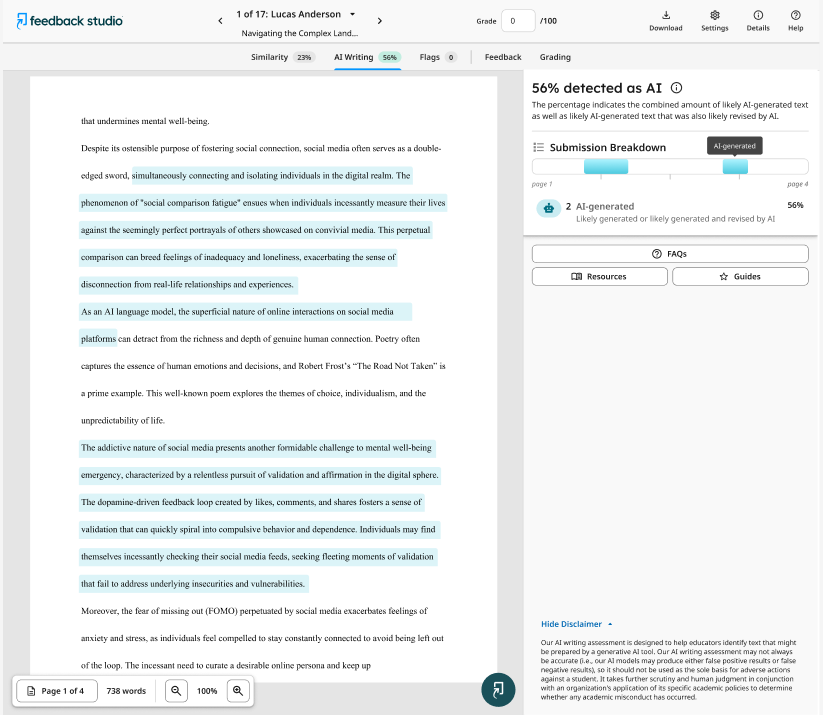
Turnitin does not publish the model's internals in its help pages, so I will only describe what its documentation states. The detector reads the prose sentences of a document and estimates, for each, whether it was likely written by a generative AI tool, or written by AI and then reworked with an AI paraphrasing tool. The headline figure is the share of qualifying text that the model flags. Highlighted sentences show you where.
The word that matters is "qualifying". Turnitin defines it as prose sentences in a long-form writing format. The model is not reliable on poetry, scripts or code, and it does not detect short-form or unconventional writing such as bullet points, tables or annotated bibliographies. Turnitin's FAQ adds that the system eliminates lists, headers, references, data tables and text that looks like formulas or code before it scores anything.
Source: Turnitin Guides
Turnitin lists these requirements for a file to receive an AI report:
- File size under 100 MB.
- At least 300 words of long-form prose, and no more than 30,000 words.
- File types .docx, .pdf, .txt and .rtf.
- Supported languages: English, Spanish, Japanese, Arabic, German, Dutch and Turkish.
Four practical consequences follow.
- The percentage is calculated from prose only. A chapter that is half tables and bullet lists is judged on its prose half.
- A long reference list neither raises nor lowers the figure, because the model removes references before analysis.
- The percentage and the highlights can disagree. Turnitin warns that a document containing several types of writing can produce a disparity between the two, and that, unlike the Similarity Report, the AI percentage "does not necessarily correlate to the amount of text in the submission".
- Short documents are riskier. For short texts Turnitin says the prediction is mostly "all or nothing", so a 320-word statement can swing wildly compared with a 6,000-word chapter.
Turnitin also says its detector covers Modern Standard Arabic long-form text since an announcement dated 18 August 2026, with a list of recognised model families that includes GPT, Claude, Gemini, DeepSeek, Grok, Llama, Mistral and Qwen. Two limits apply: the feature only matters if your institution has enabled it, and detection of AI paraphrasing and "bypasser" tools exists only in the English detector.
An illustrative example of two numbers on one document
This example is invented to show how to read a report. It is not a real student's result.
Imagine a 6,000-word master's chapter. About 40% of it is tables, bulleted lists and a reference list. The Similarity Report says 22%, mostly properly cited quotations, standard methods wording and the reference list. The AI indicator shows *%.
Reading this as "22% quoted and 15% AI" is a double mistake. The first number calls for a look at the match sources and at whether quotes and references were excluded in the settings. The second has no number at all: Turnitin deliberately does not show one. The two figures cannot be added together or compared.
Reading the similarity score: colours, bands and the missing pass mark
Turnitin defines the similarity score as "simply the percentage of text in a submission that matches other sources", and adds that it does not check for plagiarism in writing. It shows overlap. It does not judge intent. Even when a submission has quotation marks and references, the quoted text will show as a match.
Source: Turnitin Guides
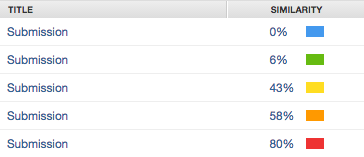
The instructor guide lists these bands. Turnitin notes the colour scheme "may vary depending on the integration", so check which version your institution runs before interpreting a colour.
| Colour | Feedback Studio and Originality Check | Similarity and SimCheck |
|---|---|---|
| Blue | No matching text | 1% to 24% |
| Green | One word to 24% | 0% |
| Yellow | 25% to 49% | 25% to 49% |
| Orange | 50% to 74% | 50% to 74% |
| Red | 75% to 100% | 75% to 100% |
Notice that blue and green swap meaning between the two systems. A "green" report is the lowest band in one product and a perfect zero in the other.
More important than any colour: Turnitin's student guide states that there is no fixed number to aim for. In its words, "every school, instructor, or assignment could have a different amount of matching text that is considered acceptable." Another help page adds that a higher similarity percentage "is not an automatic indicator of plagiarism" and may simply point to a need for better citation or paraphrasing skills.
If your question is specifically about similarity thresholds in a thesis, our guide to acceptable similarity percentages in research papers covers that side. The section on university documents below also lists three published similarity limits.
What the asterisk (*%) means in the AI report
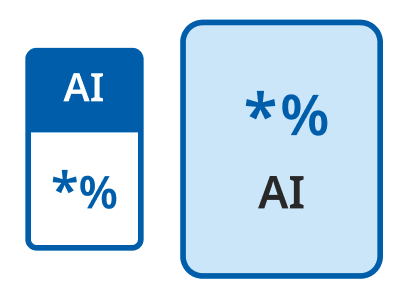
This is the most misunderstood part of the report. If the model finds AI-written text between 1% and 19%, you will see neither a number nor highlights. You will see an asterisk next to the percent sign.
Source: Turnitin Guides
Here is what Turnitin's documentation says, quoted from the guides I read on 5 November 2026:
- "No score or highlights are attributed for AI detection scores above 0% and below the 20% threshold in the report. When this occurs, it is now indicated with an asterisk (*%) and no percentage is attributed."
- The reason given: "Our testing has found that there is a higher incidence of false positives when the percentage is between 0 and 19", so the asterisk is shown "to call attention to the fact that the score is less reliable."
- A second help page describes it as: an asterisk appears when detection is below 20%, "where results are less reliable and false positives are more likely. In this range (1-19%), no exact percentage or highlights are shown."
A small wrinkle: one guide says "between 0 and 20" while others say "1-19%". In practice 0% is displayed as 0%, and the 1-19% range is displayed as an asterisk. I use 1-19% throughout.
There is also a historical exception. Reports generated before 8 July 2024 may still show a numeric score below 20%, so do not compare an old report with a new one.
| What you see in the AI box | What it means according to Turnitin | How to treat it |
|---|---|---|
| 0% | The model found no qualifying text it considers likely AI-generated | Not a certificate of authorship either; it only reports what the model found |
*% |
Detection between 1% and 19%; no number or highlights because the result is less reliable | Do not read it as 5% or 10%, and do not treat it as an accusation or as clearance |
| 20% to 100% | A number is shown, with highlighted sentences | Read the highlights sentence by sentence; they are evidence to discuss, not a verdict |
| No indicator at all | The text may not qualify (too short, wrong format) or the feature is off or unavailable to you | Ask your instructor or graduate office |
Source: Turnitin Guides
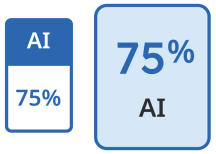
Turnitin explains the figure shown at the top of the report as the amount of qualifying text that its detection has identified as likely AI-generated, or likely AI-generated and then modified by an AI paraphrasing tool.
What is an acceptable AI percentage on Turnitin?
There is no official universal number. Turnitin does not publish a pass mark for the AI indicator, and its guides tell reviewers to treat it as a single data point. In its guide on reviewing the report, Turnitin says the tool "is not meant to provide definitive answers in isolation", and that when educators use the score "as a single data point rather than a definitive response, then it is being used as intended."
So who sets the line? Your institution, your department, your instructor and, for each assignment, the rules for AI use stated in the course. To see what real institutions publish, I searched university websites on 5 November 2026 for written AI-use policies and for written similarity limits. Here is the honest count:
I verified 2 published AI-use policies (United Arab Emirates University and the American University in Cairo) and 3 published similarity-threshold documents (Umm Al-Qura University, Princess Nourah bint Abdulrahman University and the University of Sharjah). That is fewer than I hoped for, and I have not padded the table. None of the five documents states a percentage limit for AI-writing detection.
Table 1: published rules on using AI (2 verified)
| University | What its document says | Date and source |
|---|---|---|
| United Arab Emirates University (UAE) | "Generative AI Usage by the Students Policy". Article 7: students should add a declaration when adapting material generated by GenAI, "even if students were to completely rewrite and paraphrase the text". Article 10: using AI-generated content without acknowledgment "is considered plagiarism and a breach of academic integrity". Article 8: faculty are required to use AI text detection tools to evaluate how much is present in student work, with zero points for merely reproducing tool output, and a lower baseline possible for students who declare AI use. Article 2: use is prohibited in in-class, unseen and online exams unless the instructor says otherwise. No percentage threshold is stated | Effective 11 August 2025, next review 1 September 2027. Policy PDF |
| The American University in Cairo (Egypt) | On its AI Student Resources page: "Do not assume that your instructor allows the use of AI tools for submitted work. Before using these tools, you must check with your instructor", and, if permitted, "make sure to indicate where AI was used and cite" it. AUC's integrity policy requires that all students submit original work, and it offers a CLEAR checklist (Citation, Learning, Elaboration, Accountability, Reflection) plus guidelines on responsible use with seven principles. No detector percentage is stated | Page shows no last-modified date. AI Student Resources and guidelines |
One more point from the UAEU document is useful if you use a grammar checker. Its footnote allows tools of the Grammarly type for structure, fluency, presentation, grammar, spelling and punctuation, but warns this "may be considered Academic Misconduct if substantive changes to content have been made." The line between language polishing and changing your content is one you should know well.
Table 2: published similarity limits (3 verified documents)
These concern the similarity score, not the AI indicator. They are worth knowing because the same word, "percentage", is used for both and students often mix them up.
| University | Published rule | Source and notes |
|---|---|---|
| Umm Al-Qura University (Saudi Arabia) | Among the breaches that can lead to cancelling a student's enrolment: quoting "more than 20%" of the thesis, according to the university's approved plagiarism-detection mechanism. The permanent graduate studies committee may adjust the figure | Executive rules of the graduate studies regulation, read 5 November 2026. Refers to similarity; nothing about AI percentages |
| Princess Nourah bint Abdulrahman University (Saudi Arabia) | Graduate guide 1445-1447 AH, thesis defence procedures: the citation rate in theses must not exceed 25%, and the report must show the filters used | Graduate guide PDF, read 5 November 2026. Page number not pinned; the document is in Arabic |
| University of Sharjah, College of Graduate Studies (UAE) | Circular CGS.04/2023 dated 22 May 2024: a maximum of 15% similarity in the thesis report "after the exclusion of all references, endnotes, footnotes, and materials enclosed within double quotations". More than 15% can be approved after examining the original report. The circular objects to manually excluding references or using "Exclude small sources" before generating the report | Turnitin report circular for graduate students, read 5 November 2026 |
What I did not find
I also searched the sites of American University of Beirut, American University of Sharjah, Qatar University, KFUPM, Sultan Qaboos University, Khalifa University, Zayed University, the University of Jordan and Cairo University, and found no page that sets out an AI-use policy or an AI-detector policy. "I did not find it" is not the same as "it does not exist": such rules may sit in an internal regulation or a department handbook. King Abdulaziz University has two pages on plagiarism-detection programmes, but they contain only a title and a "Next" link, so I did not rely on them.
What this means for you in practice:
- No documented "acceptable AI percentage" exists in any university document I verified. Be wary of anyone who gives you a number as if it were a general rule.
- Disclosure is the common thread. Both AI-use policies ask you to say honestly where AI was used and to check with your instructor first.
- The numeric limits that universities do publish concern similarity: 15% at Sharjah after exclusions, 20% at Umm Al-Qura and 25% at Princess Nourah.
- Ask your own institution three questions: Is AI allowed in this assignment? What are the disclosure rules? Where is the written appeal procedure?
If you are using an AI tool for part of your work, such as exploring questionnaire data, see our guide to analysing a questionnaire with AI for what a committee tends to accept, and then cite the use according to your institution's rule and your referencing style, as in our APA 7 examples or the Harvard referencing examples.
How accurate is the Turnitin AI score?
An honest picture has two sides, and both come from Turnitin.
The accuracy claim. Turnitin says it aims to keep the false positive rate under 1% for documents that contain more than 20% AI writing. It explains this as "we might flag a human-written document as AI-written for one out of every 100 fully-human written documents", and says it tested on more than 700,000 papers written before ChatGPT existed. This is the vendor's own figure, not an independent audit. One in a hundred is not zero.
The admissions.
- To keep false positives low, the model can miss AI text: "if we identify that 50% of a document is likely written by an AI tool, it could contain as much as 65% AI writing."
- Turnitin lists content that is more likely to trigger false positives: text without much structural variation, text that literally repeats itself, and text paraphrased without developing new ideas.
- In Turnitin's own study of English-language learners, the gap in false positives between second-language and first-language writers was "small, and not statistically significant" for documents of 300 words or more, but for documents that are "too short" the false positive rate was significantly above its 0.01 target. The study covered English texts, mostly secondary-level essays, and says nothing about other languages.
- Models are updated. The latest English model update I could find was dated 14 October 2026, and updates are not retroactive: to see the score produced by an update, an existing submission must be resubmitted.
The rule Turnitin sets for using the tool is plain. The indicator "should not be used as the sole basis for adverse actions against a student", because it takes further scrutiny and human judgment, applied with the organisation's own academic policies, to decide whether misconduct occurred. And: "The final decision on whether any misconduct has occurred rests with the reviewer/instructor. Turnitin does not make a determination of misconduct."
In short, do not argue that the tool can never be wrong, and do not accept that it is always right. Both claims are false, and Turnitin's own words say so.
Can students see the AI report?
Usually not directly. According to Turnitin's FAQ, only instructors and administrators can see the indicator. An instructor may choose to make the AI Writing Report available to students, and if so, students can open it from their Similarity Report. Administrators can also disable AI detection completely.
So many students first hear about the indicator from an instructor or a committee, not from a screen of their own. I found nothing in the Turnitin documentation I read that lets an individual student check a draft with the real detector before submitting, except through an institution that offers it.
That is why you should be careful with free "Turnitin AI check" websites. You do not know which model they run, which thresholds they apply, or what they do with the text you upload, and an unpublished thesis is exactly the kind of document you do not want to hand to an unknown service. A better question for your supervisor or graduate office is: will my work be checked with the AI indicator, will I be able to see the report, and what is the written rule for using these tools?
Frequently asked questions
How do I find out my Turnitin AI writing percentage?
You usually cannot see it yourself. Turnitin shows the AI indicator to instructors and administrators by default, and an instructor may choose to share it with students. Ask your supervisor whether your work will be checked and whether you will get the report. Third-party sites claiming to show your Turnitin score use unknown models and thresholds.
What is the difference between the similarity score and the AI writing percentage?
The similarity score is the percentage of your text that matches other sources in Turnitin's database. The AI writing percentage estimates how much qualifying prose looks AI-generated. Turnitin states the two are independent. A paper can be high on one and low on the other, so read each number separately and never add them together.
What does the asterisk mean in the Turnitin AI report?
The asterisk, shown as *%, appears when detection falls between 1% and 19%. Turnitin found more false positives in that range, so it shows no number and no highlights, only a flag that the result is less reliable. Treat it as neither an accusation nor clearance, but as a weak signal that needs context.
What AI percentage is acceptable on Turnitin?
There is no official universal figure. Turnitin publishes no pass mark and says the indicator must not be the sole basis for action. The two university AI policies I verified, from UAEU and AUC, give no percentage either; they focus on permission and disclosure. Your institution's written rules and your instructor decide, so ask for them before submitting.
Does Turnitin AI detection work in Arabic and other languages?
Yes. Turnitin lists English, Spanish, Japanese, Arabic, German, Dutch and Turkish as supported, with Arabic limited to Modern Standard Arabic long-form text. You need at least 300 words of prose, and your institution must enable the feature. Detection of AI paraphrasing and bypasser tools is currently available only in the English detector.
Can Turnitin flag text I wrote myself?
Yes, and Turnitin says so. It aims for a false positive rate under 1% for documents with more than 20% AI writing, meaning roughly one in 100 fully human documents could be flagged. Short, repetitive or formulaic text is more at risk. That is why Turnitin requires human judgment before any action.
Why doesn't the AI percentage match the highlighted text?
The percentage is calculated from qualifying prose only, not from every word in the file. Lists, tables, headings and references are removed first. Turnitin also warns that a document mixing several writing types can show a gap between the percentage and the highlights. Read the highlighted sentences individually.
If a high AI percentage appears on text you wrote yourself: a checklist
These steps follow Turnitin's guides for instructors and students. The aim is to document your real writing honestly. There is no trick here for changing a number or fooling a detector, and nothing here promises an outcome.
- Read the report before arguing with it. Is it
*%(1-19%, which Turnitin itself calls less reliable) or a figure of 20% or more? Does the document have at least 300 words of prose? Are the highlighted passages the kind Turnitin warns about, such as repetitive structure, formulaic wording or literature summary with no new idea? Do the percentage and the highlights disagree? - Do not edit and resubmit in a panic. A resubmission produces a new report whose number can change because the model is updated, and rewriting text "to lower the number" is exactly the behaviour this guide does not support. Keep the version that was flagged exactly as it is.
- Gather the evidence of your writing process that you already have.
- Version history: in Google Docs, version history shows who edited a file and when. For Word, check the help pages for the version you use; I could not verify an official page to cite here.
- Outlines, notes, early drafts and dated files.
- The sources you read: annotated PDFs, your reference-manager library, draft emails to your supervisor.
- If you used an AI tool for a permitted task, a note of which tool and where. UAEU requires a declaration, and AUC asks you to indicate where AI was used. - Read your institution's rule before the meeting. Is AI allowed in this assignment? What are the academic integrity and appeal procedures? I did not verify specific appeal pages for the universities named above, so ask your department or graduate office for the written route.
- Prepare to explain your work out loud. Turnitin suggests instructors ask a student to "explain your process for completing this assignment" and to examine the AI detection report together, looking at the highlighted areas and discussing the student's choices. Prepare a clear answer. Our guide to thesis defence questions helps with explaining your reasoning to a panel.
- Ask to see the report. Politely ask whether the instructor can share the AI Writing Report so you can see which sentences were highlighted. Turnitin says instructors can make it available to students.
- If you contest the result, do it calmly and with facts. Point out that, in Turnitin's words, the indicator should not be the sole basis for adverse action, that the final decision rests with the instructor, that the vendor's own false positive rate is not zero, and that short texts are riskier. Do not say the tool cannot be wrong, and do not say it is always wrong. Neither is accurate.
- Use Turnitin's own student guide. Turnitin publishes "Dealing with AI false positives: Student perspective", a self-reflection guide for preparing for the conversation. It notes that while the risk of a false positive is minimal, "it is important to be prepared for that conversation if it happens."
- For next time, document from the start. Write in a tool with version history, keep your notes and dated drafts, build your own structure and voice, and declare any permitted AI use. If you have a finished letter, proposal or CV that only needs grammar and style polish, without any change to your content, Truescho offers a language editing service for a document of up to 1,000 words at 15 EUR; it makes no promise about any detector result.
Questions you may be asked, and how to prepare
| Likely question | What is behind it | What to prepare |
|---|---|---|
| "Explain your process for completing this assignment" (from Turnitin's instructor guidance) | The instructor wants to understand how you arrived at the text | A short timeline: reading, outline, first draft, revisions |
| "Let's examine your AI detection report together and discuss the highlighted areas" (from Turnitin's instructor guidance) | The instructor wants to see whether you understand what you wrote | Read each highlighted paragraph and be ready to explain its idea in your own words |
| Where did this information come from? | Checking your sources | Source files and the pages you quoted |
| Why did you choose this wording? | Testing ownership of the text | Examples from your early drafts and revisions |
| Rewrite this paragraph here, now | Comparing style | Practise writing the highlighted paragraph again, by hand or on a laptop |
The first two are Turnitin's own suggested prompts; the others are my expectations, not an official list. Practise all of them before the meeting rather than during it.
Common mistakes when reading the report
- Adding the two numbers. There is no combined score for similarity plus AI.
- Treating the asterisk as a small number.
*%does not mean 5% or 10%; it means no number is displayed. - Arguing that cited quotations do not count. They still appear as matches in similarity unless excluded in the settings.
- Quoting Turnitin's behaviour as your university's rule. Institutions set their own thresholds, and many publish nothing.
- Trusting free "Turnitin AI check" sites. You cannot know their model, limits or what they do with your text.
- Frantic editing before the meeting. It destroys the evidence of your original writing and guarantees nothing.
Your next steps
Three things you can do today.
- Open your current document, confirm it has version history turned on, and save a dated copy of the draft with your notes.
- Send your supervisor or department one question: will my work be checked with an AI indicator, and what is the institution's written rule on using these tools and disclosing them?
- If a high percentage ever appears on text you wrote, do not react in a rush. Collect your evidence, separate similarity from AI writing, and ask for a direct conversation with the instructor.
Remember the principle Turnitin states itself: the indicator is a single data point, and the decision belongs to a person who reads your work and asks you about it.
Want someone to handle this step for you?
If you already have a finished letter, proposal or CV and want the grammar and style polished without changing your content or voice, Truescho offers a language editing service for 15 EUR for up to 1,000 words. It makes no promise about any AI detector result.
Sources
- Using the AI Writing Report: Turnitin's official guide, including the asterisk rule and qualifying text.
- Turnitin's AI writing detection capabilities FAQs: independence of the two scores, false positive rate, who can see the report.
- AI writing detection capabilities FAQs (Arabic edition): the same FAQ in Arabic, including Modern Standard Arabic support.
- File requirements for an AI Writing Report: file size, word count and supported languages.
- How to access the AI Writing Report: the display of
*%and of values from 20%. - Understanding the similarity score: the instructor guide to similarity colour bands.
- Understanding the similarity score for students: the student guide, with no fixed acceptable number.
- AI writing detection: what academic leaders need to know: Turnitin blog, 18 August 2026, on Arabic support.
- Dealing with AI false positives: student perspective: Turnitin's preparation guide for students.
- Generative AI Usage by the Students Policy, United Arab Emirates University
- AI Student Resources, The American University in Cairo
- Executive rules of the graduate studies regulation, Umm Al-Qura University
- Turnitin report circular for graduate students, University of Sharjah
- Find what's changed in a file, Google Docs Help: how to view version history.